A free version is a great idea, just don’t limit too much, but since I’ll upgrade to the advanced version later this year anyway it’ll probably only be enough to keep me going till then
As long as a plugin (or module) is commercial, you are aware in case the module(s) is/are few limited, nobody will buy it and will use as-is for their productions (sometimes for… commercial productions, to make money, perhaps a lot of money).
Also depending the complexity of the module(s) - here we don’t talk about a simple blank plate  - possibly required investments (hardwares, softwares, development kits, libraries, licensed samples, licensed fonts, etc), perhaps marketing by external company (rarely free), also… required energy (electricity) and… spent time. Of course, for end-user (as non-developer), it’s very difficult to imagine and evaluate all the backstages of any software development!
As final words, here on VCV Rack, most of us (developers) don’t live with module revenues. We are not Adobe, Apple or Google mastodons, but mostly enthusiasts (some are less or more talented in term of C++ development) and the revenues may help to… finish months! And at the moment, we’ve the opportunity to buy a module or a plugin, instead of renting it, by subscription model!
Here’s what I’m thinking for the free version, and let me know what you think.
- The free version will have the “Page” controls disabled. This means that the maximum sequence length will be 16 steps for the free version.
- The free version will have the ratchet switches disabled
- The free version will have the scripting engine disabled
- When I implement requested sub-modules, they will be added to the paid version only.
My goal for the free version is to give people a chance to try the module before buying. I understand that it’s difficult to pay $30 for a module before being able to play with it.
A few quick updates:
- The module will ship with 62+ custom made, license free percussive samples. (I’m not done building the sample pack, so it might grow.)
- I’m trying to use the module myself to learn about what features it needs. I’ve added additional effects, sub-modules, sample selection shortcuts, and other UX improvements.
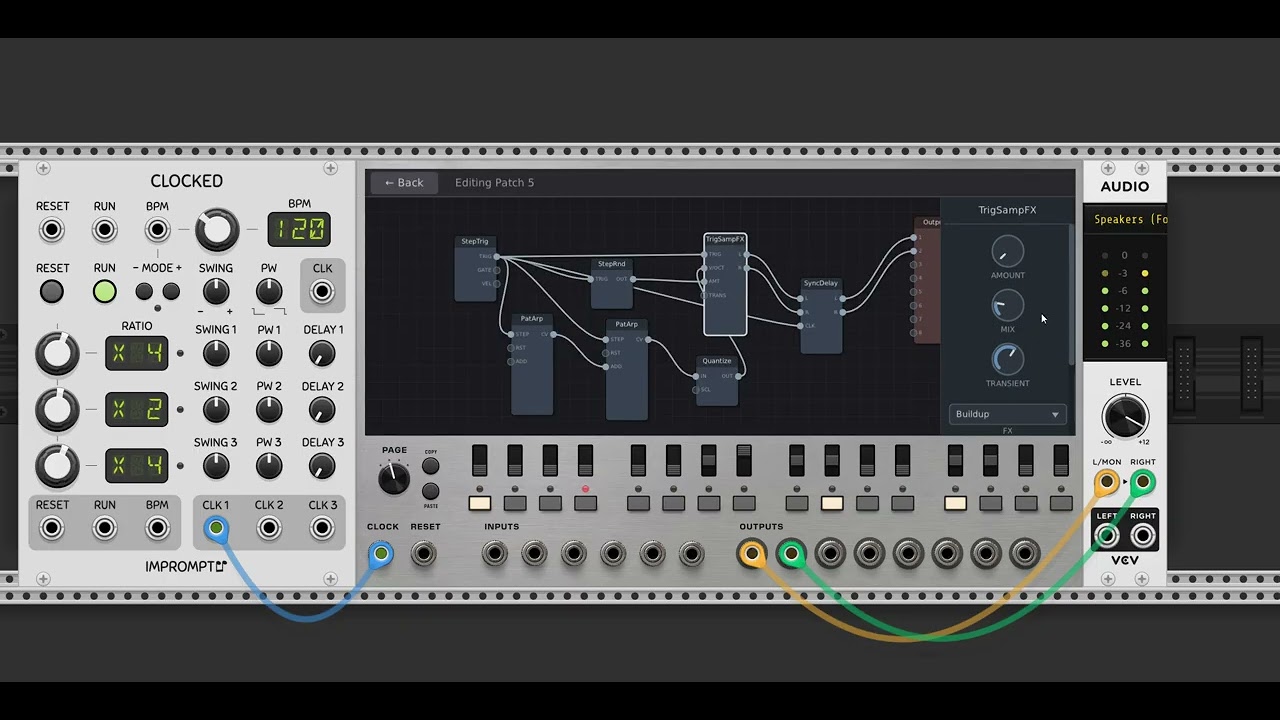
1 Like
- The free version will have the “Page” controls disabled. This means that the maximum sequence length will be 16 steps for the free version.
- The free version will have the ratchet switches disabled
- The free version will have the scripting engine disabled
- When I implement requested sub-modules, they will be added to the paid version only.
Totally agree (perhaps except ratcheting, i don’t know, and… you’re the Boss about your modules  , it’s just my opinion). Perhaps also you’ll must consider (instead of ratchet blocking), the disabled save/recall… (it’s just another idea, I have just implemented this limitation into - WIP - 6OP-DX module!). Another possibility will concern COPY/PASTE, once allowed per instance (or disabled)… The list is long!
About requested sub-modules –> obviously!
It’s true, but - regardling the fantastic stuff on PatchSeq module (just as example), I consider that this is not “theft” (or not scam - not sure about term). Voxglitch have a solid reputation in our VCV Rack world!
As I’ve replied to a community member (shawnbortree19), of course a demo for evaluation purposes is a “big plus”, but the demo must not be used for (commercial) productions. About my (WIP) 6OP-DX synth voice, they’re troublesome tones (or noises, all are random) sent to all outputs, every approx. minute (random). Also, except global settings, all synthesizer parameters are lost (aka all banks return to INIT) when VCV Rack is closed.
Just be careful about possible “holes” (weakness) where any end-user will try to go in order to bypass any limited feature implemented in demo version!
The most difficult, in fact, is to find the right balance for a demo version! A demo is an excellent weapon for marketing.
Sorry if TLTR.
Oh, this is a very good idea. I hadn’t considered this! 
This is a better solution then what I had in mind, giving users complete access to all of the features, but disabling saving. Thanks so much for suggesting it. I’m going to do the same. 

2 Likes
I will definitely keep an ear out on any progress made here for improvements to the groovebox, just so long as the free version has external input so it can at least either use a different sequencer or be controlled with a midi controller/keyboard I will be happy with this demo version… it’ll at least keep me going till later since there’s at least $30 to send… maybe once black Friday comes?
@shawnbortree19 It’s still in debate whether there will be a demo version.
Can you help me understand this request a bit better? Are you saying, “As long as I can use the free version by sidestepping the save/load limitations, then it will work great for me.” Which, if so, I will present you with this thinking face emoji: 
Not sure how many here have spent time at KVR, but in plugin-land, there’s been a LOT of discussions over the issue of “How do I not irritate users with a too-crippled demo/freeware version, but not make it pointless for them to actually buy the bells-n-whistles version?” the No-Saving, in combo with ”advanced option xyz available in paid version”, seems to be the least offensive to users, and least painful to devs’ wallets.
1 Like
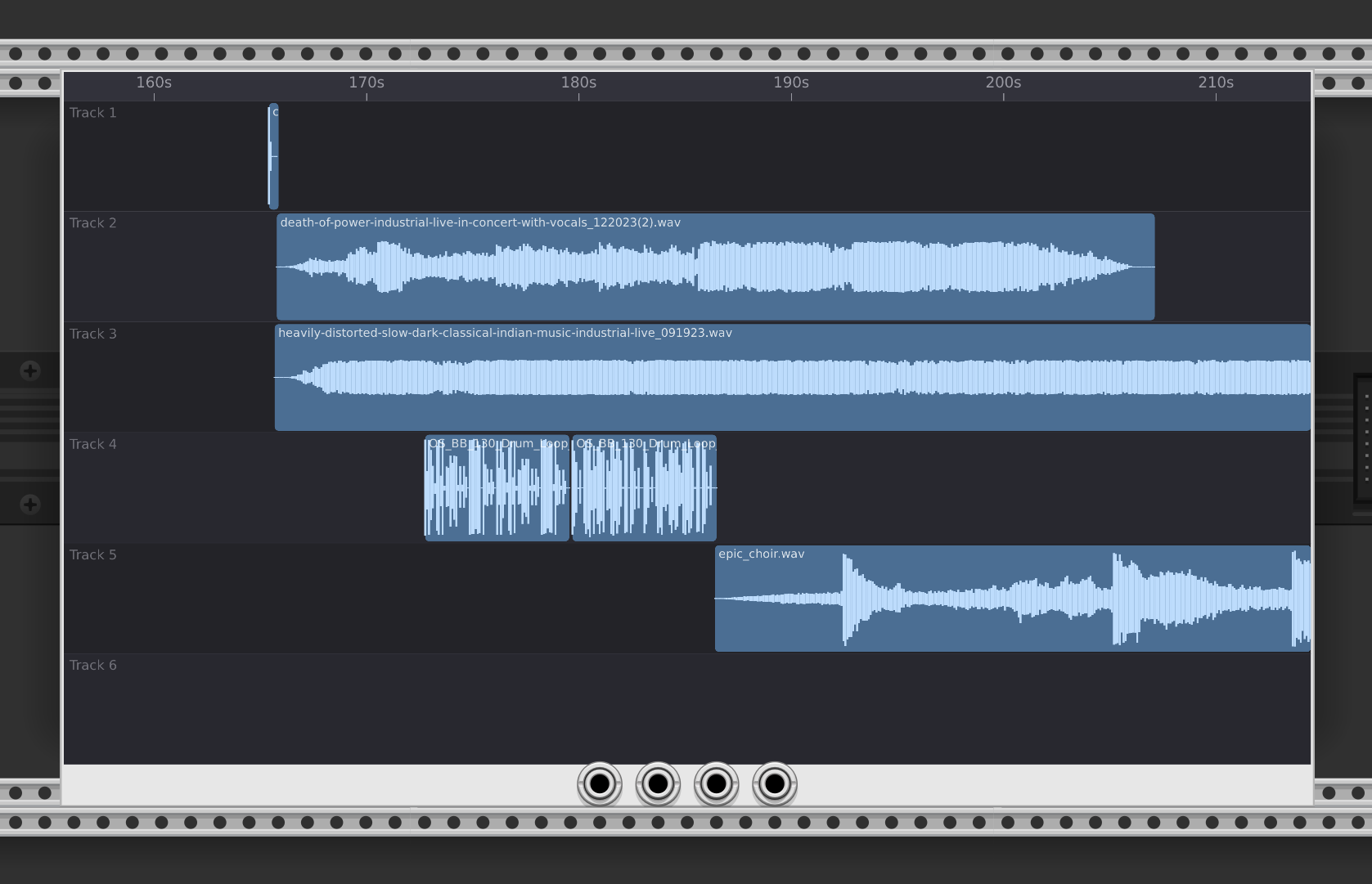
Someone had asked me a while back if I’d create a mult-track “DAW” style sample player with time stretching. If that was you, please remind me! I lost the conversation. I might be getting started on it soon.
I’ve added a “resample” feature to the groovebox advanced.
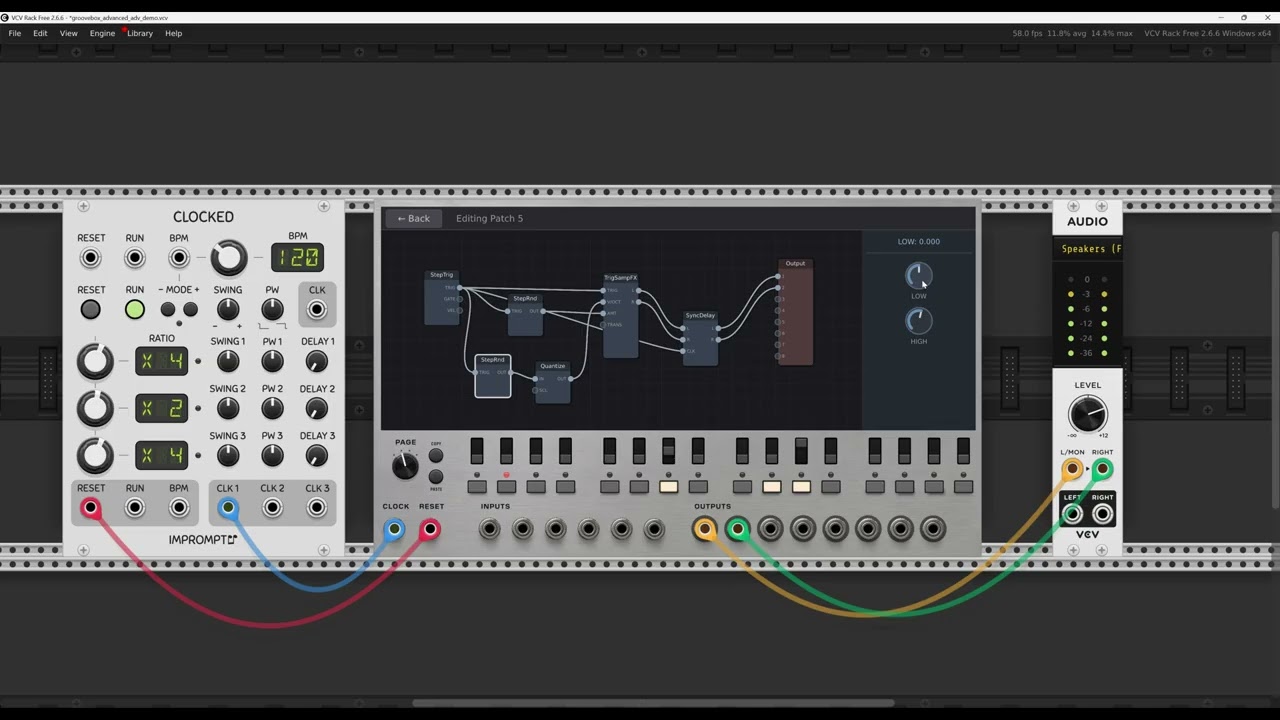
It’s fairly simple in concept:
- I added module called “resample”, which takes two stereo audio inputs and a trigger input. Basically, it records audio.
- I created another module called “replay”. It plays back from the audio buffer.
- The audio buffer is global.
So what’s the big deal?
A typical use case might be to add the resample module to the Groovebox Advanced global effects patch.
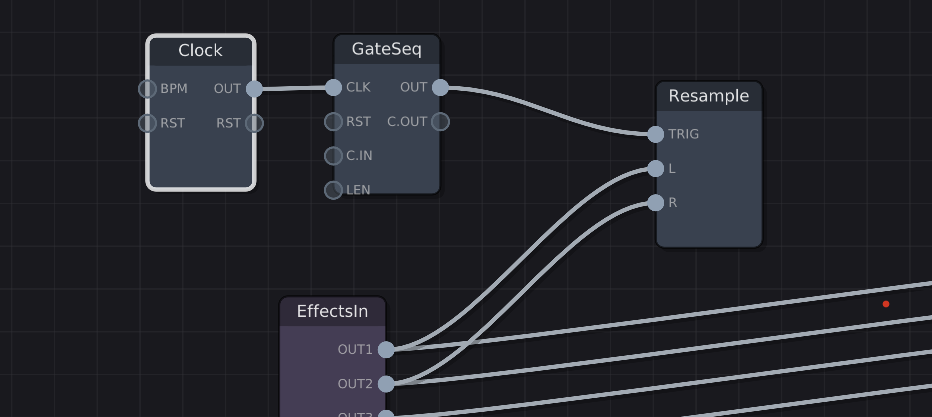
Then in a track you can playback the buffer:
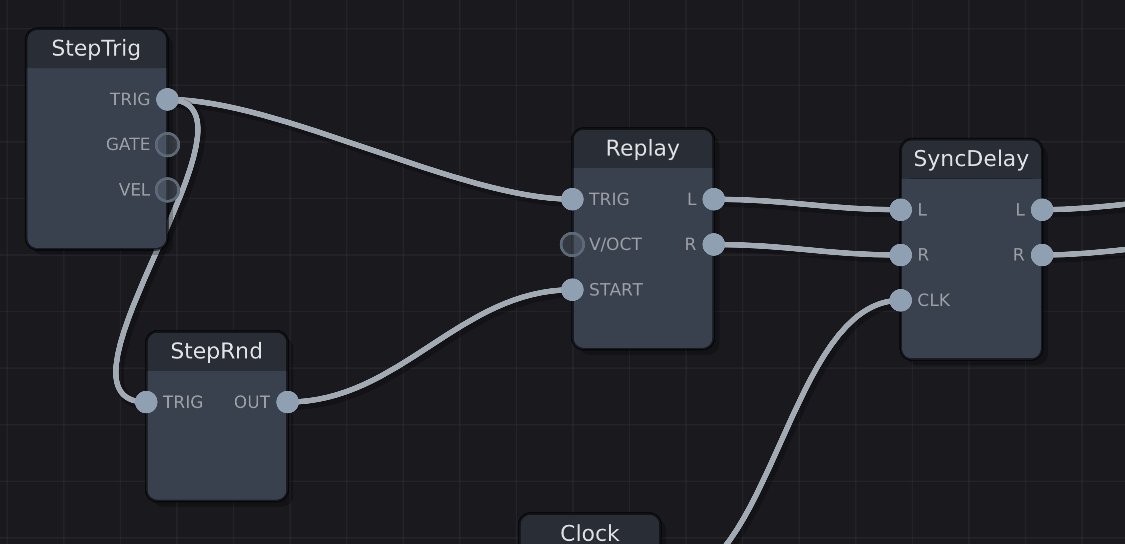
It’s essentially a way to sample the entire module’s output, and use that recorded audio as a “drum sound” in a track.
2 Likes
Then you can put a buncha glitchy effects in the buffer and create samples of crushed grooves distorted to oblivion
Nice! That’s my favorite feature from the Machinedrum. In conjunction with CTRL-ALL, this feature is showcased in one of the best gear demos ever:

3 Likes
The Groovebox Advanced should launch relatively soon. I’ve sent all the stuff to VCV Rack, and I’m patiently awaiting the release.
In the meantime, I have a few new updates to it that won’t ship initially, but won’t trail too far behind.
A Euclidean Sequencer module:
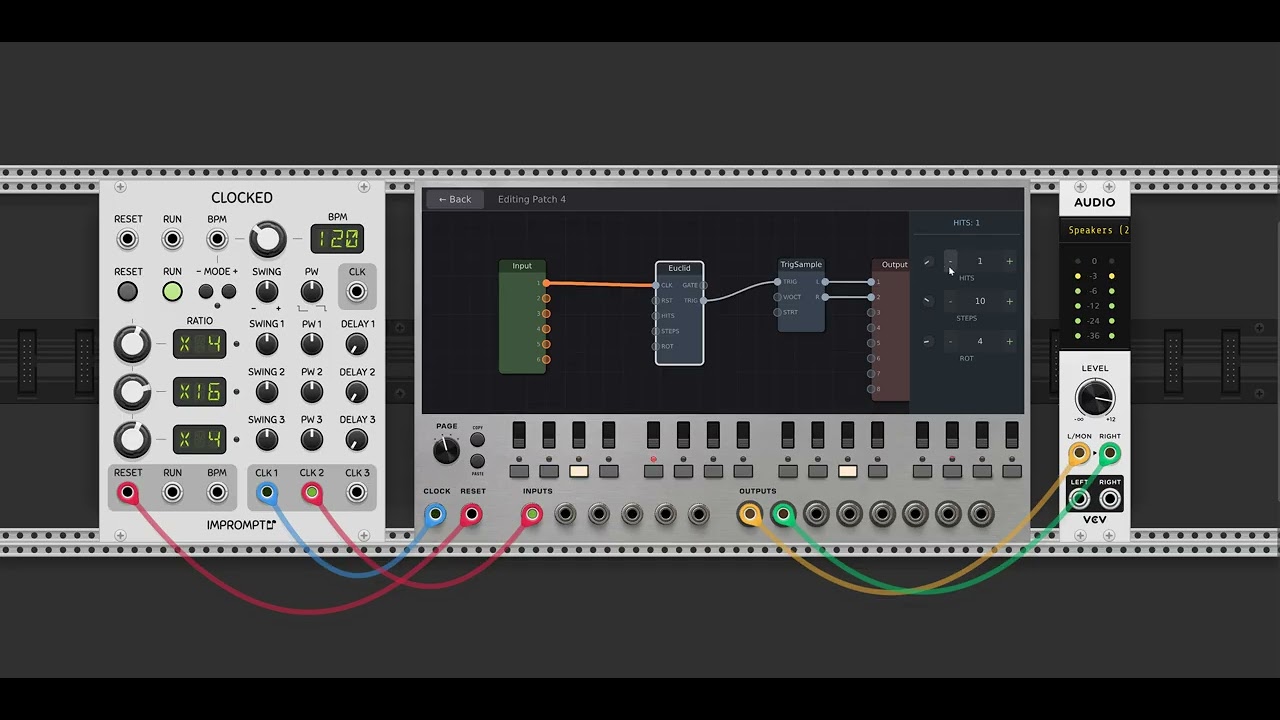
ShiftReg: A clocked shift register with 8 taps.
MsDelay: A pure time-delay for CV/gate/trigger signals, calibrated in milliseconds (0–500ms)
4 Likes
I’m really intrigued by PatchSeq but I fear that I may not be able to get the most out of it because I don’t really have a programmer’s mind. But I really like the results. Is it fairly easy to learn for a non-programmer type do you think?
I absolutely love the patterns that come out of this thing by randomizing all and then randomizing individual steps. I don’t program all the patches manually unless I want something specific. Its a really fun module for techno patterns and mechanical type loops.
I use it similarly to how @jeremy does. In the context menu, I set the randomization button to randomize ALL tracks. Then I clock the module, and listen to the output. If I don’t like what I hear, I just press the randomize button until I do. Pretty simple!
I rarely go in and patch anything myself. To answer your question directly, I think you’ll be fine as a non-programmer type. 
Cheers,
Bret
1 Like
Day #1 development on the new Tracks module. It will evolve considerably, but I’m already super excited. I have no idea what the final feature set will look like. One step at a time. 
8 Likes
looks cool! be ready for millions of suggestions 
Just purchased the PatchSeq and was a little confused. Then I RTFM’d and pressed ““Random”.  Great work, Bret!
3 Likes
It can still reward careful patching
1 Like