Point taken. I would think for this Rack would only need to report usage stats when it’s doing the “Library/Query for updates” call on startup. But I also really doubt anything like this will ever be implemented, and as I hinted at, perhaps that’s for the best.
1 Like
All I want for Christmas is the ability to hide modules (ie, the modules I know I will never use) in the Module Browser.
1 Like
You can right click and go to the VCV Library Page and click Remove.
it does not work, after doing that you should delete files on your hard disk.
to hide a module there’s something to do on an editable file somewhere, if I remember correctly
It works better to do it the other way around. So the modules you actually use, mark them as favorites, and then use the favorites filter in the module browser.
2 Likes
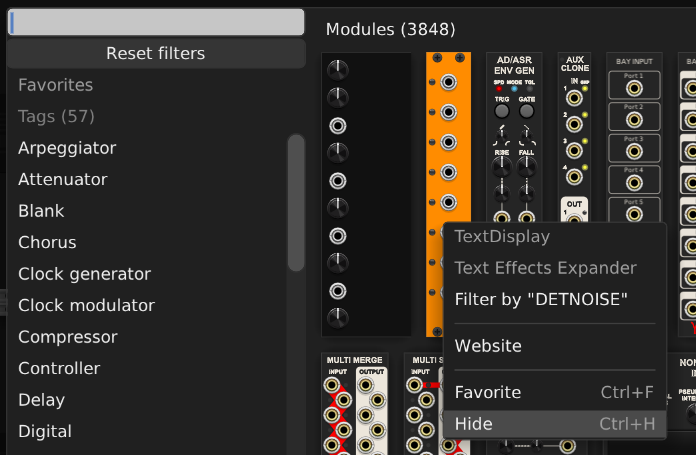
I appreciate the suggestions. They help reinforce my Christmas wish for a quick, easy, built-in way to hide unwanted modules in Rack 2.6-forward.
Cheers!!
1 Like
It seems to me like there is pretty widespread agreement that it would be better for the library to only manage subscriptions to entire plugins, and for the Rack app/plugin itself to manage the showing/hiding of individual modules. The way the library manages both is source to a lot of confusion, that’s evident on this forum. And I imagine it generates a lot of support requests etc. So it wouldn’t surprise me at all if @Vortico does it that way in Rack 3. Or maybe sooner, who knows.
Whether that happens for Christmas is another matter. 
5 Likes
February 2024.
2 Likes
Ah yeah there it is!
Yeah, that’s over a year ago and never happened.
2 Likes
Here’s another crazy wish… For someone to pick up the Frozen Wasteland/Frequency Domain torch/es and fix the buggy, but otherwise fantastic, modules in those plugins.
2 Likes
(Not a big deal - just noticed often to see requests to dark panels, curiously but for me in contrary prefer light panel variants)
1 Like
A good Christmas present would be:
- An amplifier simulator: although a similar result can be achieved with a filter and a lo-fi patch.
The Airwindows module has a couple amp sims worth checking out.
5 Likes
That’s an easy one, ask Santa for Host-FX and use a free plugin! I’ve been using NAM recently for guitar (Neural Amp Simulator) although I leave the amp part blank and just load a cab IR. You could also use Nysthi Convolvzilla (or the VCV one, but I think that’s only with Pro) and load an IR.
NAM has a few other features like EQ and a noise gate, which is particularly useful when playing guitar in front of a computer and getting loads of interference.
I also have a few of the Brainworx amp sims, which you can find really cheap if they’re on offer.
Yes!!! Running a synth voice through NAM can yield some really nice tones.
1 Like
Yep, absolutely. Slightly hijacking my own thread here to spam one of my videos, but if anyone hasn’t seen NAM it’s in my latest tutorial which I just uploaded. It’s about 12 minutes in (it’s quite a long video because I wanted to demonstrate some of my favourite effects. Not sure why because hardly anyone else uses VCV for guitar effects, but you can use these patches for other stuff too!).

6 Likes
More filters from the hardware clone sets, e.g.:
- Audible Instruments Blades
- Befaco BF-22
- Klavis Grainity
- ALM Busy Circuits MCFx2
2 Likes
Along the lines of what @trickyflemming said, easier and faster access to presets and specifically selections. Strip is there, but I want something that accessible on right click just library browser menu to load selections more intuitively.
3 Likes