A new Hazumi version has been submitted to the library containing @jeremy 's request. I’ve added a right-click menu with per-column settings for trigger settings:
Bottom (default): Outputs trigger when the corresponding ball hits the bottom
Top: Outputs trigger when the corresponding ball hits the top
Both: Outputs trigger when the corresponding ball hits either the top or bottom
Hmm, I just got around to this and I’m not quite sure how to implement what you suggested. I also found code that implied that I could override the randomization function using something like:
I added this to my module’s struct, and although this compiled, it don’t think that it’s running. It’s also not stopping the parameters to be randomized when I CTRL+r, or when I right-click and select “Randomize” from the context menu. Any ideas?
I don’t know the whole story. In this case I implemented randomize on my widget. the knobs and such implement randomize already, but if you make your own widgets they may not.
I have noticed that Grain Engine Mk2 changes dramatically cpu usage when switching from 1 thread (~10%) to 2 (~33%) to 3 threads (~42%). Increasing more than 3 threads does not have a notable impact.
I’m curious about this. Is it usual or does it have to do with my system? My cpu is an AMD FX-8350 Eight-Core Processor 4.00 GHz
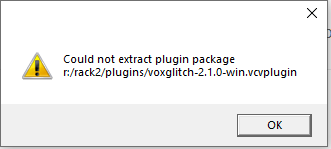
Hi David, thx for the reply! Folder was in use for God knows what reason, i logged off and on again and i deleted the folder (and did an undo) to see if the folder was unlocked. Started VCV, did the upgrade and everything is fine again!
Cheers!
Kris.
Hi @BlamesJake, I’ll take a look. I may have to ask someone far smarter than myself for advice since I don’t know how the threads could be effecting Grain Engine Mk2. I’m not doing anything fancy in that module. I’ll keep you posted!