What a marvelous module! Many thanks to you both, @clone45 and @Omri_Cohen !
2 Likes
This looks fabulous, thank you! Looking forward to playing with this.
One thing I can say already is that I’d love some more play-modes (Shape), such as the ones, for example, from Squinktronix Arpeggiator, and including one or more “drunken walk”/brownian motion modes, which are really musically fun and useful.
2 Likes
I saw Omri’s video on this module yesterday and I played with it for long enough to see that it is a fantastic module. Great job!
1 Like
That’s really interesting! I’ll check it out and see what I can do.
4 Likes
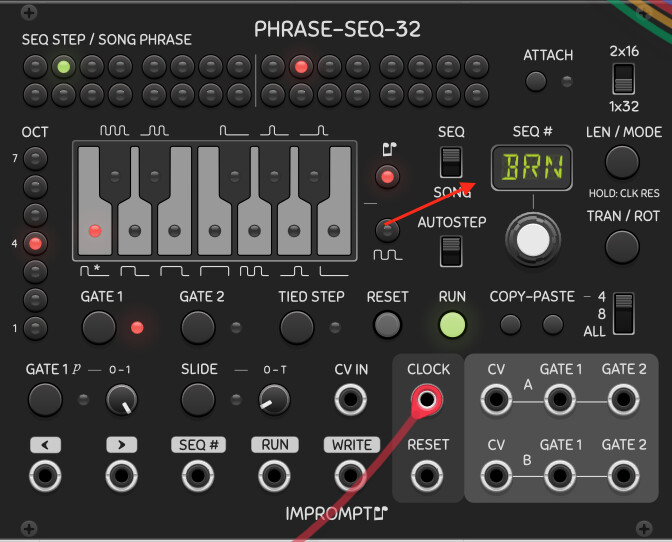
Pachde-1 Imagine module in Wander mode is effectively brownian motion. Use either the sample outputs eith an interesting image or the just xy outputs for cv.
Hello. Can anyone help me?
I am a windows 10 user. I tried to load a voxglitch module but with most of them I have a “display/graphical” problem.
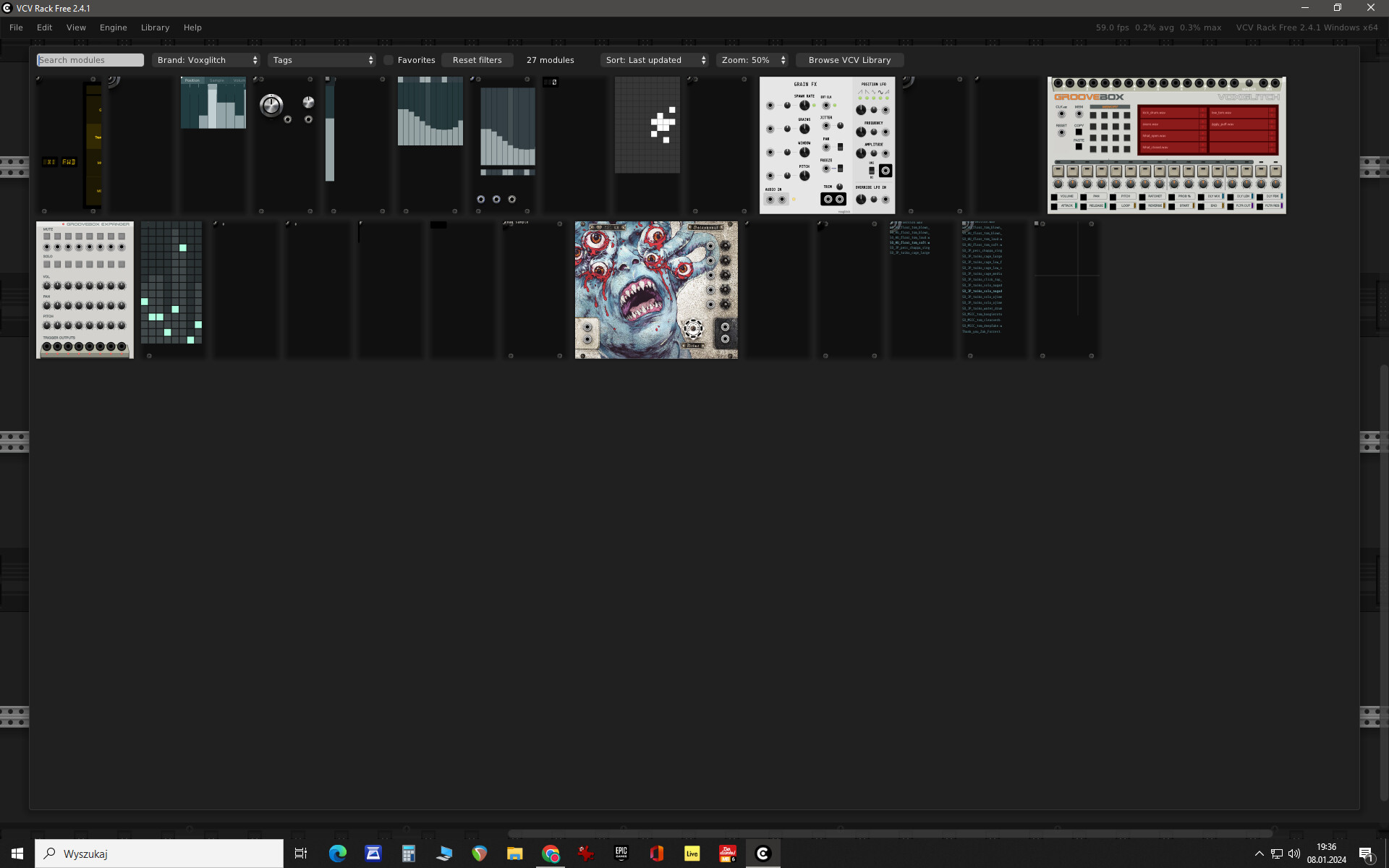
It looks like this in the browser area:
And like this when its loaded into the program:
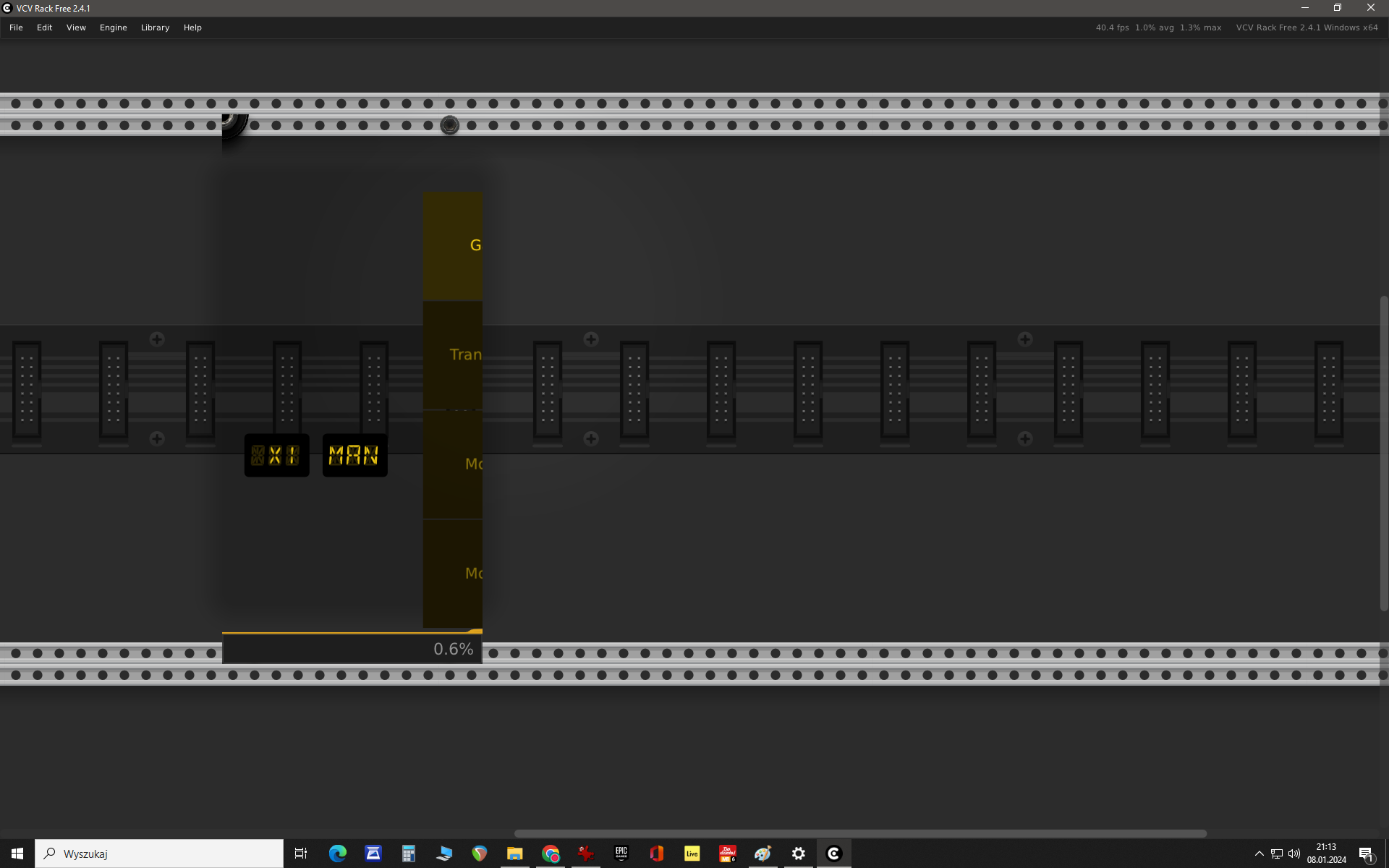
I reinstalled the vcv rack with no success.
I tried to instal up to date nvidia drivers (geforce gtx 980), but it did not help.
I also tried to change the system resolution etc.
I would be really gratefull for the solution
Looks like the modules are failing to load their SVGs. What does the Rack log.txt show (exactly)? (Help>Open user folder opens the folder where the log.txt file is).
I expect you’ll see lines in the log about SVGs failing to load, which will give the full path to the .svg file it attempted to load, and you can check that there is an svg at that location, and if the SVG can be displayed (double click to open it in a browser, or select it in the Windows File explorer with the preview pane open).
You might need to reinstall the plugin.
This is what the log shows:
[8.764 info src/window/Window.cpp:73 loadFile] Loaded image C:/Users/Paweł/Documents/Rack2/plugins-win-x64/voxglitch/res/autobreak_studio/themes/default/waveform-placeholder.jpg [8.811 info src/window/Window.cpp:73 loadFile] Loaded image C:/Users/Paweł/Documents/Rack2/plugins-win-x64/voxglitch/res/components/png/knob_medium_light.png [8.977 info src/window/Window.cpp:50 loadFile] Loaded font C:/Users/Paweł/Documents/Rack2/plugins-win-x64/voxglitch/res/ShareTechMono-Regular.ttf [9.112 info src/window/Window.cpp:73 loadFile] Loaded image C:/Users/Paweł/Documents/Rack2/plugins-win-x64/voxglitch/res/satanonaut/satanonaut_baseplate.png [14.695 info src/app/Browser.cpp:88 chooseModel] Creating module Voxglitch Digital Sequencer [14.695 info src/app/Browser.cpp:92 chooseModel] Creating module widget Voxglitch Digital Sequencer
There seem to be only a small part of the svgs in the folder. I reinstalled the plugin but it didn’t help.
I’m not seeing any references for the SVGs. Make sure you’re showing a log from a run where you open the browser.
Current released voxglitch for me (Windows 11) has 23 svgs in the plugin res folder, plus more in res subfolders. Sounds like Rack is having trouble unpacking the .vcvplugin file, which sometimes happens with 3rd party (non-Microsoft) antivirus programs. If you’re running 3rd party antivirus, you might be able to exclude scanning the Rack user folder.
Unfortunately, Rack uses a compression format that isn’t available on Windows by default. Fortunately, 7Zip is able to unpack .vcvplugin files. If you have that (or another compatible decompression program), manually expanding the .vcvplugin might be one way to get around the install issue, assuming that you have an uncorrupted .vcvplugin.
1 Like
the txt log shows something like this now:
[13.272 info src/window/Svg.cpp:28 loadFile] Loaded SVG C:/Users/Paweł/Documents/Rack2/plugins-win-x64/voxglitch/res/arpseq/readout/1.svg [13.273 info src/window/Svg.cpp:28 loadFile] Loaded SVG C:/Users/Paweł/Documents/Rack2/plugins-win-x64/voxglitch/res/arpseq/readout/2.svg [13.273 info src/window/Svg.cpp:28 loadFile] Loaded SVG C:/Users/Paweł/Documents/Rack2/plugins-win-x64/voxglitch/res/arpseq/readout/3.svg [13.273 info src/window/Svg.cpp:28 loadFile] Loaded SVG C:/Users/Paweł/Documents/Rack2/plugins-win-x64/voxglitch/res/arpseq/readout/4.svg [13.273 info src/window/Svg.cpp:28 loadFile] Loaded SVG C:/Users/Paweł/Documents/Rack2/plugins-win-x64/voxglitch/res/arpseq/readout/5.svg [13.273 info src/window/Svg.cpp:28 loadFile] Loaded SVG C:/Users/Paweł/Documents/Rack2/plugins-win-x64/voxglitch/res/arpseq/readout/6.svg [13.274 info src/window/Svg.cpp:28 loadFile] Loaded SVG C:/Users/Paweł/Documents/Rack2/plugins-win-x64/voxglitch/res/arpseq/readout/7.svg [13.274 info src/window/Svg.cpp:28 loadFile] Loaded SVG C:/Users/Paweł/Documents/Rack2/plugins-win-x64/voxglitch/res/arpseq/readout/8.svg [13.274 info src/window/Svg.cpp:28 loadFile] Loaded SVG C:/Users/Paweł/Documents/Rack2/plugins-win-x64/voxglitch/res/arpseq/readout/9.svg [13.274 info src/window/Svg.cpp:28 loadFile] Loaded SVG C:/Users/Paweł/Documents/Rack2/plugins-win-x64/voxglitch/res/arpseq/readout/10.svg [13.275 info src/window/Svg.cpp:28 loadFile] Loaded SVG C:/Users/Paweł/Documents/Rack2/plugins-win-x64/voxglitch/res/arpseq/readout/11.svg [13.275 info src/window/Svg.cpp:28 loadFile] Loaded SVG C:/Users/Paweł/Documents/Rack2/plugins-win-x64/voxglitch/res/arpseq/readout/12.svg [13.275 info src/window/Svg.cpp:28 loadFile] Loaded SVG C:/Users/Paweł/Documents/Rack2/plugins-win-x64/voxglitch/res/arpseq/readout/13.svg [13.275 info src/window/Svg.cpp:28 loadFile] Loaded SVG C:/Users/Paweł/Documents/Rack2/plugins-win-x64/voxglitch/res/arpseq/readout/14.svg [13.276 info src/window/Svg.cpp:28 loadFile] Loaded SVG C:/Users/Paweł/Documents/Rack2/plugins-win-x64/voxglitch/res/arpseq/readout/15.svg [13.276 info src/window/Svg.cpp:28 loadFile] Loaded SVG C:/Users/Paweł/Documents/Rack2/plugins-win-x64/voxglitch/res/arpseq/readout/16.svg [13.276 info src/window/Svg.cpp:28 loadFile] Loaded SVG C:/Users/Paweł/Documents/Rack2/plugins-win-x64/voxglitch/res/arpseq/readout/QuantizeOn.svg [13.277 info src/window/Svg.cpp:28 loadFile] Loaded SVG C:/Users/Paweł/Documents/Rack2/plugins-win-x64/voxglitch/res/arpseq/readout/QuantizeOff.svg [13.277 info src/window/Svg.cpp:28 loadFile] Loaded SVG C:/Users/Paweł/Documents/Rack2/plugins-win-x64/voxglitch/res/components/DigitalSwitchOff.svg [15.018 info src/patch.cpp:211 saveAutosave] Saving autosave C:/Users/Paweł/Documents/Rack2/autosave/patch.json [15.021 info src/settings.cpp:498 save] Saving settings C:/Users/Paweł/Documents/Rack2/settings.json
I uninstalled the third party antivirus, reinstalled vcv rack and the plugin itslef once again. Still no success 
Can you be so kind and write which .vcvplugin files should I try to manually expand?
The plugin containing the modules that aren’t showing their faceplates in the browser.
I didn’t see any issues flagged in the posted log, so not completely certain what’s happening.
When installing a beta release, you just download the .vcvplugin and copy it into the user folder. When updating a subscribed module from Rack, Rack downloads the file to the user folder, then prompts you to restart Rack. Instead of restarting Rack and letting it expand the .vcplugin file into the plugins-win-x64\<plugin-name> folder, expand the plugin package manually before restarting Rack.
This will bypass potential issues Rack might have been encountering while unpacking the plugin. This is all assuming that there has been a problem with the install process.
I think it’s your user name , the L with the ` on it is probably causing VCV to not find the SVG files.
3 Likes
Good observation, @Yeager!.
The log quoted in this thread shows Rack finding and loading svgs and other resources in that path successfully. Rack file access methods have been fixed to handle Unicode (non-ASCII) paths properly on Windows.
More likely it’s specific modules that are handling the path incorrectly because they’re not using the Rack methods for opening files, and instead using a library or other code that doesn’t handle non-ASCII file paths properly on Windows. It’s also why we’re not seeing anything in the log about the file load failures.
This is a bug in the individual plugins that should be reported to the plugin owner.
The only workarounds to this problem are to change your user name to remove non-ASCII characters, or install Rack on a path that contains only ASCII characters. At least, until plugin owners fix their bad code ;-).
A possible workaround that might fix this issue, but I haven’t seen anyone verify yet is:
- Go to Windows Settings, Time & language > Language and Region > Administrative language settings
- Under Language for non-Unicode programs click Change System Locale
- Check the Beta: Use Unicode UTF-8 for worldwide language support check box and click Ok
(probably requires restarting Windows)
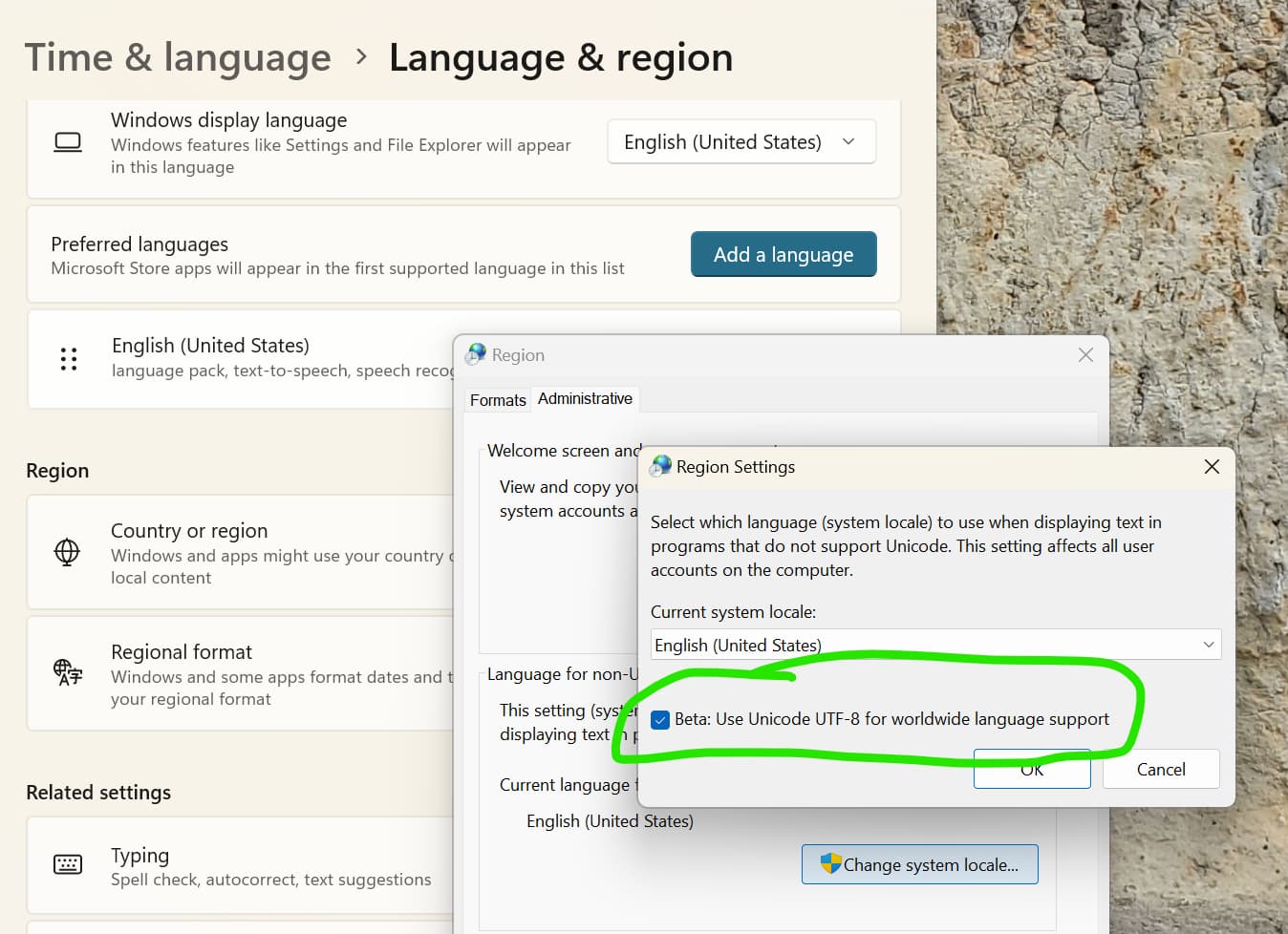
Please let us know if that works.
[Ed: OP confirmed that this workarounds solves the bug in the module]
4 Likes
Thank you so much!!! It solved the problem. 
4 Likes
If I had to guess (or assign probabilities for possible problem strings), the comma after the L is also pretty “hmmm” in addition to the diacritic above the L
Edit: great that you got it sorted 
2 Likes
Thanks for confirming that this workaround works!
Now I feel sad that the existence of a simple workaround may enable some developers to not fix their code :-/.
But I’m happy that users have a simple way to continue enjoying making music/noise.