Hey Ben, so happy you’re back here in full effect. Can you expand on that ‘report parameter updates to plugin-hots’? Updates from midi data connected to Transit or…? Thanks for updating the whole pack!
If you map a parameter from the VCV Rack plugin in your DAW, you can enable this option to get any changes made by TRANSIT pushed to the DAW. This behavior caused quite high CPU usage when Rack v2 was released, so I removed it. It is available again but optional if you need it.

Thanks for the clarification Ben!
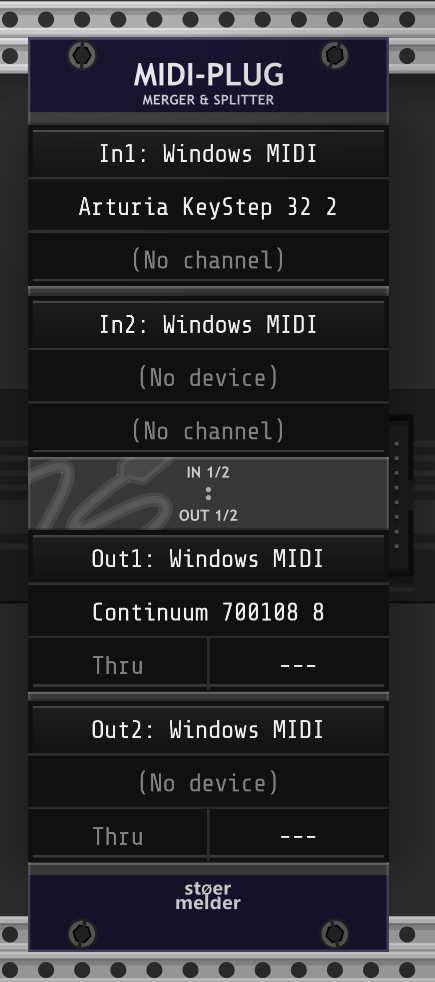
Is there a way to quickly soft thru Midi from a novation controller to a midi out on another device ? I’m trying to make it work with midi map but it does not seem to work. Perhaps the module is not intended for that functionality but having a midi out would be good to have it there if at all possible.
Edit: We have Midi Plug for that. Thank you Sir !
Yes, thank you Paul. Wouldn’t it be nice to have CV to midi CC in stoermelder world with labels and offsets and added tricknology.
May I add to the above CV to Midi request, one that includes program changes with LSB and MSB bank select to. It is currently not implemented anywhere that I can see and it would be incredible to be able to fully experiment with.
I‘m not sure I understand you. Can you describe what you are trying to achieve by an example?
There is no MSB/LSB for the MIDI program change message. What device are you wanting to control?
Nord drum 2. Bank select message needs msb and lsb. Then program change message.
What I dream of is a CV to midi module that has offsets and ranges built in the sockets by context menu just like midi cat can adjust each cc to control each parameter. And it also has a comprehensive bank and program change section
Hope that makes sense !
That does make sense. So that’s cc0 MSB + cc32 LSB for bank select. This is the same for most EaganMatrix devices, which I built the #d CHEM plugin for (Osmose is similar, but doesn’t use cc32).
I have some sketches for a plugin focused on MIDI, so requirements like you’re saying are very useful to have before starting on it. This would actually be pretty easy to get up and running. I would make the bank selection thing a separate module, ending up with something very much like #d CHEM: Preset or CHEM: Play only you’d have a UI for editing the midi codes to send, a way to give it a name, tags for filtering, and some way to drive changes from CV. All that is a straightforward adaptation of CHEM:Preset, but not certain the best way to do CV control for preset selection. CHEM: Preset currently offers only Next/Previous triggers, which operate relative to the current filter and sort order.
I’ve added another expander for MIDI-CAT which implements something, that have been requested repeatedly:
FINE is a companion module for MIDI-CAT which provides ability to fine-tune mapped parameters. If the input/gate on either 10% input or 1% input is high, the module switches to fine-tuning mode: In fine-tuning mode, the MIDI control must be moved to its center, then fine-tunes the parameter with 10% range or 1% range, respectively. Fine-tuning for a parameter can only be used on MIDI CC mappings with input mode set to “Pickup (snap)” or “Pickup (jump)”. Addtionally, the module switches from 10% range to 1% range and from 1% range to 10% range smoothly, if the 1% input is enabled while 10% input stays high. This means, finer adjustments can be made while holding two buttons without a need to center the MIDI control. After fine-tuning is finished and gates on 10% input and 1% input are low, the mapped MIDI control can pickup the current parameter value again. FINE for MIDI-CAT must be placed on the right side of MIDI-CAT and can be used together with the other expanders. High gates for the two inputs can be created by VCV MIDI-GATE using MIDI note messages or by STROKE using keyboard hotkeys, for example.
It is available in the development build. Please let me know what you think, any feedback is appreciated.
Cool!! Thanks Ben!
I just plugged FINE into a patch that’s been using several midi buttons to change pitch control range, wow, what a godsend this module is. i can now free up a lot of midi buttons to do other things, and the way i can fine tune oscillators now is extremely smooth and intuitive i love this, thanks for adding it man, this is gonna be in every patch. maybe in a future update we could have different values besides 1 and 10 percent? maybe 5 percent? or 2 or 3 (something between 1 and 5 percent)
i also love how i can use one button to change coarse/fine for all the modules that i am controlling with my midi controller, instead of mapping each one individually for fine tune
I’m happy you like it! This is a nice suggestion, I’ve just added a new option to configure the higher precision range for 1%, 2% or 5%.
amazing!
I’m preparing another update for the VCV Library and I’m focusing on revision of the manuals and fixing any bugs. This is the preliminiary changelog. Please let me know if you have any questions.
2.2.0
Modules 8FACE, 8FACEx2 and 8FACE mk2 are now considered stable again. A “Safe-mode” has been implemented, which loads presets on the next rendered frame, introducing a minor delay. Disabling “Safe-mode” will load presets more quickly but may lead to crashes or other issues. If you load presets manually by clicking snapshot buttons, you’ll will not notice any difference with “Safe-mode”.
New modules
- Module MIDI-CAT FINE
- New expander for MIDI-CAT, allows fine-tuning of MIDI CC parameter-mappings
Changes and Fixes
- Modules 8FACE, 8FACEx2
- Added Safe-mode and use as new default setting
- Module 8FACE mk2
- Added Safe-mode and use as new default setting
- Improved robustness for expander +8
- Modules CV-MAP
- Added mapping functions “Map module (left)” and “Map module (select)”
- Added color setting for mapping indicators
- Modules CV-MAP, MACRO, µMAP, MIDI-CAT, MIRROR, ReMOVE Lite, X4
- Added context menu option to report parameter updates to plugin-host (only in plugin-version of Rack)
- Module GOTO
- Extended jump-points for multiple modules/selections
- Module MIDI-CAT
- Added input-modes “Snapped” and “Snapped (short/long)” for CC and Notes for use with snapped parameters (e.g. “Steps” on VCV SEQ3)
- Added handling for MIDI System Reset message for resetting input-mode “Pickup (snap)”
- Added color setting for mapping indicators
- Module MIDI-CAT MEM
- Added module restriction list
- Fixed broken MIDI feedback when loading stored mappings
- Module STRIP
- Remember and recall file-dialog folder locations for vcvss and vcvs files
- Module STROKE
- Fixed cables’ “Toggle visibility” command (cable plugs still visible)
- Module TRANSIT
- Improved robustness for expander +T (e.g. crashes when using module-presets) (#412)
everything looks great,

I’ve just added a new module. As far as I know nothing like this exists yet. PANIC ROOM is a utility module, it restricts your modular space within Rack, making it impossible to patch outside of a defined area.
How to use
After adding PANIC ROOM to your patch, choose Learn from the context menu and drag to select the usable area. Any modules placed outside that area will be automatically disabled.

REALLY neat idea! Well done!