Have opened up a whole new world for me. Thank you, thank you!
I currently draw the Phasor Ramp in my DAW to control the playback position, and it works perfectly. I’ve been trying to do this for ages using different samplers and delay modules, but this is the best method so far for me.
I’ve been using that same strategy for DAW syncronization for a long while now. Work great for sequencing things and many other purposes, but running modulators based on those synced sources may get zipper noise. I’ve been toying with the idea of writing a little plugin to output (as audio) some tempo/timeline synced phasors for sample-accurate DAW sync. I’ll let you know if I actually get around to it.
…that’s why. Using an audio signal into rack for the phasor solves the problem, but generating those in a sample-accurate timeline-aware way takes some thought. Hence the idea.
This is a real bummer. I was really hoping to be able to control the playhead position with an automation, but it doesn’t seem possible. Is this because of 7bit midi resolution (even if it is an automation from the DAW)? Sorry Im dumb with these things.
It is possible but not in a sample-accurate manner.
It has nothing to do with MIDI if you’re using DAW automation, it’s just that DAWs don’t process everything per-sample like VCV does, rather things update over blocks of samples. The stair stepping you see in my screenshot above comes from the param value (offset on the Bogaudio in my case) getting updated at the start of each DAW block, and held there until the next.
This isn’t VCV’s fault entirely, in the AU and VST plugin formats you cant have sample-accurate DAW automation of parameters. You can in VST3 (though it’s tricky) and CLAP (a bit easier) but I’ve compared and seen the same results in every format of VCV plugin. Somewhat understandable, it’s tricky to maintain this multi-platform stuff.
Audio signals are sample accurate and high precision however. Hence my thinking of writing a little plugin to generate phasors you could send into VCV. Say one that goes over a beat, one over a bar, and one over some number of bars.
Thank you so much for the explanation. I understand now what its doing (with sample blocks).
Its easy to match a specific bpm with a phasor(ramp) and reset it every bar or beat (although I think that might also need to be sample accurate ). (Something like Shapemaster will then come in handy) But what happens with gradual tempo changes? A dedicated plugin will help.
Anyway I’ll keep experimenting. Thanks again for the info. Really appreciate it.
Yeah there’s two primary frustrations with clock-based workflows that led me to explore these options: sync when starting playback at an arbitrary point on the DAW timeline, and dealing with gradual tempo changes. If neither of those is important there’s much less reason to care but both of those are indispensible to me.
I am hoping in Rack 3 Andrew and friends will want to expose the timeline info from the plugin API’s in the Rack API. That way you could write a module that outputs phasors with perfectly reliable timeline sync, and all the sample-accuracy benefits of a phasor. But as of now that’s not easy to do. But the Audio solution can work really well I’m sure. Just you know, there’s a lot of projects.
I’m waiting for version 2.0.24 of my plugin to be released, but in the meantime, I bought a large sample pack for myself (from Slate + Ash), and wanted listening to samples to be easier, so I made this WAV File Explorer | Patchstorage patch to listen to a directory of WAV files more easily.
2.0.24 is largely about making rhythmic sounds with Memory easier, and also several small tweaks. Here’s what’s coming:
Many changes to Memory modules:
Fixation now has a menu option that changes the LENGTH from “time in milliseconds” to “tempo input + note length”. I think this will make it far more suited to tempo-synced playback. Thanks to @cothiele for a discussion that got me to think of this.
Brainwash now has a new method to determining when to record and for how long. It takes a CLOCK signal and a count of CLOCK triggers, and after being ARM’ed, records for that many CLOCK triggers. COUNT doesn’t have to be an integer; fractional values can make for interesting polyrhythmic effects.
Fixation now has a Clock Gate STYLE option, where the CLOCK is a gate that turns playback on and off.
Both Fixation and Ruminate now have a “Default direction is reverse” menu option. This allows “Speed as V/Oct” to be used with reversed playback. Thanks to @shrymusic for suggesting this.
Both Fixation and Ruminate now have a menu to set the behavior when the module’s playhead hits the end of Memory, with options to Loop around, Bounce or (newly added) Stop playback. This replaces the BOUNCE button on Ruminate.
While Ruminate already had this, now both Ruminate and Fixation now have a CURRENT output, which has found some interesting uses as a phasor input. I’ve also made those outputs polyphonic, with the 2nd channel being the current position of the playhead in seconds from the start.
In Venn, menu options can change the ranges of the X and Y Point position from [-5, 5] to [0, 10].
Added a V3 input to TTY. My initial expectation that TTY would be used more with text than with signals was likely mistaken.
Some bug fixes:
The resizable modules act better when used with the STRIP module.
Fixation wasn’t counting playbacks correctly in some situations.
I agree with @geetommy:
that sounds like a massive update! Very much looking forward to be playing around with the new features in this year
Happy New Year indeed!
I am not that much active in the VCV community but I am thoroughly enjoying the latest update, thanks for listening and adding “Default direction is reverse” menu option, made my life so much easier plus “tempo-synced note length” mode was such a bonus, thanks to @cothiele for suggesting!!
Added new features to my very first module, Drifter:
Drifter now has a TRIG output.
Outputs a short trigger each time the IN value moves to a new “section” of the graph (i.e., changes which two points it is between).
Putting a phasor into IN, TRIG now turns that phasor into a set number of triggers, which can drift in timing individually (on each click of/trigger into DRIFT), but will complete all triggers in the length of the phasor. For example, sending Drifter’s TRIG to the CLOCK input of a sequencer and drifting with a non-zero X DRIFT value will cause the timing of each note to vary, yet complete the cycle in the same length of time.
Drifter now has an UNDRIFT input and button. UNDRIFT will cause the points to drift back to their original locations each time it’s pressed. If you’ve changed the RESET shape from the menu, then UNDRIFT will move the points towards what that shape would be.
Trimpots for BIAS and ATTN have been added to OUT, allowing the output to be used more directly for some applications.
A bug in the Drifting math has been fixed; previously, X DRIFT and TOTAL DRIFT values were used as if they had a value half the value actually set. Meaning that the same X DRIFT and TOTAL DRIFT values will now allow more movement.
In the Memory modules:
Memory and MemoryCV now show the length of its contents, and also output that length as seconds. This makes it easier to do some kinds of computation on the Memory with other modules.
Memory and MemoryCV now have a better menu for loading files, including remembering recently used loading directories.
The L & R outputs in Embellish now fall back to zero when recording stops, just like the other playback modules.
Fixed a clicking issue with Fixation that makes it sound much better in some circumstances. Thanks to @shrymusic for sending me the test case.
Fixed bugs, including:
a flaky bug that would sometimes make playback much faster than desired. Thanks to @fiddlercrabseason for making me realize that the bug wasn’t just my imagination.
heads on a Depict appearing outside of the Depict screen; thanks to @cothiele for showing me that.
Finally, to avoid a future parts shortage, all of the screws have been removed from all of the modules The modules now look a bit cleaner and more contemporary, and it gives me more room to move UI elements around when adding new features.
I cherish the Memory plugin! Ran into this problem just yesterday and was puzzled about what was going on. So your fix comes at the right time, thank you very much!
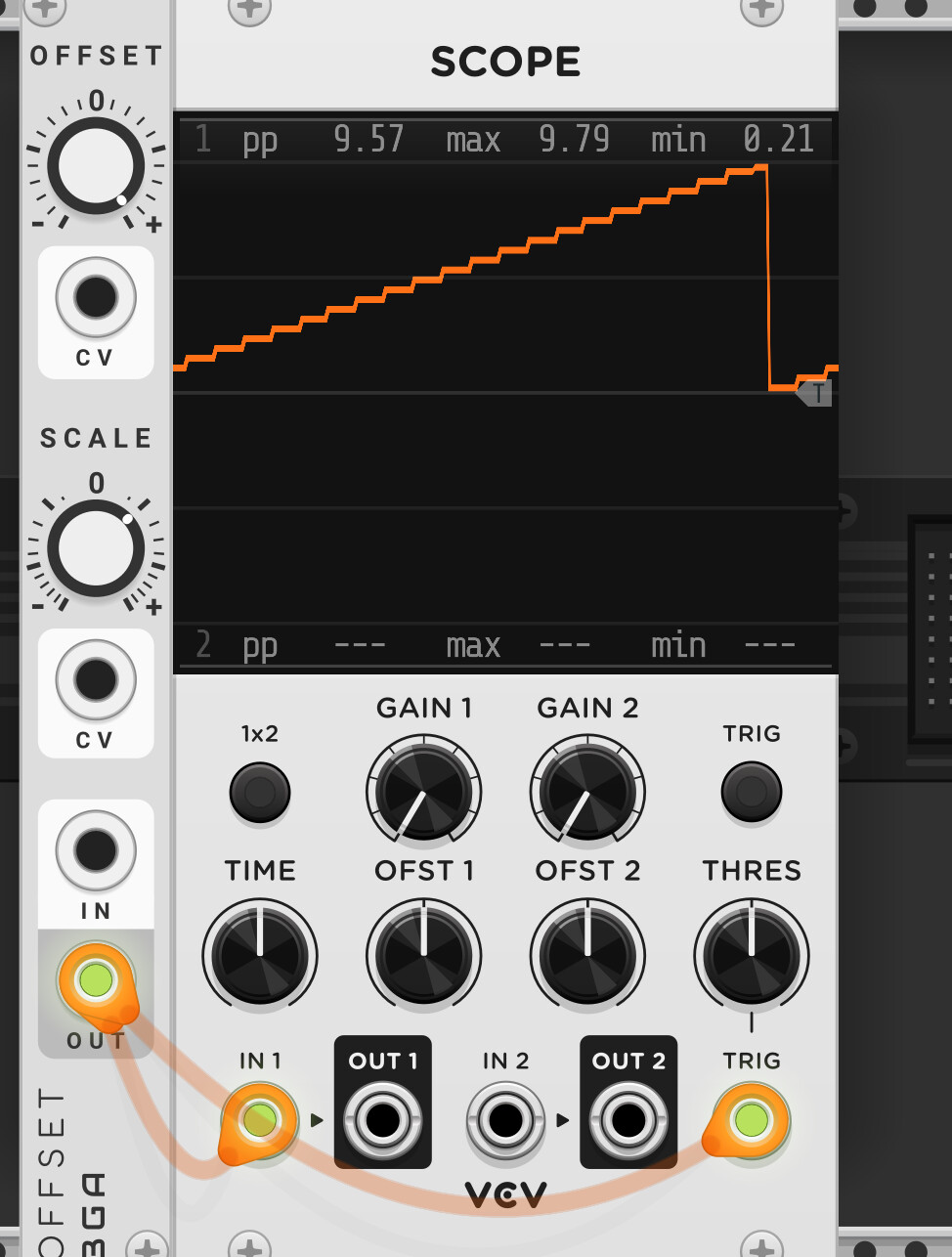
 Using an audio signal into rack for the phasor solves the problem, but generating those in a sample-accurate timeline-aware way takes some thought. Hence the idea.
 ). (Something like Shapemaster will then come in handy) But what happens with gradual tempo changes? A dedicated plugin will help.
 happy new year
 Happy New Year indeed!
 .
.