Not a bad thought, but there are non-polyphony cases where this could be handy.
For example, in the BASICally preset “Quantize Octave”, the code walks a short sorted array range, trying to find the two values an input value new_in is between:
    FOR k = 0 TO notes_len
      if range[k] <= part AND range[k+1] > part THEN
        ' Found it!
        prev_in = new_in
        OUT1 = value[k] + octave
        OUT2 = new_in - OUT1
        OUT3 = abs(OUT2)
        EXIT FOR
      END IF
    NEXT
This is only run when the input value changes, and range is pretty short (12 values in this case). So changing NEXT to NEXTHIGHCPU means that this will respond with the correct answer with no delay, and at unnoticeable cost.
But you raise a good point. My thinking is that, in the docs for BASICally, I can make a little chart of situations and suggestions for which variant to use:
Initialization on startup → NEXT
Running a calculation over a long array (more than 20 items) → NEXT
Processing polyphonic audio → NEXTHIGHCPU
Processing polyphonic CV, per sample accuracy is not required → NEXT
Processing polyphonic CV, per sample accuracy would be good → NEXTHIGHCPU
etc.
In point of fact, there are ways for the BASICally user to mitigate the CPU hit that NEXTHIGHCPU incurrs. It’s just a matter of trying to explain it all, and asking people to pay attention to something I’d rather they didn’t have to understand. I’ll likely hit up this community for notes later when I’ve written out a tolerable version.
Thanks to maunatanmaya for this suggestion in my GitHub Issues, and for wrapping it in a Ko-fi donation
BASICally:
Added WHILE-END WHILE loops. Thanks to @gabtiorbi for unintentionally reminding me that it’s confusing not having WHILE loops.
Polyphonic INx and OUTx ports! Thanks again go to @gabtiorbi for getting me to think seriously about supporting this. It’s made many of my programs much simpler.
Adding polyphony convinced me that a faster FOR loop mechanism is (sometimes) needed, so I’ve added the NEXTHIGHCPU option to FOR loops.
Updated the BASICally presets to use these features when appropriate.
I have a question concerning Fixation from the most beautiful Memory Modules.
I just started to fool around with those modules for processing live audio from my instruments. And I wanted to try to create a rhythmical glitch effect. Basically looping a short section on the press of a button in a specific note length within a certain tempo.
As an example:
I press and hold the button and a section the length of a 1/8 note in tempo 58 is looped until I release the button.
I set the Fixation Play Style to “Always plays LENGTH” since I would like the loop to start immediately when I press the button.
But now I’m trying to change the LENGTH input according to note length values and this is giving me some headaches
I wanted to use the ASBPM to delay/ms calculator to be able to change the tempo and automatically change the length of the glitch accordingly.
But that does not work since the LENGTH input at Fixation does convert the CV input in a different way.
The output CV of the AS-Module is for example: 1/8 at 58bpm = 517ms = 0.517volts
But to get roughly 517ms of loop at the Fixation Module (LENGTH setting to 1ms and the attenuverter all to 100%) I need a CV of roughly 6.77volts. (I took me quite some time of try and error to figure that out )
my question
: is there an easier way to do this? It says in the manual that the INPUT is multiplied by the attenuverter and then added to the LENGTH setting. But in my above example that would mean that 6.77 is multiplied by 76,22 to come to 516 with is added to the 1ms setting on the length knob.
I could create a workaround with CV-Map or the 8face module but it would be so lovely if there is an easier solution that I’m just too dumb to see.
I don’t know the direct answer to your question. But I was at one point trying to do this same thing, and eventually decided not to use fixation for this purpose.
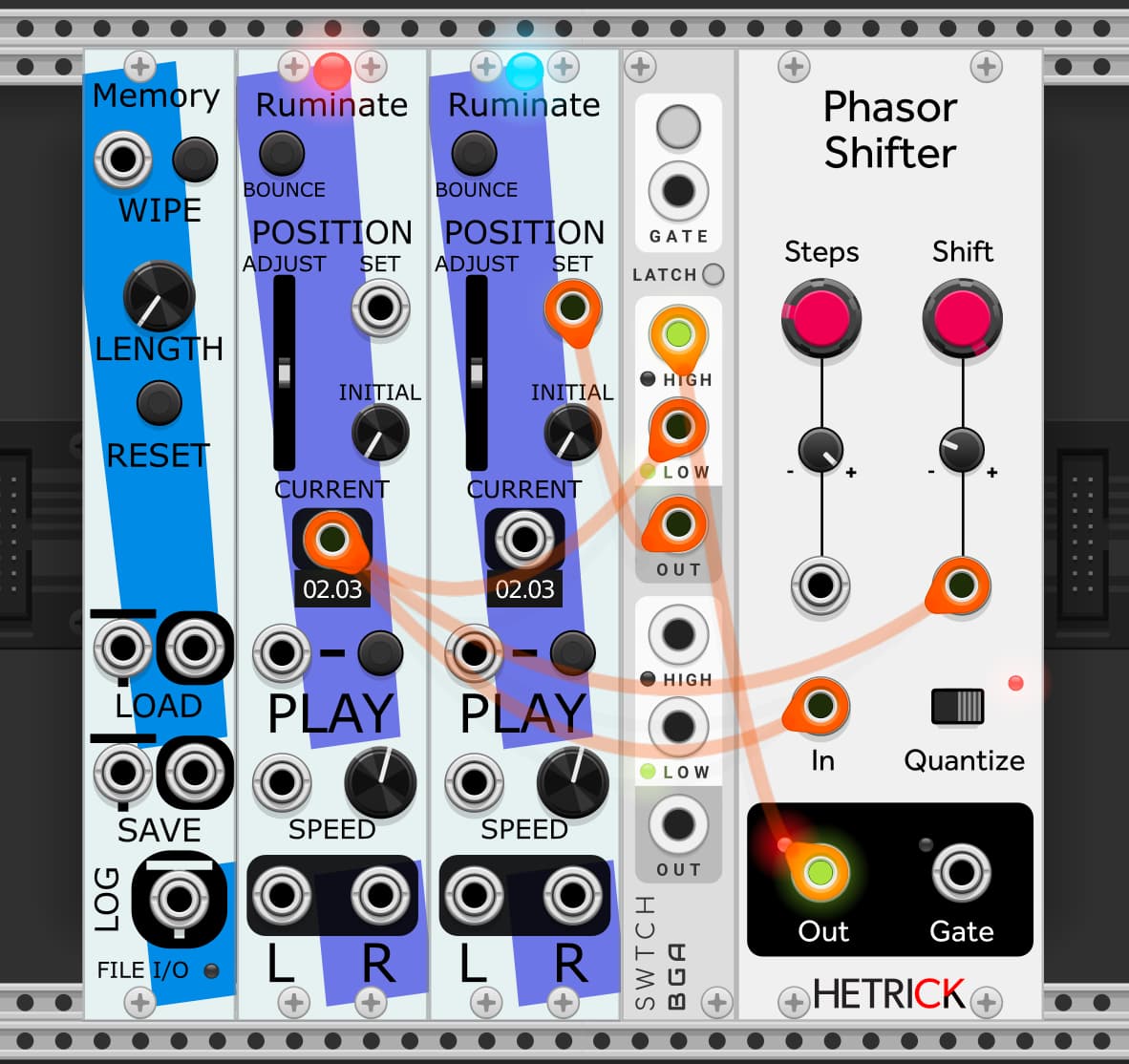
Instead, I keep an extra Ruminate module around which does nothing except play the loop normally. Its CURRENT output then serves as a phasor that is always perfectly synced to the main loop. You can then manipulate that using HetrickCVs phasor modules, patch the manipulated phasor to the SET input on a different Ruminate (“fade on move” must be turned off), and patch that to the audio out. Example here: Stochastic Telegraph Announcements - #72 by andreya.ek.frisk
There may well be a way to do this with Fixation too, maybe Mahlen knows. But in case you find this other approach useful, well there it is.
Yeah, I’ll admit, Fixation and Ruminate are not well suited to following a clock or tempo easily as they currently exists. My music tends not to follow a tempo much, so this is a blind spot in my design space a bit, I confess.
The solution from @andreya.ek.frisk is surely a great starting place (i love that patch too). But I’d happily take suggestions as to how you think it should work for future iterations on these modules.
First of all: thanks for the answers guys
I still need to try out @andreya.ek.frisk suggestion and see if it’ll work or inspire me to my own solution.
But to come back to suggestions if I may be so bold.
I love the way that the AS module is handling note length values, milliseconds and voltage: because it’s very straight forward one on one.
I use the AS BPM to delay/ms calculator in some of my delay patches as a central CV source to change time settings on the ASSignal Delay for weird rhythmical tap delays. And then if I change the tempo at the BPM to delay/ms calculator everything adjusts accordingly.
(the inspiration for that came from Omri Cohens video about a tap delay build)
And the CV amount corresponds to the ms exactly, so it’s very clear how it behaves.
If the LENGTH section of Fixation could have the option to follow that logic that would be amazing! Maybe as a check box in the right click menu, similar to the “Use speed as V/Oct” check box?
The easiest way then would probably be that the attenuverter and the LENGTH knob get bypassed completly. So that the length gets set by an external source only. One issue there would probably that 0.000v and 0.0001v need to correspond both to 1ms which is the smallest setting at Fixation if I remember correctly. And after that it’s just 0.002v = 2ms, 0.003v = 3ms, etc … up to 10.0000v = 10 seconds
Or that you can also still adjust things with the LENGTH knob.
With the AS Signal Delay you can set the milliseconds at the module itself and then the incoming CV amount get’s just added on top. The AS Signal Delay starts at 0ms though.
Probably easier to do this with Chronoblob synced to a clock. Use a Stoermelder Map module to directly control the time knob, and something like Bogaudio ADDR sequencer. You can adjust each step to give you the exact subdivision you want.
In my humble opinion the most overall useful standard for this kinda thing is:
1: Have a way to set a tempo-synced baseline duration. Clock or phasor input or a BPM dial, etc. Check out the awesome tooltips in Sapphire Echo for a great example.
2: Voltage mod of that baseline in the V/Oct style. That is, plus one volt = twice as fast.
Hey thanks so much with still engaging with my issue!
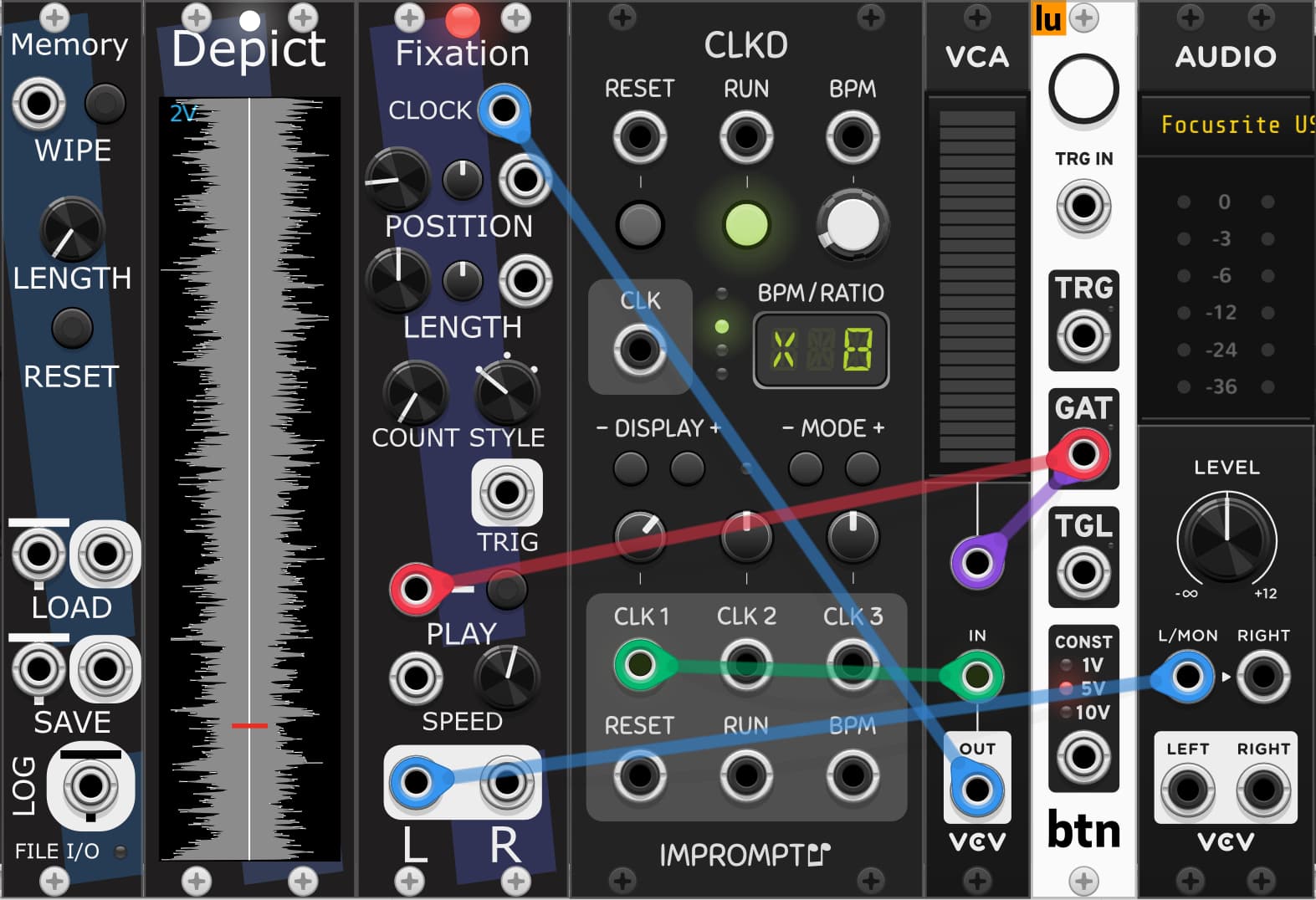
And yes, that actually was my first tryout with Fixation.
The issue that I had with that patch was that the play button “waits” for the next gate of the clock. So that the first loop can be slightly stuttering (because of not triggering exactly at the start of a gate signal from pushing a trigger). With faster subdivisions that isn’t really audible but the slower the subdivisions the more apparent the effect becomes. And I’m also using this in a live setting, so I will not always be perfectly synced to a clock to make this work 100% accurate.
That’s why I switched to the Length Style option. There the play button immediately starts the playback in a certain length on a pushed trigger.
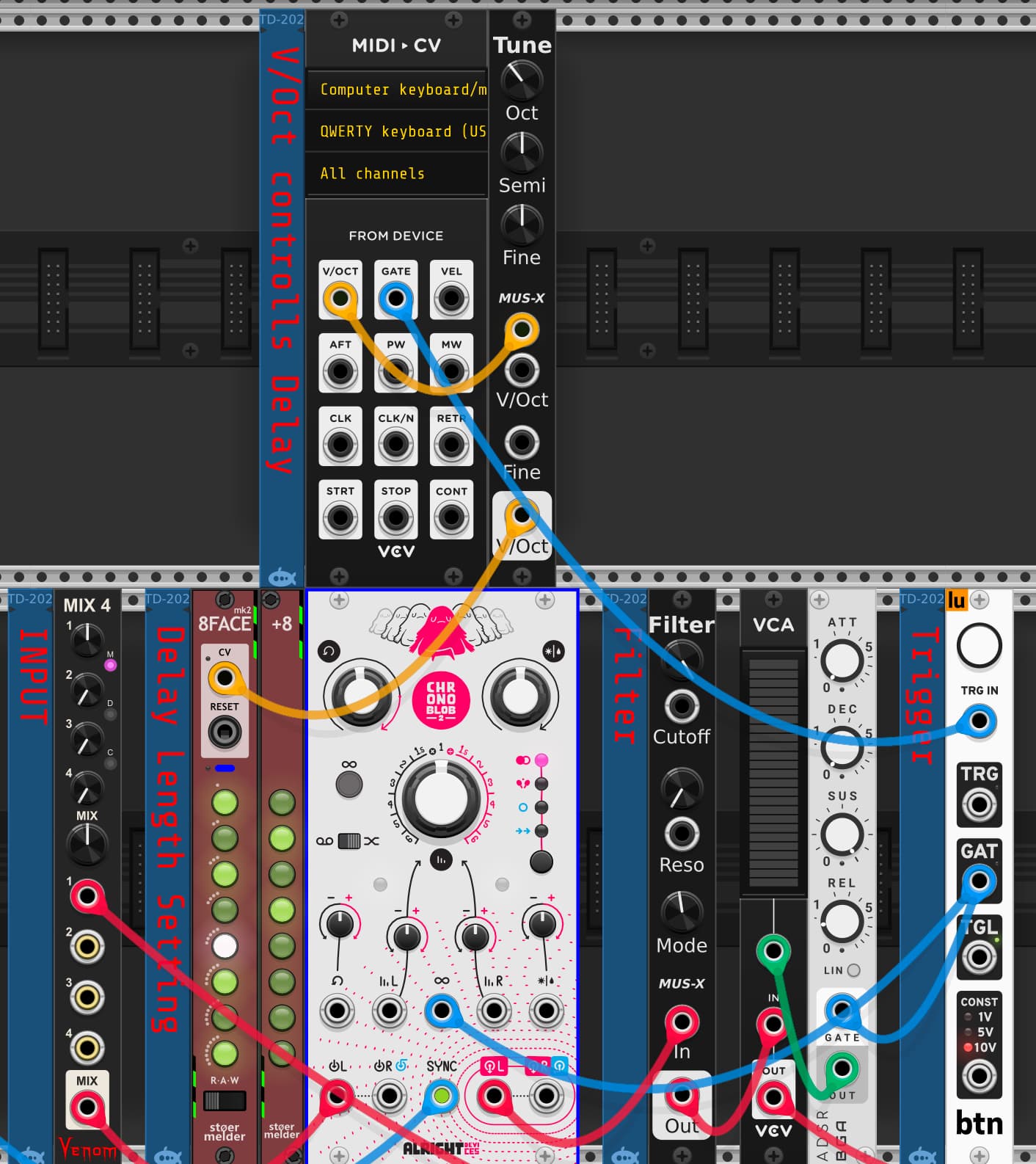
But for now I found that what @VirtualModular suggested about Chronoblob works quite well. Because the loop function of Chronoblob works immediately and is not waiting for the next gate of the clock. Below that’s my tryout patch so far. Didn’t manage yet to use it in the rehearsal space with me playing live and triggering it with my midi-keyboard. I basically use v/oct to trigger
a gate to open the VCA
8face that saved the delay section of Chronoblob in different “subdivisions”
On a gate input the VCA opens and feeds the audio back into Signal Delay basically looping the last 64ms while another VCA reduces the input to the module to not get clipping problems within the loop. But the fun thing is that it also loops further hits that come later into the same 64ms loop. Still need to test this live as well. It’s VERY clicky though, something I still would like to solve in that patch.
What @andreya.ek.frisksuggested doesn’t really work for me in the end (as much as I would love it too) since I’m not working with pre-set loop length but recording my instrument on the spot so overall length setting of Memory isn’t corresponding to any amount of bars or beats of my playing. I think this is how HetrickCVs phasor modules are getting a steady clock from the length of the Memory-Module, right?
BUT I’m playing around with other possibilities of Memory, Fixation etc… still would like to incorporate that Module Set into my playing because it’s still AMAZING
I already found a beautiful patch how to play melodies with my percussion basically. If anyone is interested I’ll post about that but maybe in an extra topic, because I feel like imposing myself already too much on this thread here.
Ah, I assumed you wanted it to wait for the gate. If you don’t, you could attach the TRG from “btn” to the RESET of CLKD. This forces the gate to happen immediately.
Oh! That works perfectly!!!
I was slightly confused there for a second because I didn’t send the clock first through a VCA to Fixation. And in that case if I trigger the reset on CLKD on a high gate, it just stays high aka starts playing delayed and not immediately.
But if I patch it the way it’s on the picture it works perfectly
More ideas to play with!!! Thank you (and also learning more and more how to work with gates and triggers )
The left ruminate would not have its audio patched anywhere, it just plays the loop normally, providing a phasor perfectly timed inside the loop length. Without a gate to the switch, that phasor goes directly to the position input on the second ruminate (with “fade on move” disabled), so it also just plays the loop normally, bar two samples of latency from the cables. That second one is the one you listen to.
But it also goes to the phasor shifter, which outputs a phasor at the same speed but at a different location. The offsets are quantized to X steps. Set that to 16 for 16th notes in a 1-bar loop. Or 32 for a two bar loop, etc. The shift is modulated backwards by the phasor itself. At exactly half depth the result is a phasor that repeats the first Xth of the loop over and over!
Add a random offset to that modulation to choose which part of the loop gets stuttered. Slightly more built-out example here:
The nice thing about Phasors is they always know their exact sub-step location. That opens up some possibilities that you don’t really get with clock signals. Hard resets can still be tricky sometimes. But one nice thing is tempo changes and such sync up on the next sample rather than the next clock count. Very nice for live stuff I find.
The Brainwash module is also a godsend, lets you record a loop to Memory and set the length perfectly immediately. Great for live beat-cutting.
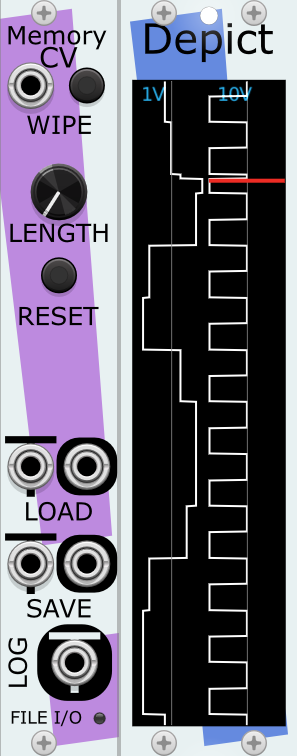
New MemoryCV module! A drop-in replacement for Memory within a Memory Ensemble, but better for storing and playing control voltage.
Memory (and MemoryCV) can now load and save files with non-ASCII characters in the name or path.
Note that the Rack fonts don’t support non-ASCII characters, so still can’t display these names correctly.
MemoryCV (and Memory) can load and save .CSV (Comma Separated Value) files. Great when you want extremely fine editing control over the signals, or if you’ve longed to use a spreadsheet in your musical process.
I had a weird “bug” behaviour today from the memory module.
When I used it earlier today it suddenly had a length of under a second. I tried to set a different length and press the RESET button, but it didn’t really change… then I turned the LENGTH button all the way to the right aka 1000 seconds and then I got a loop of roughly 16 seconds after pressing reset…
NOW (10hours later) it behaves normally again
Was there an update within the last 10 hours? Or is the bug somewhere in my patch? OR am I hallucinating
The last update to the Stochastic Telegraph modules was published October 5th. Of course, I don’t know when you updated the modules in VCV Rack, so I don’t know if/when that update went into effect for you.
On the other hand, I don’t know for sure of any situation that would cause that exact behavior. However, I do wonder if when you used it the first time, if the AUDIO interface was pointing to an audio device that didn’t exist? I’ve noticed behavior that suggests that sometimes Rack doesn’t run the modules (more explicitly, doesn’t call process()) when that’s the case. In that case, Memory doesn’t know what the sample rate is, and so doesn’t allocate the right size of memory for the data.
Maybe? Glad it works now. I’ll try and see if I can get a repeatable example and verify this suspicion.
mmhhh… that’s a good question. Since I’m working on my laptop I switch quite often between different “interfaces” (headphones, MacBookSpeakers and my actual interface).
It actually happened when I used the patch the first time in the studio with my EVO 16.
I build the patch at home without the interface. So it might be some confusion between VCV Rack, reaper and the interface.
I will try to recreate it the next time I have my interface. Thanks a lot for the input!!!
it might actually also point in the right direction for another weird glitch I’m having with another module (Midi to CV by VCV) where sometimes it happens that it repeats a sequence of midi notes I played a minute earlier AGAIN without me touching my midi keyboard… super weird the first time that happened. That also might be a miscommunication between reaper, VCV and the interface, because that happened the same day when I had the other issue for the first time again since quite a bit… although that glitch also happened just using VCV and reaper without the interface…


 I still need to try out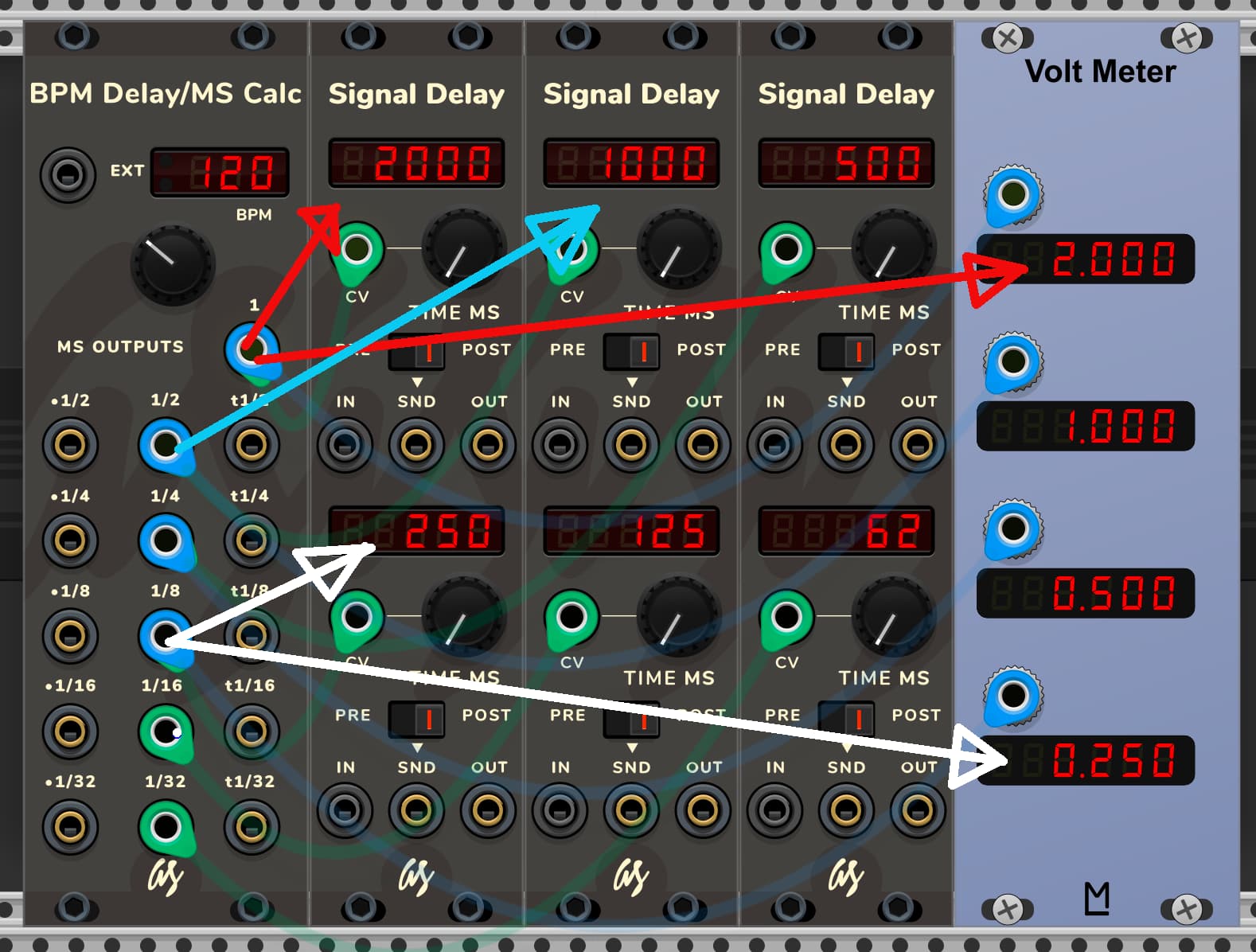



 super weird the first time that happened. That also might be a miscommunication between reaper, VCV and the interface, because that happened the same day when I had the other issue for the first time again since quite a bit… although that glitch also happened just using VCV and reaper without the interface…