Howdy. Newbie here. Just recently got introduced to VCV, which is sick cause I’ve been wanting to get into modular stuff for years. I was talking with a guy who’s been using VCV for a while and I asked him what solutions there are for printing individual stems for mixing purposes. He showed me what he does for this and it’s very inefficient and time consuming. He’ll rout everything to a mixer module, solo each sound, and record it that way. I’d much rather be able to just click a few buttons and print them all to audio in one fell swoop. How should I go about doing this? I’ve been doing some looking and I can’t really find a clear answer to this question.
Also, I’m currently on Windows 10 and running Cubase 11. Not sure if that’s necessary info but there it is.
When you say you’re using Cubase, are you using the VST version of VCV? I’m pretty sure you can use the built in audio modules to have multiple outs from the VST host of your DAW (I’m 90% sure I’ve done this in an FL project, not a Cubase user).
If you don’t have the VST version, could you use multiple instances of the stock recorder, and route the outputs yourself in VCV? I think there are dedicated multitrack recorders out there like the one @rsmus7 mentioned, but looks like you’ll have to merge into a polyphonic cable.
Yeah if you have Rack Pro and are running in a DAW you can just output individual parts. If you aren’t you would either use those recorder modules or use something like Blackhole (for Mac, not sure what the equivalents are on Windows) to route multichannel audio into your DAW.
If you can bring yourself to try out Reaper as your DAW, then you can use the VCV Audio 16. It has 16 inputs and 16 outputs (or 8 stereo ins and outs) that can be mapped directly to Reaper tracks via their ReaRoute driver. There is very little benefit to VCV Pro when using Reaper.
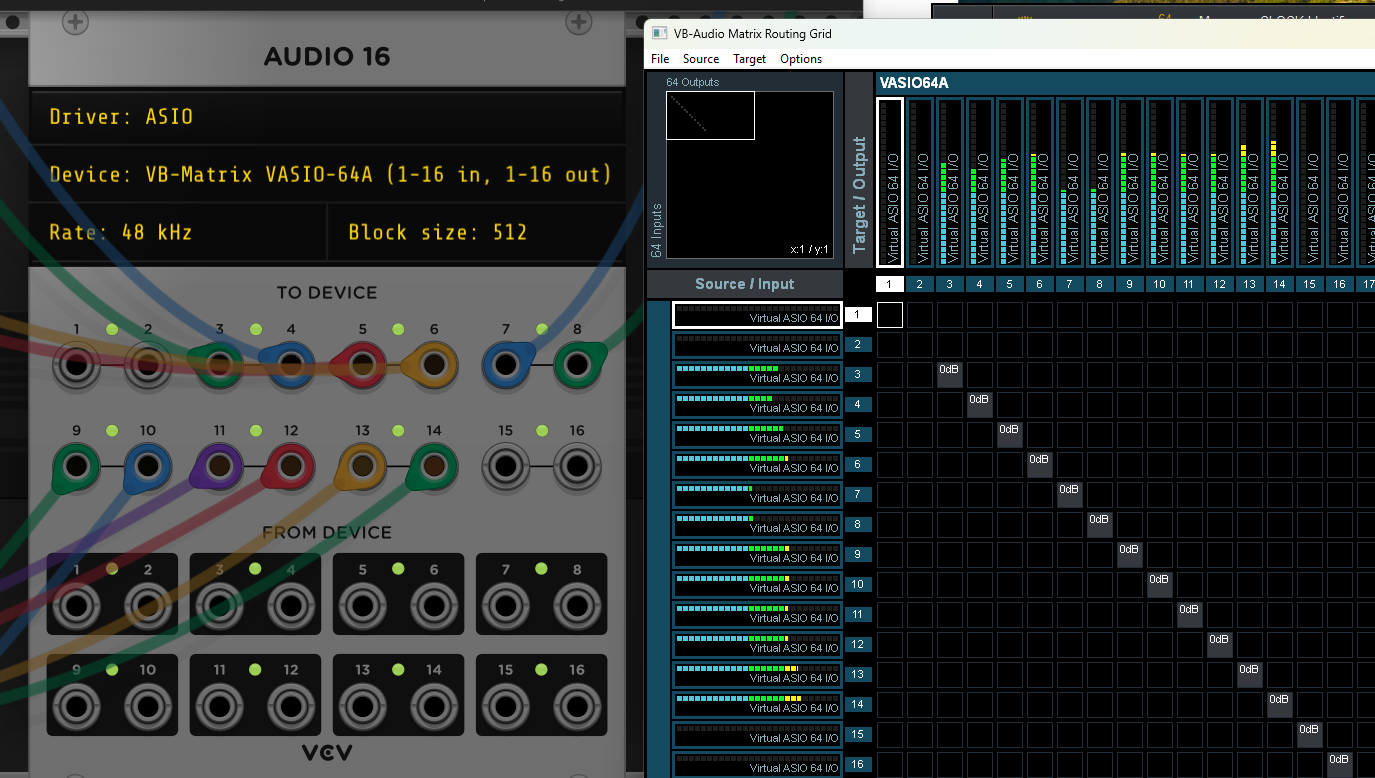
VB-Audio Matrix or Coconut (donationware) should work on windows with any DAW. Set up a virtual asio device in matrix, use it in VCV Audio 16 and your DAW and record from whatever channels you want. If you have other audio devices you can use it to route stuff around wherever you want. VCV Rack Pro is even better for Rack and DAW, you get syncing. VB-Audio Matrix
Personally I find this workflow doesn’t work for me creatively. I find I have something I like in Rack using the rack mixers and regular audio out and want to mix it better but it all seems to fall apart in the attempt to multitrack it in a daw
Respectfully, I have to completely disagree with this!
I use Reaper and have the Pro version. It allows me to load a patch made with VCV standalone, create the 16 outs, then re-wire each mixer channel to its own track in Reaper. I can then arm each track to record its output, hit record and bounce the patch to audio with each VCV part on a different Reaper channel, and perfect sync.
That’s not the only way of working, I can also load different patches on different Reaper tracks with stereo outs, and build something up from multiple patches. I’m going to start using this a lot more, but ultimately there are practically infinite workflows, and it’s a personal thing - you have to find whatever works for you.
I thought you could do the same running VCV standalone and route the 16 ASIO outputs to individual Reaper tracks via ReaRoute. Or are there sync issues with that setup?
I have never done any sophisticated work with Reaper (or any DAW). But ReaRoute worked great for me with two standalone VCV channels mapped to a stereo Reaper track, coupled with a mic for my flute mapped directly to another Reaper track. I eventually figured out how to broadcast to a live Zoom open mic and record through the DAW at the same time. I probably should have broken out complex synth patches into more channels/tracks to give me better mixing options post performance, but it worked out well enough.
If that is a workflow that you like, then I can definitely see an advantage to VCV Pro.
Yeah, I think you can do that. But if you’re combining it with any other parts, you’d need to sync it up manually. I’m guessing you hit play on the VCV patch then hit record in Reaper so it’s going to start at a random point and need editing…
If you record from Pro within Reaper then it’s perfectly sync’d straight away. This makes it easier to add more parts, either with MIDI and other soft synths or you can be lazy and drop in drum loops for example, and not have to worry about lining up any stems
Yep, absolutely. If you have VCV Host, you can also run plugins within the Pro plugin, inception style.
That may sound pointless, but you can use all the modulation options in VCV to change parameters of your favourite VST plugins, patch feedback loops into effects plugins etc. It’s basically endless.
If using a DAW was your main was of making music before using VCV then loading VCV inside said DAW will offer many many advantages indeed. That’s probably true irrespective of the DAW, though some are more flexible about audio/midi routing than others.
If you aren’t a DAW user, and use it to record VCV’s output and maybe do some mixing, the benefits are not as obvious indeed. In that case the recorder module will likely be just fine (or routing into the DAW to record).
I don’t think it should be a replacement for a DAW personally. I know ‘DAWless’ setups are popular, and lots of people want to make music without using a DAW, and that’s fine. I often create stuff in standalone and upload it to YouTube, but sometimes I also just use the main patch for video, and arrange/mix the audio in Reaper.
I see VCV more as a tool for sound design, like any other synth/effects processor but way more flexible.
Standalone patches are like sketches, or rough ideas that need finishing, and to edit/arrange/mix those sounds is way easier with a DAW. It’s funny because when I first started using VCV, I liked the idea that it’s non-linear and doesn’t have a timeline. You can mix on the fly and get a different piece every time you load the patch. That’s cool, but recently I’ve realised I never finish anything, so I’ve gone back to the DAW!
I totally agree with you. I like starting off an idea in standalone, because it feels less cramped, and if it ends up being something I want to continue with I break the patch up into smaller patches in a DAW. And because I like to have complete control over whats happening, the DAW is the perfect environment for that type of thing.
It’s just not anywhere remotely close to the same kind of feature set at all.
Anything without an absolute timeline with a tempo and time signature etc etc just isn’t really a DAW. One could try to contain those things in modules like the Entrian ones maybe. But once you would want to add even basic features like “record audio to a specific location on the timeline and have it play back in reasonable sync with everything else” you’d already be jumping through a lot of hoops to do something which is already handled well by DAWs. And that’s barely getting started. “Record 5 takes of the same bit of audio and splice together the best parts of each take” is just one out of hundreds of features that every serious DAW can do really well today which would be properly hard to implement in VCV.
There are limited parts of a DAW feature set that you could try to make work in Rack, especially from the less traditional DAWs (Live, Bitwig Studio, FL Studio). But acting as a replacement for one, at least for someone who got their start in that world and learned to rely on a real DAW feature set just doesn’t seem remotely reasonable tbh.
Rack is a modular simulator (which is already much practical/easier/cheaper than my real modular lol) and IMHO going into a DAW direction would be a mistake
Just thinking of missing things that could keep you in Rack longer. Understood that DAWs have a distinct workflow that is ingrained for many folks. I’ve had trouble learning to think like a DAW user.