For Info, just pushed quick on-panel editing of the info: One-click inside the panel and you can edit the text. To change options like font, size, margins, and orientation, you still have to use the dialog: press F2, click the i icon, or use the context menu.
2 Likes
Visually, Info has always been my favorite text panel, but editing was a pain in the ass. I used to use Fermata to edit text, and then cut and paste.
This edit enhancement is a huge deal for me - thanks!
2 Likes
Epic, sir!
#d One version 2.3 now submitted to the VCV Rack library.
Tomorrow, If it’s not pouring rain, I’m installing boundary wires for a robot lawnmower.
Thanks @pachde for the crash fix. Noticing a few other things. Removing Skiff module when enabled does not remove its changes to Rack. This is unlike Purfenator, which does remove its setting when the module is removed from a patch. Latter seems like a cleaner approach.
The other thing I’m noticing that VCV presets do not work with Skiff. I tried creating two presets for Skiff with different settings and tried to enable the presets, but they’re not working.
Not removing changes when the module is removed is intentional. The use case I imagine is that you configure your skiff for a recording or performance, then remove the module because it’s not an essential part of the audio for the patch. You might pack modules, throw in purfenator for skiff ears, and you’re off to the races.
I’m willing to be pursuaded that resetting rack on removal is the right thing to do, probably under an option persisted a plugin level, rather than preset/patch level.
I know it’s different, and trivially recoverable – just drop in skiff, and it should pick up the altered state and allow you to proceed normally.
I’ll look into making presets work. Since setup in skiff is trivial – with no careful tuning of knobs – just click a few on/off buttons, I didn’t think they were particularly important. But yeah, they should work.
That’s fair re: the approach to how the settings are managed. My concern was if anything could cause a patch to break into the future if the module is not present. I guess that’s one thing to test which you might have done already which is to how settings carry over between loading different patches.
Thanks for looking into preset issue. I find presets extremely useful, so having the ability to switch between settings would be great.
Update: I did some testing for opening patches with Skiff settings enabled. I’m noticing that Unscrew (my favorite setting) is not carrying through when switching patches. Also, Unscrew is not working with Impromptu modules like Clocked in general. Also, when I add a new Skiff module to another patch after applying Skiff settings in a previous setting, adding the new Skiff module turns off all settings because I’m guessing it’s reverting to default state.
The screw situation is documented. A few of the effects in #d One have variable results with some plugins. This works only with modules where the screws are derived from the Rack screw widget. Some modules like impromptu have screws as part of their panel svg. Other modules like #d have a custom widget that isn’t derived from the Rack screw, so won’t be affected. In the docs I say Skiff doesn’t have the right screwdriver ;-).
Most of the effects in Skiff are one-shot transformations. If you add a module or selection, they won’t be affected by something like Unscrew, so you have to cycle the button to affect them. To do otherwise would be a more expensive implementation.
I don’t think it’s possible for Skiff to actually break a patch. All the changes are purely cosmetic. Except for hiding ports, which makes them un-pluggable by the user, but that’s not really a breakage, and it’s instantly undone.
I have a fix for Skiff preset loading coming, along with some new factory presets.
2 Likes
I’ve reviewed preset loading in the new modules, fixing issues and made improvements (such as factory presets) in Rui, Skiff, and PanelTone.
Re-submitted to the Rack library.
2 Likes
I just noticed that the Info “Show branding” setting is not being preserved.
Thanks for letting me know! Looks like i never added the persistence logic when I added the feature to hide the branding. Nightly is updated. I think I’ll hold off on a library update to see if there are more issues in the new modules. I’m pretty sure there’s something here and there that could be better.
I have one suggestion.
It is difficult to move info when it is 1 hp wide. Click and drag in the middle activates text edit mode and drags successfully. But then you have to dismiss the edit mode. I only found the bottom left and right corners work for dragging 1 hp info without triggering edit mode.
In general, once I have set the text, I don’t want the edit mode to activate by a stray mouse click.
What do you think of adding a “lock text” option to the text options dialog. I think that would solve both issues for me.
One possible refinement - maybe the “lock text” would only prevent the full module edit mode. You could still allow editing text in the text options dialog.
On Nightly I’ve implemented the following:
- I’ve allowed 100 pixels at top and bottom for dragging, and excluded the resize handles, so that they work on the full vertical range.
- I’ve made the logo widget a TransparentWidget so that it doesn’t inhibit dragging.
- If the module is less than 3 HP, the edit experience is poor so instead of opening the on-panel edit, the dialog opens.
I think this works to resolve the dragging problem (and more).
I also fixed a bug where when it’s set for bright text, it would display over the on-panel edit.
I really appreciate all the feedback to make my modules better!
4 Likes
Coming soon: background image layer for pachde1:FancyBox.

-
Pic is Leslie and Bert on the beach near Crescent City, CA.
-
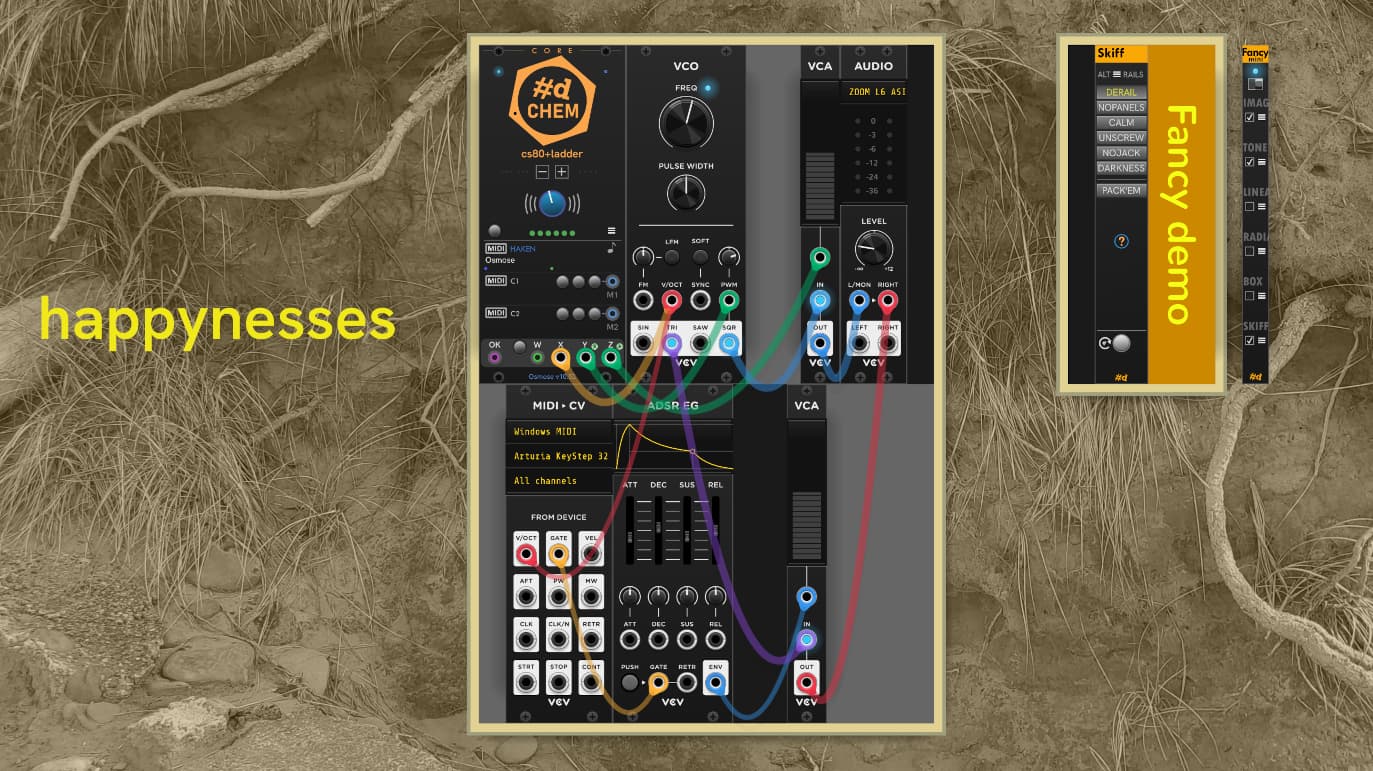
Patch is an extremely minimal but playable demo of #d CHEM with an Osmose, with just CHEM:Core, VCV VCO, VCV VCA, and VCV Audio. X from the Osmose (pitch) to V/Oct, Y to PWM, and Z into the VCA for envelope. This is at full Haken MPE+ enhanced resolution.
-
pachde1:Info for the text.
-
pachde1::Skiff has removed screws, enabled Calm buttons and ports, and hidden all the module panels, rendering them transparent.
-
pachde1: FancyBox for the background image set to Cover (other settings available for Fit, Stretch, and Scale), You can fine-tune positioning with available X and Y offsets, but not used here. The image here is converted to Luminance grayscale with the Gray option. FancyBox Tone for sepia toning, and Box gradient for the old-photo vignetting look.
This screen snip shows the image options dialog shown when clicking the hamburger (circled). A dialog is waaaaay easier to use than trying to do the same things using Rack’s menus. The preview wasn’t all that necessary, because the changes are reflected in the live background as you make them, but it’s nice to see the image in relation to the window area without the patch modules.

(2.4 submmited to the Library queue)
5 Likes

dude this is so cool. i cant wait to incorporate this in everything i do
1 Like
pachde One 2.4 has been published.
There are some UI glitches editing images in FancyBox that I’ve already fixed for the next update. The next version will include a non-automatable low-profile FancyBox Mini (2hp):
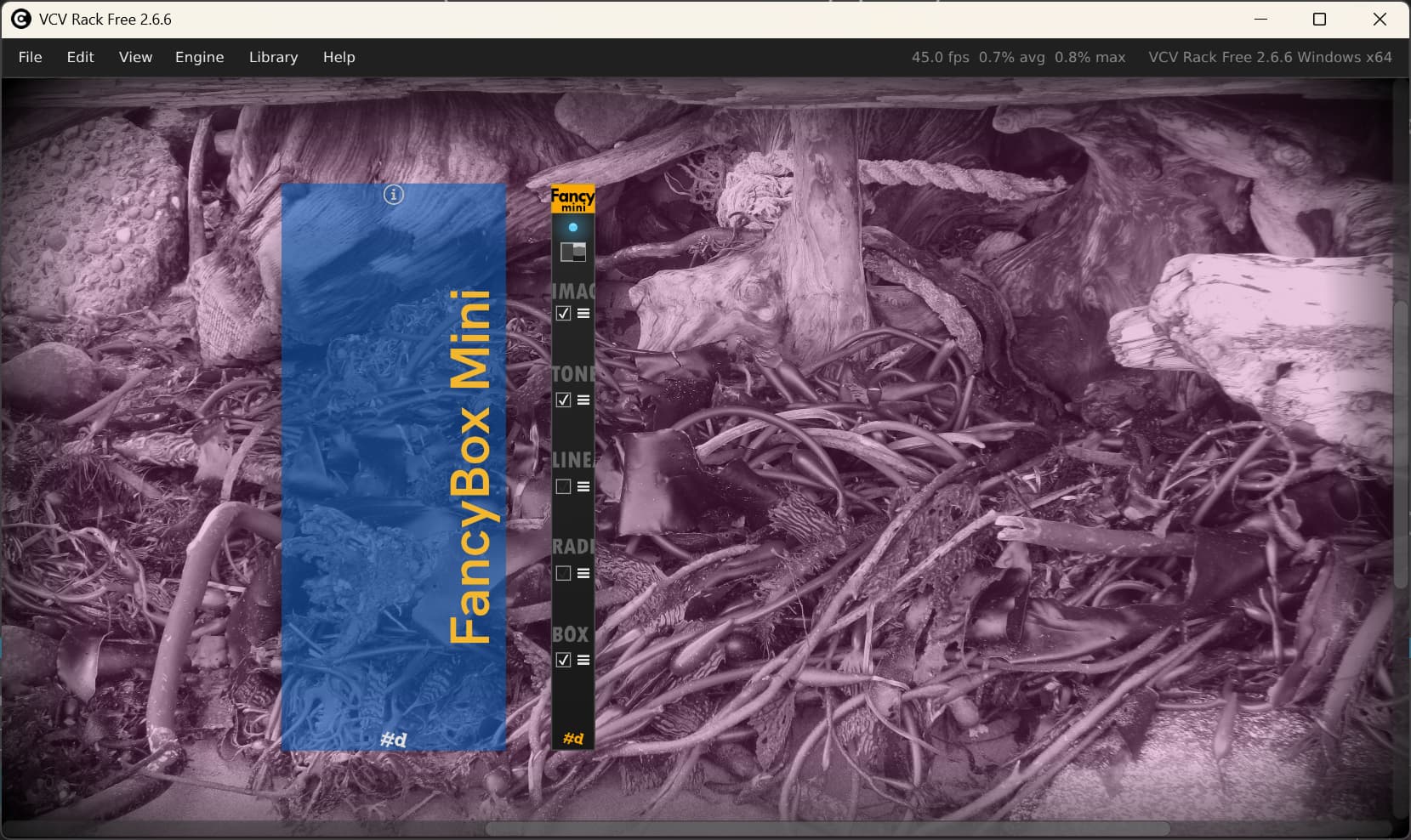
The hamburger menu next to the check box for each layer displays a configuration dialog, keeping the panel lean but having complete control over the effects.
Mini has the identical underlying module as the full FancyBox, just a different ModuleWidget on top.
I’ve thinking about how to do remote extenders, so that you could have the UI animation offscreen with minimal cables cluttering the skiff. Also thinking about how to catch up with Purfenator to provide actual skiff visuals with bezels, (less-chubby) cheeks, and shadows.
1 Like
I’ve just submitted version 2.,5 to the library. New FancyBox Mini - a 2hp version of FancyBox without the automation, plus…
FancyBox and FancyBox Mini now have Skiff cases:
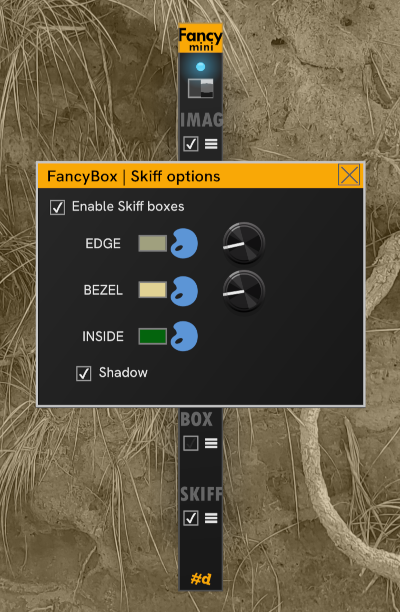
Available options:
I allow a 1hp gap between modules within a skiff. Isolated modules with no immediate neighbors aren’t boxed. This allows for the floating transparent Info shown on the left. If you want bigger gaps in the box, you can use a transparent or opaque #d Null to occupy the space and fall out from the isolated module rule.
I’ve kept it quite simple. No “3d” cases or ears (…yet – I don’t care for the results from other brands’ skiffs). Also, case interiors don’t have rails, but I have a TODO item to consider adding support for rails in the box. This would show the underlying rail, using any alternate rail provided by the #d One:SKiff module.
2 Likes