Thanks for working on this. The look is so clean!
1 Like
hiyaaaaa sorry if this isnt the right place for this .. but im encountering a bizarre issue with the pachde info module. using stoermelder’s strip, whenever i load a selection, the modules seem to load on top of the pachde info (also included in the selection). video of this behavior below. and as u can see, clicking onto the modules seems to resolve the spacing. but if i load several selecitons in a row without manually clicking to adjust the space, it causes glitches ie extra strip-bay modules to populate etc.

any ideas for a workaround ?? ive tried several other text modules in its place, and for the exact syntax im using this is the only one that seems to work for me. besides this weird issue!
thnks (:
Offhand, I suspect you may have similar issue with other variable-width modules, e.g. VCV Blank. I don’t know enough about how Strip works to theorize the issue. Please send me a copy of the patch. (my email is in the right click menu) I have an idea about how I could change Info to make it work, but I need to be able to reproduce the problem, and it might be a difference in how Strip creates modules vs Rack.
Timely, because after a hiatus, I’m currently working on updates to #d One (enhancements to Info et al., and new modules).
1 Like
sent that over, thansk!
This is a Strip issue. I can reproduce the problem using VCV Blank instead of #d Info. Add Blank next Strip, expand it wider, add any module next to it (I arbitrarily picked SPLIT). Save the Strip, and reload it. You get this: Split showing on top of Blank (until you click on one of the modules in the selection).
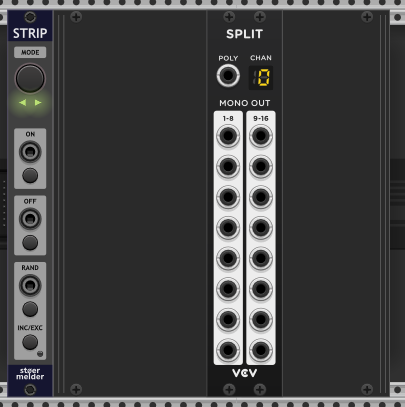
The cause of this issue is that Strip is failing to call the Module::dataFromJson before creating the ModuleWidget. When Rack loads a selection, it calls dataFromJson before passing the module to the ModuleWidget constructor.
In the case of variable size widgets, they save their current width in the patch/selection json. When the ModuleWidget is constructed, it sets its size using the width provided by its Module. Since Strip isn’t calling dataFromJson, resizable modules are seeing their default Width, not the correct width from the selection, so you get the odd symptoms. Strip eventually gets around to calling dataFromJson, but doing it too late causes this and likely will cause other subtle bugs in other modules that depend on Rack’s initialization order.
@stoermelder this one’s for you!
1 Like
thanks for looking into this!
Thanks for letting me know, I will check.
I don’t think this is an issue, and I actually think this is a bug in VCV Blank. dataFromJson is called when you load a preset into a module, which can happen any time after the ModuleWidget is created, if you click it manually.

3 Likes
Right – excellent point – I should have realized that. Thanks for taking a look, Ben! I appreciate it.
Info is now fixed in Release Nightly · Paul-Dempsey/pachde1 I’ll be updating #d One in the library soon. Info has some new options (vertical layout, margins), and there are some new oddball modules for doing unholy mods to your Rack.
This is an issue #d Info has in common with VCV Blank (I borrowed the sizing logic from Blank, after all, probably like other resizable modules). I checked the same scenario with Computerscare Blank, and when loading a wider preset, it fits itself to the available space which can be argued either way as bug/feature.
Fix is we see that width has changed as a result of json loading, we call:
APP->scene->rack->setModulePosForce(this, box.pos);
It’s not good enough to just change the box size. When clicking the module, Rack goes into module drag mode and fixes up the layout, but that’s not a great experience.
setModulePosForce pushes modules to the right to make room and no effect when shrinking.
3 Likes
thanks for the sleuthing & updates!! yall r the best (:
Coming soon
I’m putting the finishing touches on an update to pachde One, including 5 new modules, with fixes and user requests for the existing #d One modules.
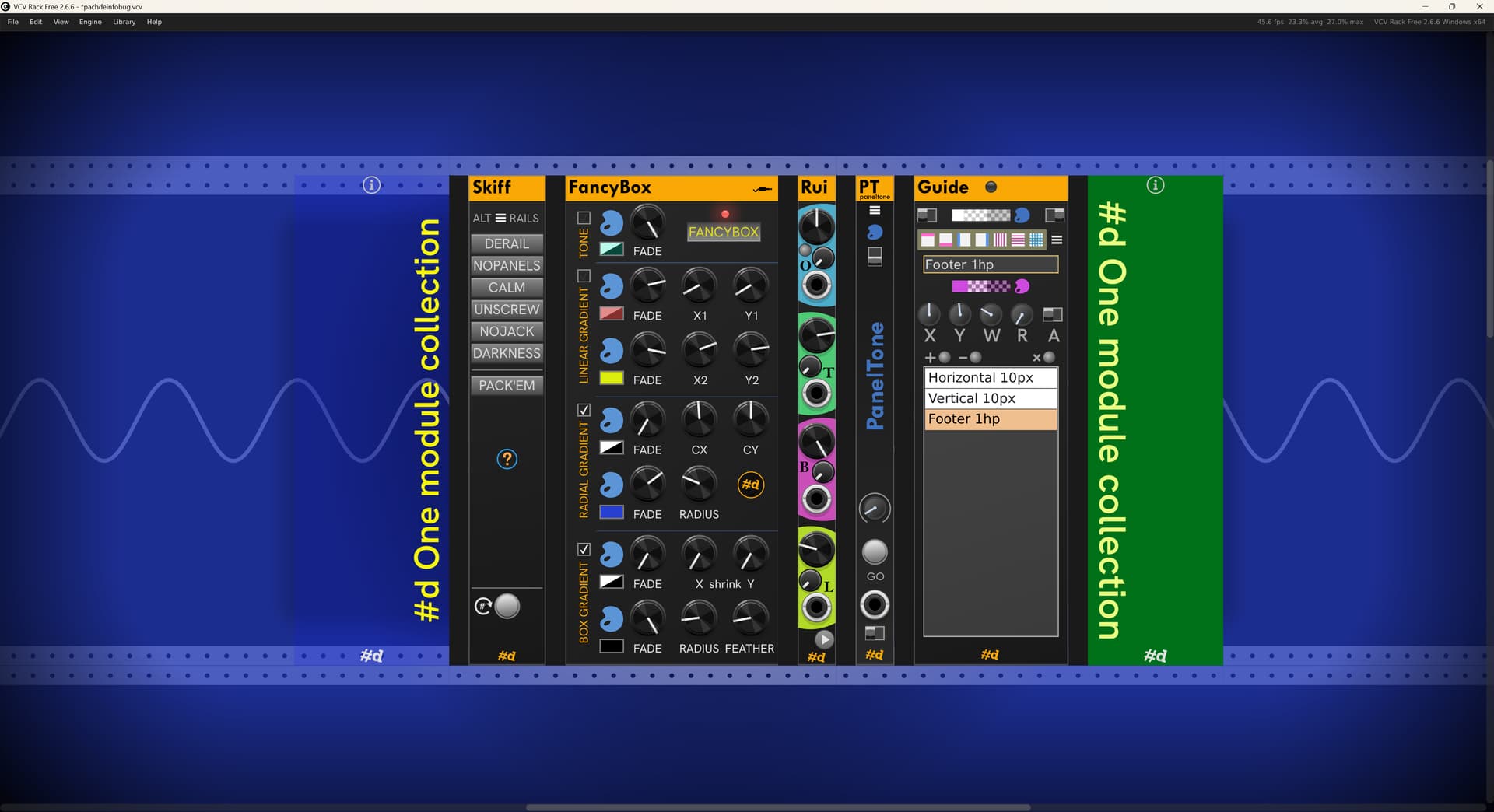
All effects in this picture come from the new modules:
- Alternate rails courtesy Skiff.
- Radial and box gradient background overlays from FancyBox.
There’s some interesting UI and dev ideas for developers in the code:
- Expandable panel (“accordian panel”, which may have been a thing in Rack v1).
- Hot panel svg reload (dev builds only).
- Widget positioning at runtime based on SVG placeholders.
- Themes that optionally track the 3 Rack UI themes - Light, Dark, and High Contrast. Based on a stylesheet applied to the panel Svg instead of separate SVGs for each theme.
- Options dialog instead of hard-to-use cascading menus.
I’ll be updating my Rack dev notes with detailed examples all these features, and reusable free-to-use code.
All modules where it was relevant got a new refined popup color picker.
Info gets Up, Down, and Inverted text orientations (Up and Down shown in the pic), adjustable margins, finer-grained Copper integration. Copper gets continuous color changes using the mouse – just what you wanted, @zakforrest.
New modules are:
-
Skiff — Wild ways to transform your rack, including a set of alternate (themed) rails, and the ability to provide your own Rail SVG. deRail to remove rails entirely (back to black). noPanels hides all module panels, making all modules transparent, Calm for lower-key Rack knobs and jacks. noJack to hide unused Jacks, darkness to hide lights (user request to deal with the “blinkiness” for sensitive users). Plus PACK-EM (F7), to pack all the modules, or just the selected modules into neat left-aligned rows, and a buttonless keystroke to add the missing Rack feature to Zoom selected modules (F6).
-
FancyBox — 4 CV-animate-able background overlay layers: Tint, Linear gradient, Radial gradient, and Box gradient aka vignette. Tint by itself can be used for green-screening. The screen snip here shows it in closed form. Clicking the little Jack icon opens an extended panel with 46 input jacks for animating HSLA color and the other parameters of the layers.
-
Rui — Knobs and CV control for Cable opacity and tension, Room brightness, and light bloom.
-
PanelTone — Tint and tone the modules in the Rack for a more unified appearance. Animatable via Copper. Fade the effect in and out with a trigger input.
-
Guide — For developers - overlay the adjacent module with design guides/grid to help with panel layout. In the future, this may be extended with more functionality for fine-tuning panel UIs.
11 Likes
amazing work
1 Like
Exciting!
Nawow, that’s a real toy. I like it a lot. Thank you for your hard work. Very tiny bug… Skiff no Reset for Darkness.
2 Likes
Thanks for the bug! I’ll get that fixed (one line of code I think). I added darkness and forgot to include it in reset.
2 Likes
Glad I ran across this thread (especially the fix), since I have three resizable modules, all of which are likely to manifest this bug.
1 Like
I’ve just finished a documentation pass. As always, when I do a final review and update of the documentation, including setting up scenarios for screen shots, I find some bugs to fix, and get new ideas for usability enhancements and discover features that are missing.
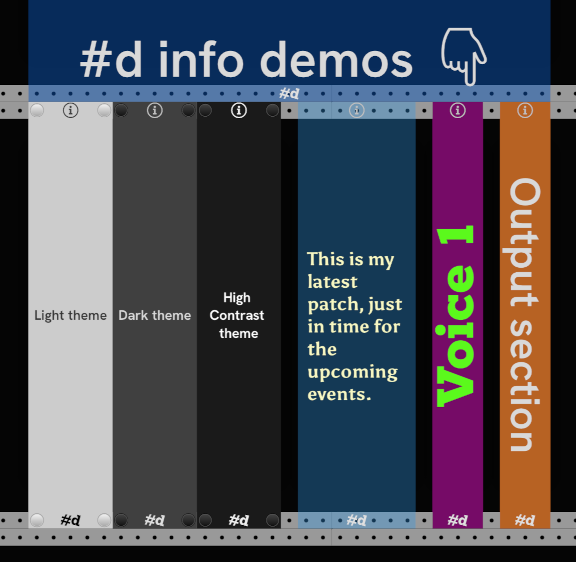
For example, I wanted to get a horizontal label above a row of modules using a stretched #d Info, and putting the text toward the bottom, and found that I really did need bottom (and top) margins in addition to left/right. That made this sampler screen shot for the new Info docs possible:
As part of this pass, I added a hotkeys for useful tidbits like popping up Info’s settings dialog (yes, I’ve added SVG-based dialogs), or setting cable opacity to zero in Rui. I already had hotkeys for “Zoom selected modules” and “Pack (selected) modules” in Skiff.
Oh, you’d like to see a module dialog, and how a dialog can be an improvement over a long cascading module menu? Here’s the Info Text options dialog:
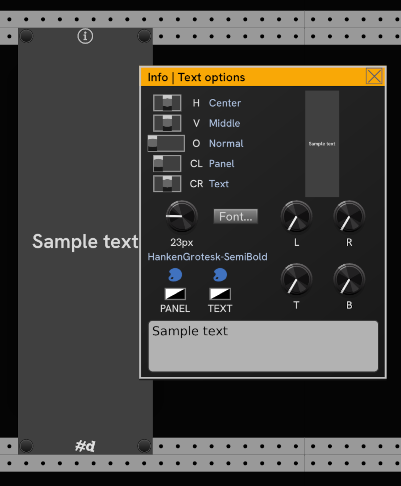
(oh, and you might notice the alternate Rack rails in the shot, courtesy of Skiff.)
4 Likes
dude this rules. i love the horizontal label too going across the top of several modules. will totally be doing this.
@pachde Experiencing a crash with beta build of Skiff. If I change some settings on Skiff like replace skiffs, unscrew, etc and then remove the module, the rack setting don’t revert. But then if I Ctrl+Z to undo removing the module, VCV crashes.
Thank you for letting me know! I’ll investigate the issue tomorrow.
{update:} This is interesting for developers. Depending on how you look at it, it could be considered a Rack bug.
Turns out that if you push an Undo History action while an Undo or Redo is underway (undoing the module delete in this case), it will corrupt the currently executing action, because Rack:
- Runs history actions in-place in the history vector.
- Doesn’t prevent operations on the history vector while an undo/redo is being processed.
- AFAIK doesn’t provide a way for a plugin to know when you’re in the middle of an undo/redo.
I think one possible way Rack could fix this is that it could point the history index after the one it is processing (instead of updating the index afterwards), so that pushes to history don’t overwrite the one currently in flight.
I had added undo for the changes to state, and in DRY fashion, use the same state-changing functions as happens interactively. In this case, the module at creation time is restoring the saved state from json. But in the case of undoing module removal, this happens in the middle of processing a history item.
(whew)
Fixed by setting a flag for when we’re in the creation process and avoid creating any undo items while a module is being instantiated. On more gotcha for the notebook. Fix is available on the Nightly.
1 Like