pachde One This plugin contains Null, a flexible blanking panel. Info simple patch notes, Copper a modulatable color picker, and Imagine a unique and eccentric source of voltage, gates, and triggers using an image.
Generic Blank
This is a great place to get started making a VCV Rack plugin. It’s a good alternative to the VCV Rack tutorial. While it’s a generic blanking plate out of the box, the code is well-commented with what you need to do to build out a functional module. recently updated for Rack 2.4 “Use dark panels”.
svg_theme For plugin developers: Lean in-memory SVG theming for VCV Rack plugins, using a json configuration. This allows you to maintain a single SVG for your rack, and theme it as needed. Includes a simple demo module to show you how it works.
I haven’t updated svg_theme for the Rack “Use dark panels” option yet. Not even sure if I really need to do anything special, since applying a theme is up to your module. Let me know if you’re using svg_theme and interested in having this feature added.
pachde HC One
I have a new plugin under development. It’s a highly specialized plugin for controlling Haken Audio Eagan-Matrix-based devices, including the Continuum, ContinuuMini, the Eagan Matrix Module for Eurorack, and the Osmose from Expressive E. This module brings performance-focused control of the Continuum and other EM devices, integrated with VCV Rack.
The first module HC-1 covers preset selection, managing preset favorites, and Knobs with CV Macros and Recirculator parameters. This is shaping up nicely, and I’m enjoying playing the Continuum while I have CV modulating macro and recirculator parameters. Some of the presets are awesome just running freely on a sustained note with modulated parameters. The feel can be remarkably different from simply playing the same preset on the fingerboard.
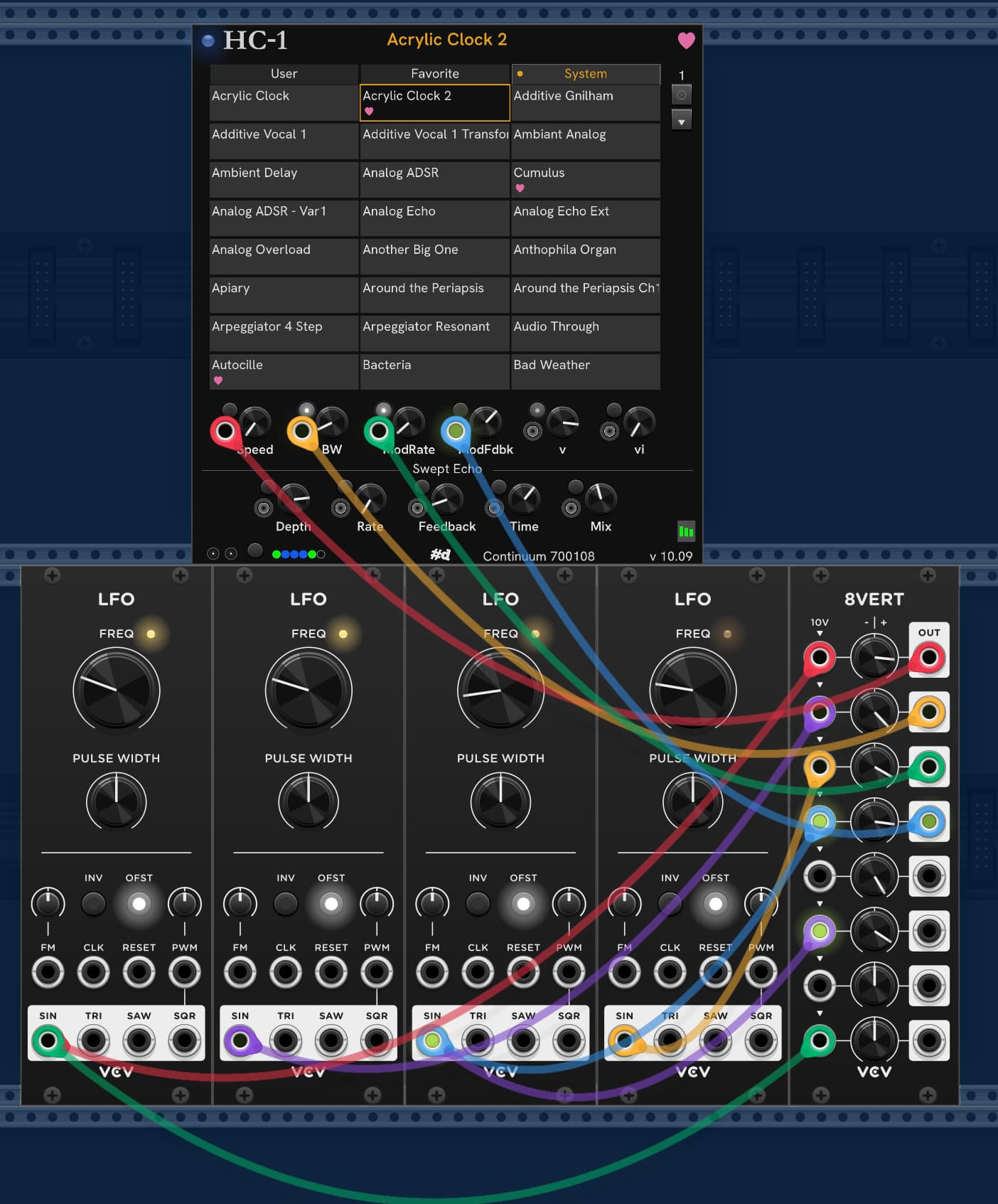
Here’s a teaser screen snip of where it is right now, with 4 Fundamental LFO coming through 8vert for modulating macros. My pachde One Null modules are used for the ice-blue overlay of the Rack. System presets that have been favorite’d are shown in the list with the pink heart.
The little light buttons put the CV into relative mode, so the CV value is an offset to the Knob position. The green bars in the lower right show the current DSP usage reported by the Continuum.
I just opened the request to update pachde-One to version 2.2.0 in the library. pachde1/CHANGELOG
New Copper-mini module, added minimum gate/trigger time knob and CV to Imagine, plus some little tweaks and minor bug fixes.
With Copper-Mini, I discovered that you can have a different UI (ModuleWidget) with the same underlying Module. This really makes it much easier to do variants of a module with more or fewer controls and different sizes or looks beyond theming or skinning.
HC-1
I think I have the basic MVP for HC-1 nearly ready to send out. Writing the docs now. It’s tempting to add one more feature, but the UI is full, and it’s better to get feedback on what users really want.
I’ve been enjoying playing Continuum with modulated macros and audio through VCV (Plateau), and the knobs of the HC1 controlled by a physical NanoKontrol2 via Stoermelder MIDI-CAT. Setting up MIDI_CAT is soooo much easier than making a custom config for the NanoKontrol. This also works better than routing the NanoKontrol directly to the Continuum because it causes less MIDI traffic as the control value bounces to HC-1 and back, modulated. By controlling the knob in Rack via MIDI-Cat, the modulation and knob value are summed and updated on the Continuum without intervening MIDI traffic.
I get a kick out of twisting the knob or pushing a slider on the Nano and seeing the knob in Rack move.
I have a visual on the knobs when running in CV-relative mode so that both the knob position and the resulting modulated value are both visible. Basically a LED ring on the knob.
I have seen deadlocks in Rack, it seems when there are very high levels of MIDI traffic. I don’t see my module anywhere in the call stack when this happens, so I suspect it isn’t my bug. When I hit one of these deadlocks, I can’t kill Rack using Task Manager or the taskkill command until I disconnect all my MIDI devices.
The deadlocks seem to be related to the -d console logging. If I’m debugging Rack in VSCode I have nasty glitches in the audio output each time Rack logs the settings/autosave, which suggests that it’s locking while doing that output. Doesn’t seem to happen when running without -d. Same glitches happen under -d not under VSCode, only less severe (because it’s quicker).
When it deadlocks, RTMIDI is always one of the threads sitting at a lock.
When it appears in the library, I recommend subscribing to the plugin (not individual modules). Then you’ll automatically get updates. Nightly builds will keep running if you want/need to stay at the bleeding edge.
If you’ve previously downloaded a beta, you may need to delete the local pachde-hc-one plugin folder before you subscribe.
I didn’t get as far as I would have liked, in building out functionality to cover more of the engine features, but what I have managed to do is tremendously useful.
I spent a huge amount of time working on just the startup and handshaking with the device, instead of building EM feature coverage. It turns out that a lot of the problem is in the device firmware. Luckily, an upcoming update to the firmware will large resolve these issues. The bad news is that the next firmware release will break this plugin, and I’ll need to make a new release of HC One to catch up with the changes. Such is the nature of writing for someone else’s hardware.
Here’s what I have so far for a new module Skiff for manipulating the look of your Rack.
I’ve got room in Skiff for more features in the same vein. What would you like to see?
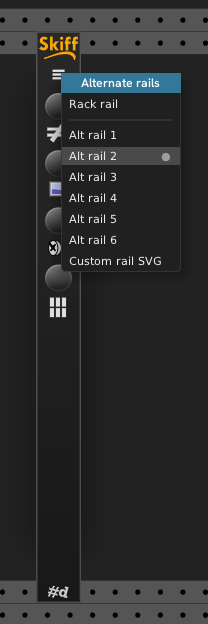
Change rail hamburger menu contains a selection of alternate rails for your rack, or choose a custom rail SVG of your own.
Some SVGs don’t work, but most will display fine.
The provided alternate rail SVGs have the identical size of Rack’s rail SVGs, but that isn’t required.
Derail Toggles between Rack’s rails visible and invisible (black).
Calm knobs and ports Toggle between standard Rack black knobs and i/o ports and calm ones that are less glossy and ornate.
The effect is a bit subtle.
Unscrew Unscrew all modules in the Rack.
If modules start falling out, you can click it again to restore the screws.
Only standard Rack screws are affected.
I don’t have the right screwdriver for the custom screws that some modules use. #d One comes with its own screwdriver in the module menu.
Pack modules Pack your modules together in neat, left-aligned rows. Any vacant rows are filled. Modules in a given row are kept together in the same row to avoid breaking extenders.
Zoom to selection (no button). Press F6 with the mouse over Skiff to Zoom just the selected modules.
To maintain the toggle state effectively, there needs to be only one Skiff in the Rack at a time. So, it checks for another instance and disables itself if there’s another one in the rack:
#1 and #3 come from some of the same code I’ve developed for hot-swapping and themeing panels. The positioning of widgets in Skiff is done using information from the panel SVG at runtime. I’ll be writing up how that’s done in my #d Dev Notes series.
#5 was an idea suggested by another Rack user on this forum.
#6 is a Rack feature that some have previously requested (10 lines of code, not including the key handling). If Rack beats me to an update release with this request fulfilled, I’ll take it out.
I plan to add a Purfenator-style feature for green-screening, pretty gradients, and making a skiff box.
I know how to place a widget in the background and do the drawing. The biggest issue is how to make a configuration UI that’s easier than stacks of nested menus.
I’ve made progress on figuring out how to do dialogs in rack, but there are some issues.
I can do a floating window – a variant on a Menu – but I want it at the same zoom as the modules (at least, not at the UI scale). I’d like to do something that’s like the flyouts in CHEM I made to solve the same problem, but I want it floating so it doesn’t move other modules in the Rack, and it should scroll/zoom with the modules. Haven’t quite got those solved yet. Open to ideas and suggestions.
If I succeed, I will write up the results as another #d Dev Note with reusable code,
All of the effects in Skiff are runtime-only and not permanent. No modification of files in other plugins or Rack happens. At the moment, nothing in persisted other than the folder you last visited when selecting a custom rail, so you have to invoke the modifications when a patch is reopened.
I’m debating whether to offer to persist the settings so that the look persists across invocations. If automatically restored, it could lead to folks wondering if Rack is broken somehow, and I don’t want that. I might add a button that applies the last saved config.
Oh wow. Love it. I like the minimal rails a lot too!
This would be great with even more options.
One think I noticed is that if you add any new modules, you’ll need to re-toggle all the settings to apply them to the new guy.
I really like the clean look and now I’m a bit hooked. I should learn how to add a toggle for the screws in my context. And I should really learn how to use my own svgs for knobs, I never learned how to do that!
Yeah, the changes are simple imperative one-shot actions. I don’t think I want to poll for new modules, but I’ll think about it. It’s not straightforward to detect whether I’ve replaced an SVG or not. Simple enough to re-toggle, and it’s plenty fast.
Toggle screws
// All screws derived from Rack's SvgScrew (Silver, Black, and any other custom derived screws).
void MyModuleWidget::toggleScrews()
{
    for (auto child: children) {
        Widget* screw = dynamic_cast<SvgScrew*>(child);
        if (screw) {
            screw->setVisible(!screw->isVisible());
        }
    }
}
Custom round knob
The simplest is modeled on the Rack round knobs. Other knobs like the Rogan knobs have more parts. The primary SVG is the foreground which rotates. The bg SVG isn’t rotated.
Here’s the complete implementation. Bring your own SVGs.
This is WIP. I’m not saving/restoring state yet – still working through that. When your dataFromJson is called, it’s quite likely that there are other modules not yet loaded that you’d like to toggle the screws on. Rack doesn’t have any notification when it’s done adding modules from a patch, selection, or browser.
There are tricky aspects to state management when you’re manipulating things outside your plugin. In this case changing rails and knobs is actually altering the data in the SVG cache.
It’s pretty interesting consequences. If you set Calm knobs and ports then open the browser the first time for a session, modules in the module browser observe the effect, but not screws because that’s a one-shot visibility change. There’s no way to fix that because of the way the browser works. If you turn off Calm after browsing, everything is still calm in the browser.
I’m prepared that VCV may not allow the plugin (or certain features) in the library because of some of the anomalies.
I’m worried about someone loading a patch off of PatchStorage and then report bugs to VCV or patch authors, thinking that Rack or the patch is broken.
At the moment, you can drop in a Skiff, alter Rack, then remove Skiff, leaving the alterations in place for the session. I kind of like that behavior. You can prepare a great look, remove Skiff, then do your recording.
Drop skiff in again and it currently doesn’t have a way to determine all the altered state of Rack and update its settings to match. I have some ideas how to get that in, but it’s not implemented yet. I could undo everything if you remove Skiff, but then the module is intruding on your beautiful skiff.
At least I’m having fun tinkering with the Rack visuals.
Ooof - of course! That can explain why I have seen inconsistent behavior with my Venom Widget Menu Extender module. It allows you to rename parameters and ports in foreign modules, as well as set custom parameter defaults. But sometimes the settings are not restored when the patch is reloaded. I was assuming that all modules have been loaded by the time the module is drawn for the first time. But I don’t think that is true. So I guess I need to wait maybe n seconds upon load before I attempt to restore the custom names/defaults. The question is, what should n be? I suppose the same would be true for your Skiff module.
I could put a status LED on my module that is maybe red while it is waiting to restore the settings, and then turns yellow or green when complete.
In CHEM, I have added timed delays (with a progress bar) to allow time for “other stuff” to be initialized before doing certain things. For CHEM, I’m giving the external hardware it controls time to be ready to receive input. This works – the question is how long do you wait?
What we need from Rack is notifications for module loading complete (patch, selection, module browser add), Or perhaps notifications to pause/resume while any bulk operation is occurring.
We could also make beneficial use of a way to distinguish between patch, selection, and preset loading in dataFromJson. This could be added in a backward-compatible way by providing a method we can call or a piece of data (an enum) we can reference during that operation to know which kind of data loading/saving is happening.
How long indeed! I might give load timing options in a context menu, as well as a manual reload button that can be pressed at any time. I don’t discard settings for unfound modules, so the manual reload should work well. In dataToJson I only write settings for modules that are present.
A generic “module loading complete” message or callback would indeed be welcome. I haven’t had the need yet to differentiate between patch load, selection load, etc.
Thanks for pointing out this issue. It has been a big help for me.

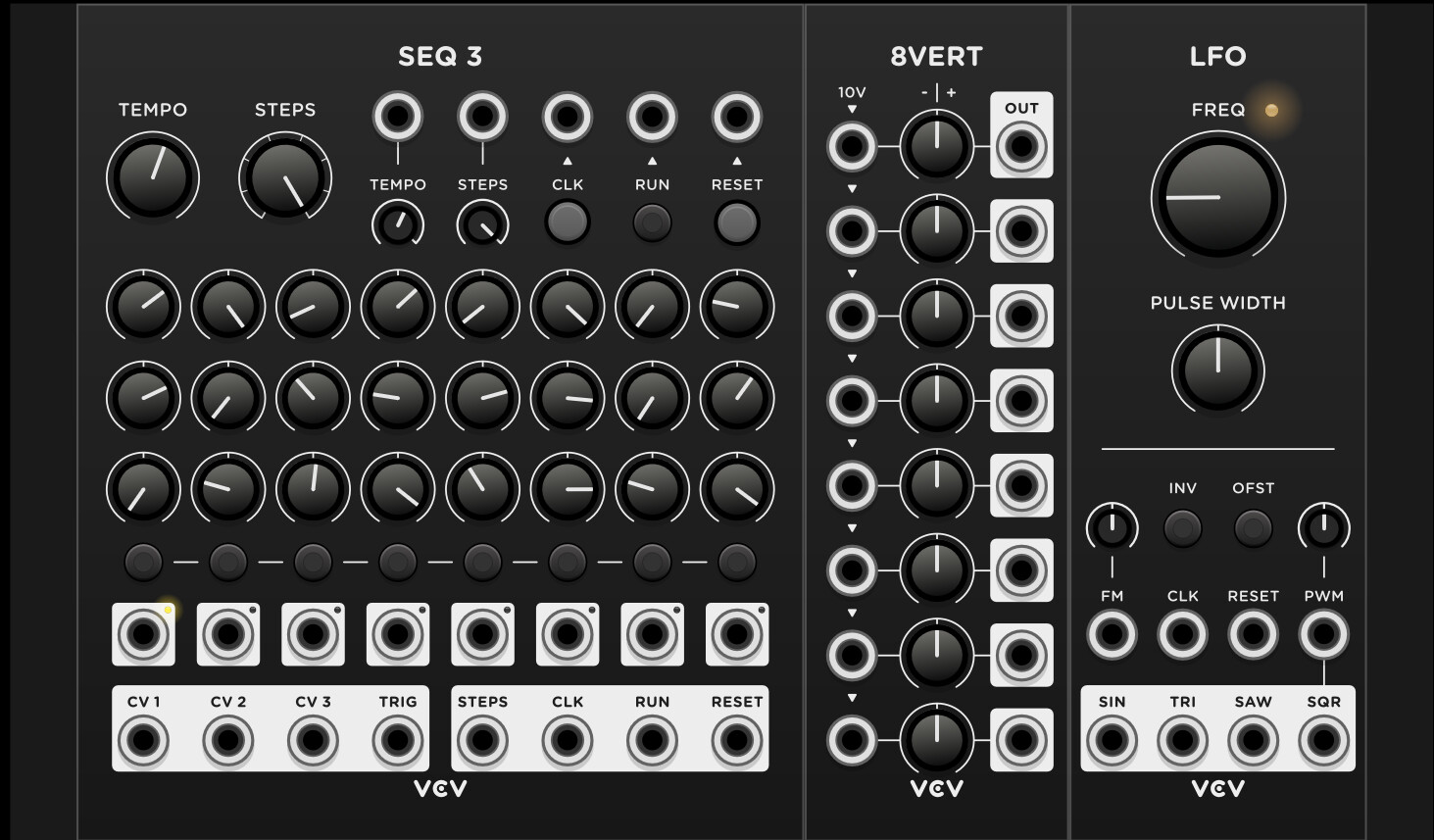
 I’m still working on it. I could have the tooltip toggle between “Unscrew” and “S**** you”.