@marc_boule
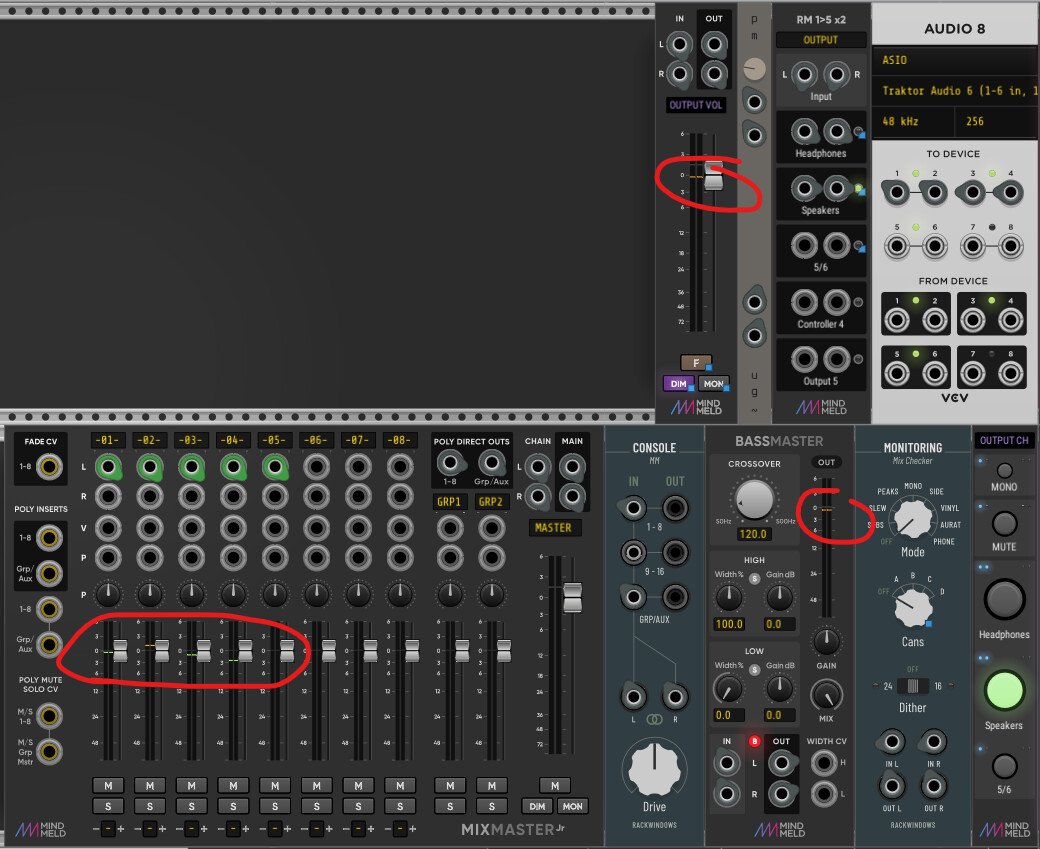
I hope this helps, for me, this happens every time I open Rack that already has those modules in the patch (but the problem didn’t happen on a newly added mindmeld module, or if i open a project or revert to last state, until i close and reopen Rack)
to reproduce:
add any mindmeld module that has a meter
send audio signal to the module (this time, all working normally)
close Rack
re-open Rack (this time, the peak level indicator will stuck)
I’m on W10, Rack v2.2.1, MindMeldModules Preview Build v2.2.0 (listed as 2.1.1)
Hmm, there is something strange going on indeed, I just tried your test and I was able to see the peak indicators misbehave on EqMaster (but not on BassMaster), so it looks like an intermittent problem. @fractalgee has also mentioned something like this, but the problem disappeared at some point. We’ll investigate!
a little update, I could reproduce the stuck indicator on the individual channel in Mixmaster 100%, but not on the MixMaster master channel and Bassmaster (sometimes the problem disappear if i remove and reconnect the cables, and sometimes just randomly disappear).
@ADRs and @fractalgee, the bug has been fixed, if you want to try the new version, I updated the builds here:
The version is 2.2.0 now, so you will get the red dot, and to keep from reverting back to the old library version, it’s best to not do the update of MindMeld in Rack until the library update goes through.
Initially I was not able to reproduce the bug since where I was testing it I had lowered the framerate, but trying it today on my music computer (with a faster framerate), I was able to get the problem, so thanks to both of you for reporting it!
For those that are curious, as the result of a change in Rack 2.2.0 relating to Window::getLastFrameDuration(), we now need to check for NAN as a possible return value.
Yep, that seems to fix it. I just saw it again as I patched in a Surge XT Classic VCO. but the latest build from you indeed fixes that completely it appears.
wow, that was fast, and yes now it is fixed.
thanks!
reading your explanation, now I remember that there are some other modules that sometimes behave strangely after recent updates (outputting NaN value, so I have to restart Rack, but I forgot which module it is, not mindmeld modules), maybe it’s related to that.
Being a bit of a noob, I either need to ask some friendly advice or suggest a feature. Lots of modules I like to control need a trigger input to start, for instance the “Run” on Clocked. But I get funny behavior if I try anything but a momentary button, and that momentary button cannot display a light when “Run” is active. It may be useful to have a “toggle light” available on buttons that actually only send a momentary trigger, and a switch to assign its current position. If there is a better way to send a command to Clocked “Run” and get a matching light on PatchMaster I guess I am too dense to see it. Thanks for any advice on the matter.
I’m not especially familiar about Clocked module (Marc Boulé is developer) because I’m using my clock module, named KlokSpid (Ohmer plugin). Perhaps by using a latch button, instead? (I don’t know).
KlokSpid module have input port (switch by any trigger/gate signal) and button to start/stop the clock.
However, Impromptu Clocked is excellent, and you can see it in most of patches!
Marc is a cool guy. Sure he’ll reply to you here.
About momentary button, I use Master Reset module (by Count Modula), it does the job.
Yeah , I have been using BOGAudio switch as an intermediate switch, as it can use a trigger to send latched or unlatched behavior to the next location. Just wanted to offload any unnecessary modules just to pass a trigger and get the right “light” behavior.
If I just use latched direct to the run switch, it takes 2 presses at PatchMaster to get one move at the selected switch on Clocked.
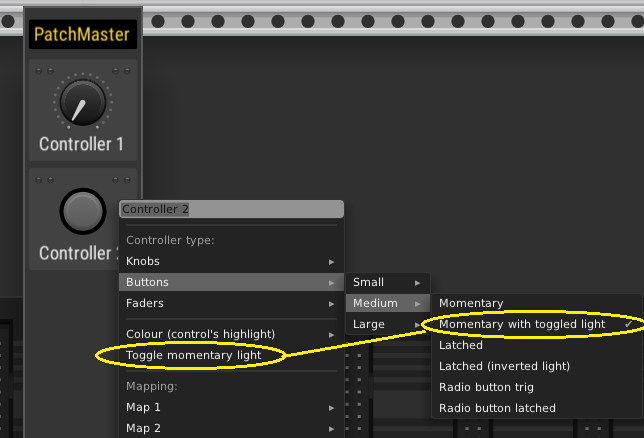
We’ve added two small new features to PatchMaster, one of which is a new button type that offers a momentary trigger output, but with a light that toggles. This makes it able to control the run button on Clocked, for example.
When this button type is selected, a menu item to manually toggle the state of the light on the PatchMaster button becomes available, as shown here, in case it is needed to match its state with the mapping target’s state:
The other small addition is an option to hide the mapping indicators on the modules being mapped-to. We also fixed a small bug where colors were not copied when tiles were duplicated.
If anyone using PatchMaster would like to try this new version, we have put up some builds here, and in a short time we will send it off to the library if its status looks good.
Awesome update! I was curious if it would be possible to add 4 more mappings? I was thinking of scenarios for toggles and mutes where mapping up to 8 controls would be helpful.
Unfortunately the most we’ll do is 4 per controller, but a small trick you could do would be to reserve one maping to map to another controller (on the same PatchMaster instance or another extra one dedicated to this), and replicate the control, thus allowing 7 mappings in total. This is perhaps not extremely elegant, but it can work I believe.
In his excellent video, @Omri_Cohen drags a separator from below to above the buttons (21:39). Try as I might, I have been unable to do this. Is there a key combination, or a special place on the element to be dragged?