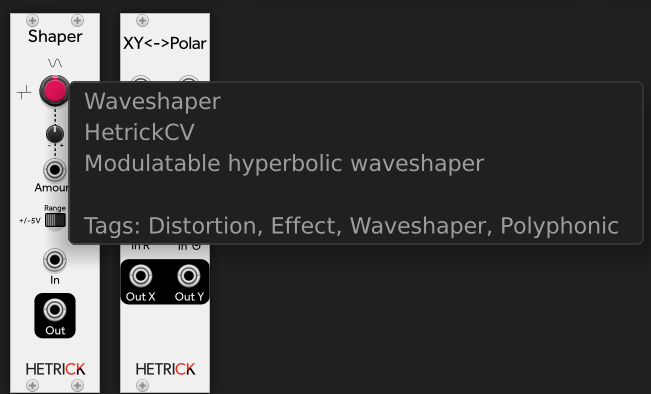
Ah, cool. Is this module going to replace the old “Shaper” of yours? I can’t find a manul for “Shaper”.
Likely, no. It will probably be a sample scrubber (arbitrary-length). I likely won’t design it to be a morphing wavetable thing since there are plenty of those around. The mip-map technique described in the gen~ book is a clever 8-point sinc interpolation esque algorithm that is essentially the same algorithm used for textures in videos. It analyzes the incoming phasor and applies octaving based on the slope/estimated frequency of the phasor. It likely has some dramatic artifacts with non-linear phasors, but that’s part of the fun! It won’t be for a while, though, since the drum synth deadlines are looming 
The “Shaper” module is really called “Waveshaper” in the documents and the browser. It’s not anti-aliased (nothing in HetrickCV is since everything so far has been designed for CV unless you count the super-basic slewing algorithm in the chaos and noise modules). It’s just a direct port of the “Hyperbolic Waveshaper” Core algo from Reaktor, which I turned into a Block for the Euro Reakt series. We use it in our Dent plugin, which we anti-alias with 4x oversampling. Not perfect, but we were still pretty new programmers and the plugin is now popular enough that we shouldn’t change the sound dramatically.
1 Like
My [ old ] ears can’t hear the difference between 4X and 16X oversampling. Yeah, I can see it, but I can’t hear it. My waveshaper is designed for audio as well as CV, so it has 1X,4X,16X over sampling choices and AC//DC coupled option.
1 Like
Oversampling is not audible…but on a final mix it play a role in my opinion
If you play at 24 96…The G point
oh, fwiw the tags on “Shaper” suggest (to me anyway) that it’s intended to be used with audio signals, but I think you are saying it is really meant for CV processing (low frequency use)?
Is that UA drum synth planned as a VST or rack module?
Interesting modules, lots to unpack. Just off the bat one feature request:
The sequencers need a run input (my preference is a toggle on trigger for on/off, so Clocked, for example. can be used to turn them on/off).
One question: When I have, for example, the 16-step phase seq set to 15 steps, step 16 turns yellow, but isn’t skipped, just silenced. Same with red mode. What are those two modes and why does it not skip them like any other sequencer I have used? Also what is the difference between yellow and red modes for the to be skipped but not steps? To add to my confusion: The 32-step one does skip step 32 if set to 31 steps, regardless whether red or yellow.
Blue: Current Step
Green: Step is toggled on
Teal: Current Step is toggled on
Red: Current Step is skipped, but toggled off
Yellow: Current Step is skipped, but toggle on.
I’ll investigate the Phase Seq 15-step thing. Can you send a photo of the patch where the behavior is occurring?
Run Input is a good idea. I would make it gated to match the behavior of the Active inputs on the various phasor effects. I tend to go this route, since you can get the toggled behavior via a Flip-Flop, but going from Toggled->Gated is more difficult.
Thanks for edification on the colors
The 16 step seq is the one misbehaving when last step (16) is red or yellow on step 16, if steps is set to 15… The 32 step one behaves as expected (skips the not used step), if set to 31 steps. Bit hard to image though.
If it matters, MacOS 13.5, Rack Pro 2.3.0
The gated run input is fine, as you say a flip-flop to use before. No problems with that one.
Wow, thanks for these tutorials, these modules are really fun! Really glad to discover these tonight 
As a heads up, 2.3.1 was submitted to the Library yesterday to add the Phasor Burst Generator and to fix a few major bugs:
2.3.1
- Add Phasor Burst Generator module.
- Fix some labels on Phasor Generator.
- Set Phasor Generator to load in Slow mode by default.
- Fix Finish output polyphony on Phasor Generator.
- Add better default values to Phasor Rhythm Group.
- Fix Phasor to Waveforms crash.
- Change Phasor to Clock default Steps value to 16. It was erroneously defaulting to 0 which caused a display bug.
- BREAKING CHANGE: Fix frequency knob state saving on Phasor Generator. The parameter was converted from variable min/max range to static +/- 1.0f internally. This will load an incorrect value on previously saved projects, but resaving will now maintain a stable/correct value.
- SEMI-BREAKING CHANGE: The Sinusoid output of Phasor to Waveforms was 90 degrees shifted from the triangle output. The two outputs now have the same phase.
13 Likes
It’s nice to have another couple of polyphponic sequencers available.
1 Like
I am experiencing crashes tonight when trying to work through Tutorial 5 I think it’s something about the Phasor->Waveforms module, but I’m not sure.
Running on macOS 13.4.1, crash seems to happen if I load up a blank patch, and add several Phasor->Waveforms, sometimes happens even with just one. Maybe an uninitialized pointer or array index?
I haven’t dug into it further than that, but posting just in case anybody else runs across it.
This was crashing for me (I’m also on Mac) but it was fixed. Are you using the latest version from the library?
Yep! Phasor->Waveforms crashes in the current Library version. I submitted a fixed version a few days ago. If you download the 2.3.1 build from my Github, that has fixed the issue. Sorry for the trouble. 2.3.1 should be up in the Library soon.
3 Likes
Definitely excited to try these out! I’m sure you have a fair bit on your plate with the upcoming UA module and all, but have you considered making a 4x8/4x16 phase-based gate sequencer? It’d be nice to control a whole drum arrangement via phase without having to wire up 4+ different sequencers.
Not a bad idea! I ended up porting all the phasor stuff back to the drum synth yesterday, and the first thing I did was add in smart handling of polymeter. Having a multi-channel sequencer would make polymeter patching easier.
Here’s a preview of what phase-based euclidean sequencing sounds like on the drum synth. #6 was recorded yesterday, #7 today. In both cases, all sounds and sequencing are done in the drum synth. The only external effect is compression:
Both of these were live improvisations using only my mouse (no automation, modulation, or hardware controllers).
2 Likes
Sounds amazing, I’m super excited for the drum synth release!
1 Like
Sounds good, thanks, sorry I totally missed the crashing thing when it was discussed earlier!
love the new phasor modules ! been using the ZZC modules for a while now and digging the way this clocking work , their function generator works great with your modules.
really fun getting everything tight and synced without relying on the slow to calculate bpm type clocks that don’t respond to modulation smoothly.
your sequencers take it to the next level , those modules are going to be a mainstay on my patches , great work !
4 Likes