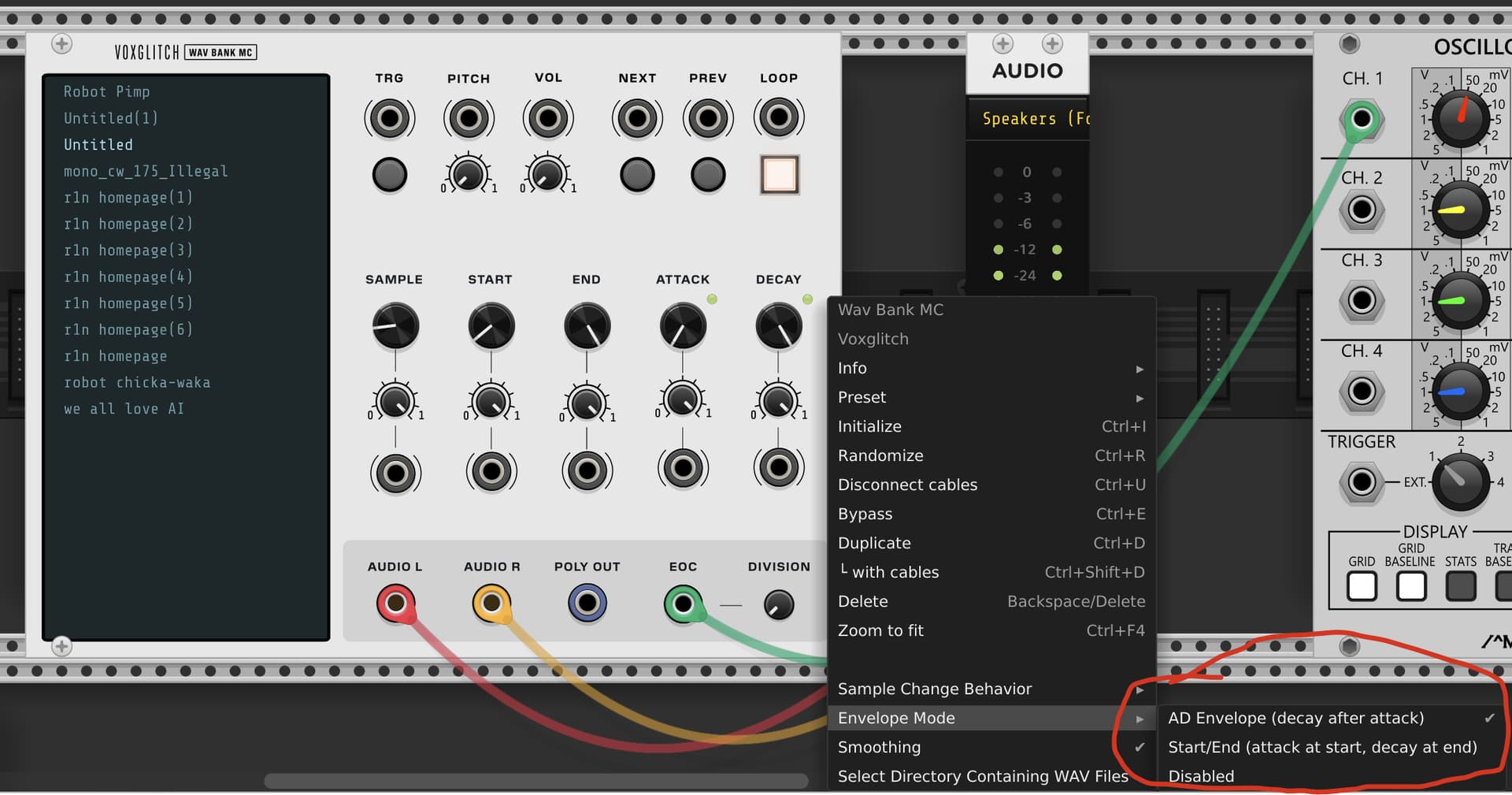
Ok, these are all fixed.  I’ve added some options for the A/D envelope, and some fancy LEDs. I’ll get this rolled out pretty soon!
3 Likes
PatchSeq Coming Soon! JW-Modules/Voxglitch collab

5 Likes
Just a heads-up.. Bytebeat has no documentation; I went to check what the presets formulas were, and no such luck.
1 Like
what the heck is this
he wanted to know the bytebeat module formulas @zakforrest
2 Likes
Thanks a heap! Now, I can enter them into Cella’s bytebeat module for comparison (and, of course, edit/add formulas- I love the editability of the Cella one, but can’t CV through different formulas as one can with the Voxglitch).
1 Like
No the YouTube video
1 Like
Haha, I also was assuming you reacted to the code…
and we all know what happens when you assume… 
1 Like
Hi everyone! I have some BIG new modules coming soon, one in collaboration with @jeremy . They’re very similar in design, but serve different purposes. One allows you to easily randomize, edit, and sequence through small patches.
The other is the successor to the Voxglitch Groovebox, completely re-imagined.

14 Likes
Your voice has changed somewhat, Bret.  Maybe the excitement about the module release…
This Groovebox2 looks very interesting!
Some comments for PatchSeq. It’d be nice if
- I could drag the cable from one socket to the other one (instead of deleting the old and adding a new one)
- there was a way to quickly delete a cable (instead of right-click and then remove)
I found the “reset from host” but Is there also a “clock from host”?
Considering PatchSeq is already out, is that one the successor to your groovebox module? It just looks so deep it’s worth a donation but I gotta hear more, I’m not being impulsive this time but it does seem this new module has grabbed me by the wallet… hoping we can get a tutorial video or another showcase of its modules and effects soon!
testing PatchSeq right now ( https://www.youtube.com/watch?v=XBNFTmJLUFM ) Love it ! would love to select the step with a Launchpad…do you think it could be a future addition ?
Edit : found a way with Transit module 
Hi everyone! It’s a busy morning, so it’ll take me a moment to respond. In the meantime, I wanted to answer Shawn’s question:
Yes, Groovebox Advanced is the successor to the Groovebox module. Let me break down the difference:
- PatchSeq is more focused on randomization and experimentation.
- Groovebox Adv. is clearly more focused on groovebox “stuff”.
- You can’t assign multiple patches to a single sequencer step on the PatchSeq. Instead, each step has its own dedicated patch.
- Groovebox Adv. will not have the randomization features that PatchSeq does
- Groovebox Adv. will be more expensive than PathSeq, because it’s more powerful. Probably $30 instead of $10 for the PatchSeq)
There’s more, but those are some of the basics. 
1 Like
Will both have similar modules and features? I could possibly help support your cause with patchseq but i might want to support with the advanced groovebox… I can’t wait to hear more from both of these modules soon
I’ll put together a comparison document for you. Give me about 30 minutes.
Ok, here we go!
————————
PatchSeq vs Groovebox Advanced
Both modules are step sequencers that sequence entire synthesizer patches rather than just notes or CV values. However, they use fundamentally different approaches to patch organization.
The Key Difference
PatchSeq uses a 1:1 model: Each of the 16 steps has exactly one patch. Step 1 plays Patch 1, Step 2 plays Patch 2, and so on.
Groovebox Advanced uses a library model: You create a library of up to 16 reusable patches, then assign them freely to any of 32 steps. Multiple patches can play simultaneously on the same step.
Quick Comparison
| Feature | PatchSeq | Groovebox Advanced |
|---|---|---|
| Steps | 16 | 32 |
| Patches | 16 (one per step) | Up to 16 (reusable library) |
| Patch assignment | Fixed (step = patch) | Flexible (any patch to any step) |
| Layering | One patch per step | Multiple patches per step |
| External CV inputs | 4 | 6 |
| Audio outputs | 4 | 4 |
| Randomization | Yes (multiple strategies) | No |
| Mode/Length CV | Yes | No (use Sequencer Control patch) |
| Global effects patch | No | Yes |
| Sequencer control patch | No | Yes |
Choose PatchSeq If You Want…
- Maximum variety per step - Every step can have a completely different sound engine
- Quick randomization - Generate instant patches with multiple sonic strategies
- CV control of sequencer behavior - Modulate mode and length from external sources
- Simpler mental model - Step 5 is always Patch 5, no assignment to remember
Choose Groovebox Advanced If You Want…
- Longer sequences - 32 steps vs 16
- Patch reuse - Create a kick drum patch once, assign it to steps 1, 5, 9, 13
- Layered sounds - Stack a bass patch and a percussion patch on the same step
- Programmable sequencer logic - Build custom sequencing behavior with the Sequencer Control patch
- Master effects - Apply global reverb, compression, or creative effects to all patches
- More external modulation - 6 CV inputs instead of 4
Workflow Comparison
PatchSeq Workflow
- Click step 1, build a patch
- Click step 2, build a different patch
- Repeat for all steps you want to use
- Each step is independent - changing step 3’s patch only affects step 3
Groovebox Advanced Workflow
- Create patches in your library (kick, snare, bass, lead, etc.)
- Select a patch, click steps to assign it
- Select another patch, click steps (including the same steps for layering)
- Changing a patch in the library affects all steps using that patch
Use Case Examples
“I want 16 completely different sounds in sequence”
Use PatchSeq - The 1:1 model means maximum sonic variety with no repeated patches.
“I want a drum pattern with a reusable kick and snare”
Use Groovebox Advanced - Create one kick patch and one snare patch, then assign them to create your rhythm pattern across 32 steps.
“I want generative patches I didn’t design myself”
Use PatchSeq - The randomization system generates complete, playable patches with various sonic strategies.
“I want to build my own custom sequencer logic”
Use Groovebox Advanced - The Sequencer Control patch lets you create probability gates, euclidean rhythms, or any custom step logic.
“I want global reverb on everything”
Use Groovebox Advanced - The Effects patch processes all audio before it reaches the outputs.
“I want to modulate sequence length with an LFO”
Use PatchSeq - The LENGTH CV input directly controls sequence length with external CV.
They’re Complementary
These modules solve different problems. PatchSeq excels at maximum timbral variety and quick experimentation through randomization. Groovebox Advanced excels at structured compositions where patches are building blocks you arrange and layer.
Many users find value in both - PatchSeq for sound design exploration and happy accidents, Groovebox Advanced for more deliberate, arranged sequences.
Also see:
https://github.com/clone45/voxglitch/blob/master/docs/modules/patch-seq/Choosing_Between_PatchSeq_and_GrooveboxAdvanced.md
https://github.com/clone45/voxglitch/blob/master/docs/modules/patch-seq/PatchSeq_vs_GrooveboxAdvanced.md
2 Likes
Well I do plan on having both available, but I must consult my wallet first cause I still have to hear more of these and I’m not sure which one to buy and which one to ask for… I’m happy to donate but since my budget is tighter I gotta wait for the groovebox to come out first
1 Like
Thank you Seth, for requesting this. I didn’t know it was possible until you brought it up. @agentf64

1 Like
Hey just chiming in to say I recently discovered your collection via the Metamodule and just wanted to say great job. Having your collection along with cv funk and mutable available in my physical rack is endlessly enjoyable. Thanks for what you do.
3 Likes