No, it is a premium module in a new plugin with a private repository - it is not open source. The cost is reasonable - only $15. It should be available in the Library this coming Monday.
I will continue to add additional modules to my free Venom plugin. But I am looking to supplement my retirement income, as I just retired from the Federal workforce a couple years earlier than I was planning. Finances will be especially tight until my house is paid off next year.
Hi, I just bought Sofia’s daughter, but when I want to add it in Live 12.2.1, it immediately crashes with “fatal program error” dialog but as soon as I click on it. Other modules can be added without any problem, but not this one.
Does anybody have this problem too ?
Windows 10, Ableton 12.2.1, VST3
Note: it doesn’t happen in Reaper 7.39. Everything works flawlessly there.
OK. Another user just gave me a license for Ableton Live Lite v12.2.1 (thanks @Jens.Peter.Nielsen ), and I am able to run Sofia’s Daughter as a VST3 plugin on Windows 11 with Live Lite. I am not sure where to go from here. I have asked for advice from VCV support, but I am still waiting to hear back.
I am working on the next release of Venom free modules, which should have at least 4 new modules.
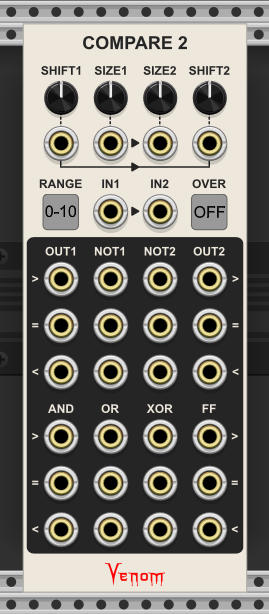
So far I have tentatively completed one - Compare 2. It is my take on the Joranalogue Compare 2 - a dual windowed comparator combined with logic operations.
I have nearly implemented all the Joranalogue features, plus
polyphony
options for output ranges
tripled the number of outputs
Joranalogue derives all outputs from whether an input is within the window
Venom adds outputs for when the input is greater than the window, and less than the window.
oversampling options - really important for audio signals (obviously not needed for the analog Joranalogue module)
The one thing I haven’t implemented is LEDs indicating the state of each output.
Question - are the LEDs really important to anyone? They are easy enough to implement for mono operation. But I don’t like the results for polyphony. I can either let the user select which channel to monitor, or I can set the LED level proportional to how many channels are high. Either way I don’t particularly like the result. Plus that takes additional CPU.
I prefer to keep the module without LEDS, but if people really want them, I can add them.
If you have a github account then you can get the dev binary at
I think in practice, if you care about an output port, you have a cable hooked up to it. And if you have a cable hooked up to it, it already has a voltage indicator provided by VCV Rack. That’s usually a good enough zero-effort method for me to know what each output is doing.
Yeah, that is generally how I feel. But I have to admit when I use WinComp with its many output ports, I find it convenient to have the LED for each port. It can be nice to have a sense of what is going on across all ports without having to patch each one. Compare 2 has even more ports than WinComp.
And @Squinky is right, it need not have any substantive effect on CPU usage.
I have convinced myself to go ahead and code up the LEDs and see how I like it. I have already written the code on paper while I wait for my car maintenance to be completed at the shop. I’ll give the user options to disable the LEDs, or set the brightness proportional to the number of high channels/total channels, or monitor a single channel.
Not sure if this is interesting or relevant to your module, but I have been working on some stuff recently and found I wanted an LED for polyphonic ins and outs
Yeah I purposefully made it the same size as a port, it potentially could be smaller… In fact it actually only needs to be 4x4 pixels, though i imagine that would be sacrificing readability, 8x8 maybe ok
I do like your module design a lot, very clean looking, but if you could fit in a custom 4x6 led widget it could work out nice
I added an LED to each output. By default it monitors all channels and sets the brightness to the percent of active channels that are high for each port. But there are context menu options to turn the LEDs off, or to monitor a single channel.
I think this module may be complete except for documentation.
Binaries for v2.13.dev2 are available below to github users