Howdy!
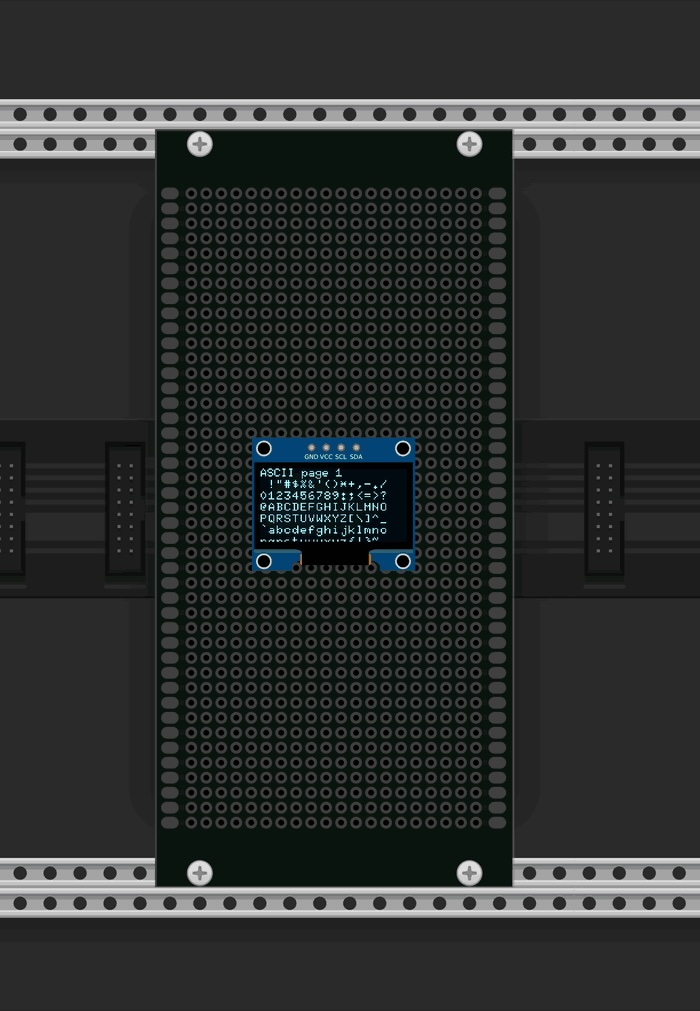
I’ve been working on a library called u8g2_vcv that brings the olikraus/u8g2 monochrome display API to VCV Rack. If you’ve ever ported (or wanted to port) an Arduino-based Eurorack module that uses an SSD1306 or similar OLED, this lets you reuse your existing drawing code with minimal changes and get a realistic-looking display widget in your virtual module.
What it does:
- Implements the full u8g2 API. Pixels, lines, shapes, text, bitmaps, XOR mode, clipping, the works
- Adds a nice glow effect that responds to VCV Rack’s Light Bloom setting
- Supports display rotation (0/90/180/270) and mirror modes
- Double-buffered with atomic swaps for thread-safe, flicker-free updates from your module’s process() thread
Usage is straightforward. Add the library as a CMake subdirectory, create an U8G2DisplayBuffered widget, and draw with the API you already know:
U8G2DisplayBuffered *widget = createWidget(Vec(10, 10));
addChild(widget);
// In your process() function:
U8G2Display *oled = widget->getDisplay();
oled->clearBuffer();
oled->setFont(u8g2_font_6x10_tr);
oled->drawStr(0, 10, “Hello VCV!”);
oled->drawFrame(0, 0, 128, 64);
oled->sendBuffer();
I’ve also put together an example plugin that cycles through a series of drawing demos (shapes, text, bitmaps, blend modes) to show what the library can do.
- Library: GitHub - colingimenez/u8g2_vcv: A u8g2-compatible OLED display library for VCV Rack. Port Arduino-based Eurorack modules with monochrome OLED displays to VCV Rack with minimal code changes. · GitHub
- Example plugin: GitHub - colingimenez/U8G2_VCV_Example: A VCV Rack plugin demonstrating how to use the u8g2_vcv library to add photorealistic monochrome OLED displays to VCV Rack modules. · GitHub
Happy to hear any feedback or answer questions. If you end up using it in a module, I’d love to see it!