Oh that’s a really clever way to deal with the scripts Inlining into a variable

But what not works is the publishing of the generated release notes files. And I don’t know what to about this.
I still need to educate myself on Azure Cl and Azure Pipelines. At the moment I don’t know enough to go either direction. Of course I may still be misunderstanding the two approaches. I’m still madly developing Meander for initial release, but will need to look at Azure as soon as I’m ready to release through VCV. For now I’m happy that you did your cross-platform fork. Thanks.
Significant commits today were:
- Redid font color upon @funkybot 's recommendation.
- Now if reset is triggered while not “running”, the gate output ports are set to OV. (also @funkybot req.)
- CV control of BPM from EXT input port was implemented.
- EXT Clock In was implemented. If connected, a 1/32 note measure clock will drive the Meander sequences. If the port is disconnected, the internal clock takes over seamlessly. So, an external clock such as Clocked can send a 8X clock signal to Meander, as well as Run and Reset. All behave as expected.
The reset was exactly what I had in mind and the color choice is much, much more legible. Thanks!
A commit was made to limit Meander to a single functional instance under Rack. This is due to large amounts of global data that can get corrupted by a 2nd instance. Now, if more instances are launched, a non-functional module displays along with a message saying it is DISABLED as only one instance of Meander is needed. Thanks to @Vortico and @contemporaryinsanity for giving me advice on how to get this working. While I was making these changes, I found that I still had a module pointer error in Meander that could cause problems even by viewing the module in the plugin manager. This was evident as the previewed instance was also launching the ModuleWidget, which it should not do (at least Meander should not since there are massive shared global memory objects). Now the preview is just the raw SVG file image, with no dynamic content, or control images.
Also, first pass code has been added in support of user editing of harmonic progressions. More to come on this.
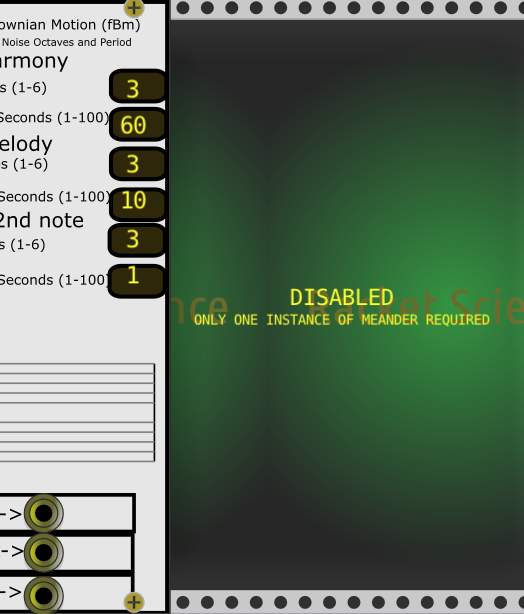
Yeah, no SVG image displayed here under Windows either. Not sure why. I am calling:
setPanel(APP->window->loadSvg(asset::plugin(pluginInstance, "res/Meander.svg")));
before the DISABLED text display. But, I suppose the problem is in a draw() function. I was doing some changes to get this all working and must have inadvertently done something.
void step() override {
		if(!module) return;
		if(!module->running) return;
The problem was in the if(!module->running) return; line. If present, the svg image is not displayed for the disabled instance. Everything seems to be working without that line, but I will do some more testing.
I may create a simplified SVG panel image for the disabled instance as the Meander panel is so large that it is too busy and the DISABLED text gets lost in the panel text.
Right, I should’ve mentioned that I don’t use svg for panels, only components, I draw my panels at run time.
The single functional instance control methodoolgy is now working for the 1st instance, the preview instance and any added instances. The added instances are “disabled” and say DISABLED on the panel. My panel is so busy it was difficult to figure out where to write this text. I may work on this some more.
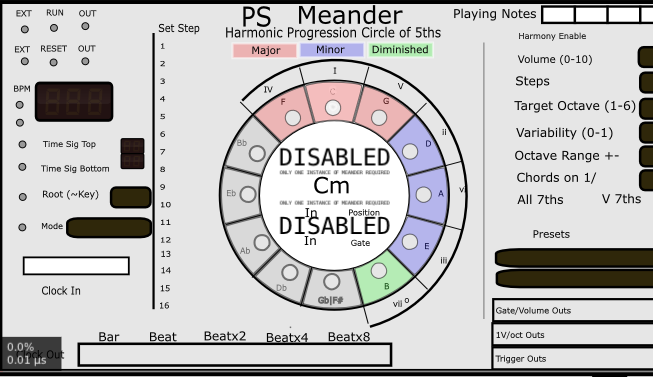
I also restored the ModuleWidget draw functionality to the preview instance.
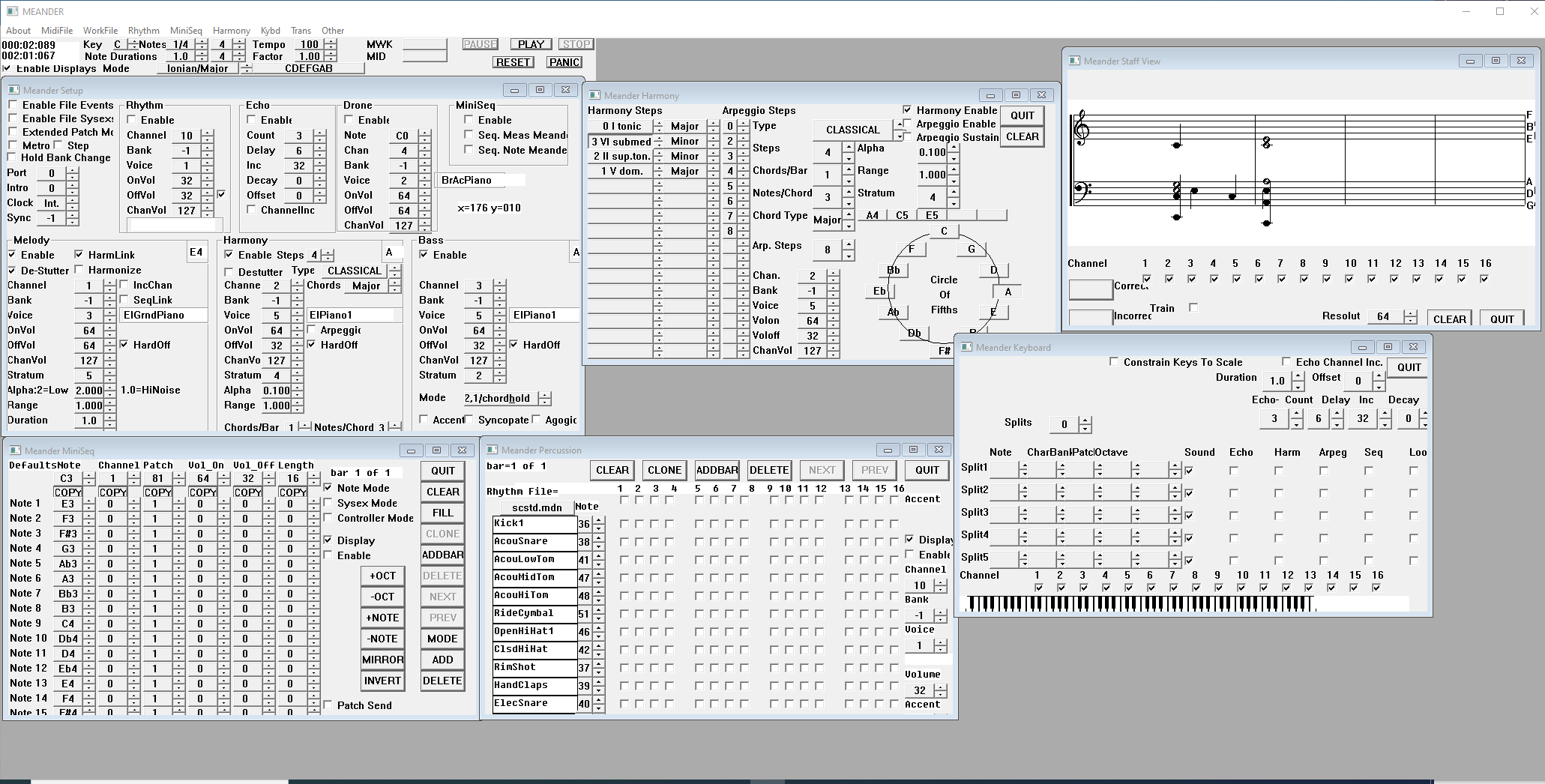
For anyone who is interested in the history of Meander for Windows, here is a screen capture of Meander with (almost) all of the windows open. I developed Meander for (DOS) Windows from 1988 until my major revision in 2001 and my last minor mod and rebuild in 2016. Meander for Windows was MIDI based, so a lot of the code had to do with MIDI. The program still works well today! This gives you some idea why Meander for Rack has so much globally scoped objects. I did a version in Ableton with Max4Live and one in Max/MSP javascript a couple of years ago, but that was less than satisfactory due to timing glitches.
Strange lines sometimes appearing in module browser preview:
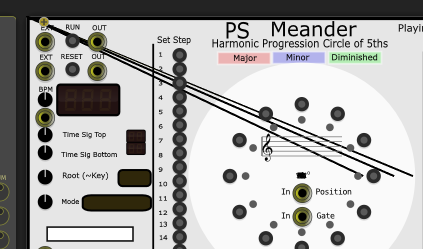
That’s worrisome. The lines are a result of some type of draw coordinate problems when the circle of 5ths annular ring segments are drawn using nvgLineTo(), nvgArc(), nvgFill() etc. But the musical staff is rendering fine using nanovg commands. I cannot duplicate it under Windows with my current commit. I’m concerned that this is related to yesterday’s changes for the singleton launch logic. If I understand the browser preview correctly, a ModuleWidget instance is launched, without a Module. I will check that all of the ModuleWidget draw() functions are not trying to use the module pointer. Any ideas anyone else might have would be appreciated.
That’s correct.
I’m in the process of sanitizing all uses of the Module pointer such that all ModuleWidget code should still work in module browser preview and I removed some struct Module pointer members that were not used. The one thing I am not certain of is in functions such as in my MeanderWidget() constructor:
CircleOf5thsOuterButton[CircleOf5thsOuterButtonindex]=createParamCentered<LEDButton>(mm2px(Vec(116.227, 37.257)), module, Meander::BUTTON_CIRCLESTEP_C_PARAM);
I believe that someone told me that this module pointer argument is not referenced and thus presents no problem if NULL, as it should be for the browser preview instance. Do you know?
I’ll be committing the sanitized version in a little while after I wring out the changes to make sure I have not broken anything.
template <class TParamWidget>
TParamWidget* createParam(math::Vec pos, engine::Module* module, int paramId) {
	TParamWidget* o = new TParamWidget;
	o->box.pos = pos;
	if (module) {
		o->paramQuantity = module->paramQuantities[paramId];
	}
	return o;
}

template <class TParamWidget>
TParamWidget* createParamCentered(math::Vec pos, engine::Module* module, int paramId) {
	TParamWidget* o = createParam<TParamWidget>(pos, module, paramId);
	o->box.pos = o->box.pos.minus(o->box.size.div(2));
	return o;
}
I’m not overly familiar with templates (more of a C guy, really must learn) but that appears to be the case.
Same behavior here.
A new update is committed to my GitHub now. All references to the Module* are checked for a non-null in all ModuleWidget code, including the browser preview. Some extraneous Module* structure members were removed for clarity and so they are not inadvertently accessed. I’ve tested if for about an hour, doing all sorts of browser browses and adds. No problems were seen.
I’m hoping this will solve the rendering issue you were seeing in browser preview mode. Let me know if you still see problems and I will give it another whirl.
Thanks for working with me on testing Meander:)
Issue persists.