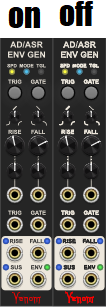
There must be something else going on. The custom square switch svg images render fine in the library browser within VCV, but not in the patch. Look at the two images in my original post. Both are at the same scale on the same monitor. The top library browser image looks great. The patch image looks like s***t
The text has been turned into paths within the svg, so it is not a font issue.
I am not saying the graphical oversampling doesn’t help. But there must be something else going on. I have lots of pathified text in my faceplate svg that is smaller and looks fine. It is only the pathified text in my switch images that looks terrible. There must be something in the code that displays a different svg (frame) for each switch state that has the problem.
That’s because, like I said, the panel gets oversampled. createPanel creates an instance of the SvgPanel struct, which is what draws your panel. That’s why the text in the faceplate looks fine. (setPanel adds it as a child of your ModuleWidget)
The other widgets you put on it are direct children of your ModuleWidget and not the SvgPanel, so they don’t get oversampled. Here’s an image of one of your modules with and without the panel being oversampled:
Looking at it, SvgSwitch already makes use of a framebuffer (I presume for better performance, since framebuffers cache their contents), so you just have to add that step code above from SvgPanel to your switch widgets’ classes.
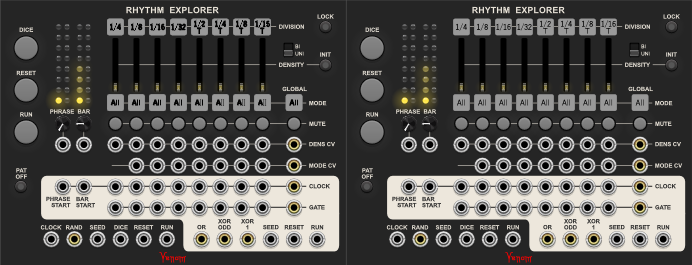
Here’s how Rhythm Explorer looks with oversampling on the switches:
Huh, good finding! Is that to do with Dave’s code or Rack by default? If so it seems like -half-a-bug or lack of forseing how people will use it. Maybe because Andrew doesn’t put text on widgets in the VCV modules, or something…
It works that way intentionally, FramebufferWidgets (what actually handles the oversampling here) cache their contents and only redraw 1. if you manually tell them to and 2. if the user zooms in or the pixel ratio changes. Otherwise, they won’t redraw anything.
Knobs, switches, etc. all have their own framebuffers as children that they place the actual SVG widgets inside for performance reasons, but those run callbacks when the user is changing them that then tell those framebuffers to redraw.
Most things don’t really benefit from the oversampling, panels in particular do because they tend to have text and other thin paths that end up looking bad when shrunk/undersampled. Dave’s switches with text are a bit of an outlier, and I don’t think the performance cost of always oversampling switches, knobs, etc. would be worth it just to fix this one case, when it’s so easily fixable in your own code if it’s necessary.
Yeah, that is a judgement call. I lean the other way, but I take your point. Also, it is not easily fixable if there isn’t any documentation pointing out the potential issue and solution.
I am going to dig up my original support email thread from years ago and follow up with the solution, asking if perhaps it should be embedded in the API. Support acknowledged the rendering was suboptimal, but never came up with any solution for me.
In the mean time I am putting the fix in my code regardless.
Thanks again for figuring this out and providing a clear explanation - this is awesome!
Actually that code was called by the draw method, not step.
Have to try this on my knobs, their serrated outline also doesn’t get rendered so well.
Update: couldn’t tell the difference, so it’s not worth the extra CPU load. But then, i am on Linux and I don’t even know if it wasnt as good as it can get for my resolution and zoom factor. Will try it again when I have booted into Windows.
Sorry, I was looking at the library preview code that you linked, and that relevant code was called in the draw method.
As Paul sated, it should work either way.
I am thinking that it is (almost surely insignificantly) more efficient to put the conditional statement that sets the frame buffer oversampling into the draw method instead of the step. The step for every widget gets called every frame. I think the draw only gets called when needed. Assuming a given widget’s draw method is called at most once per frame, then putting it in draw can never be less efficient.