I am using MIDI CAT to connect an Akai MidiMix to MixMaster. My issue is NOT about midi feedback to the MidiMix…
The mapping works great. When I move a fader on the MidiMix, I see and hear the VCV parameter responding correctly. But when I put that Reaper track in Latch mode, the VCV parameter is ignored if I adjust via the MidiMix. If I use my mouse and move the same VCV parameter, it is recorded as automation in Reaper. What’s really strange is that I can see the Reaper automation fader moving during Latch playback, but the envelope is not affected (when using the MidiMix). But again, if I use my mouse to control the same parameter, the envelope is recorded as expected… Is it a Reaper issue?
Here is a video showing the issue. Sorry for the quiet audio…
Update: I put a midi event monitor after VCV Rack, and confirmed that the same midi CC# is being sent on Channel 1 regardless of if I’m using the mouse or the hardware controller…
Update 2: If I use Reaper’s FX Window “Param/Learn” to map the hardware controller, it works as expected (records automation while using the controller).
Hi Ben, just pulling this topic back over here to this thread (sorry for hijacking the other one). Per your post over there, I have downloaded the *.vcvplugin and placed it in my /Rack2/plugins-win-x64/Stoermelder-P1 folder.
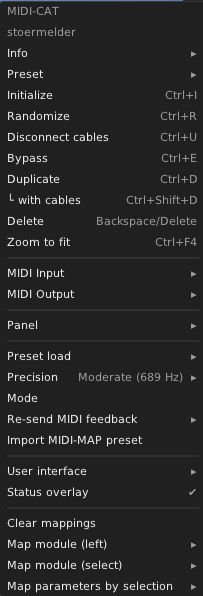
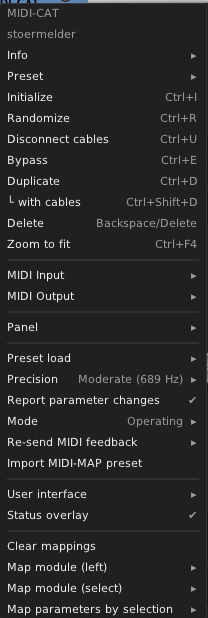
I have MIDI-CAT v2.1.0 now, is that the Dev build? I don’t see the “report parameter changes” option that Transit has:
The plugin file must be placed at the root of the plugin-folder (/Rack2/plugins-win-x64/), it will be extracted automatically on the next start of Rack. The version should display 2.1.xxxxxx with some random chars, the library version shows as 2.1.0.