I got some ideas in the back of my head for more advanced keyboard implementations, but I’m not a developer, just wondering if they are possible and maybe someone wants to pick them up.
One idea would be to be able to change the keyboard layout, so that only notes of a selected scale are present, and arranged horizontally. This would give you 4+ octaves in scale in a convenient layout. FL Studio does have such an option for computer keyboard layouts.
The other is about making a keyboard velocity sensitive.
I recently got a keyboard with magnetic switches. Those switches have a linear response and you can set the actuation point of the keys from 0.1 to 3mm. Now if there would be a way to either get the linear signal from the keyboard directly, or another way to receive 2 actuation points from a keypress, the time difference between the two actuation points could be used to calculate a velocity - which is what velocity sensitive MIDI keyboards do.
So that would be the dream for computer keyboard use - custom layouts with velocity sensitivity could turn relatively cheap computer keyboards into advanced MIDI devices.
Maybe someone like @stoermelder could tell if this would even be possible?
By the way I got this keyboard after some youtube research, and it’s really high quality for the price: Amazon.de - this is what they call a Hall Effect (HE) keyboard, and there’s a few good options in that low price range, and then there’s also a new technology called TMR, which is supposed to be more precise and energy efficient - think those start at 70$ or so…
When using the computer keyboards software, it can show the linear response of every key, so you can watch how deep you press it in realtime - so that signal should be there somehow.
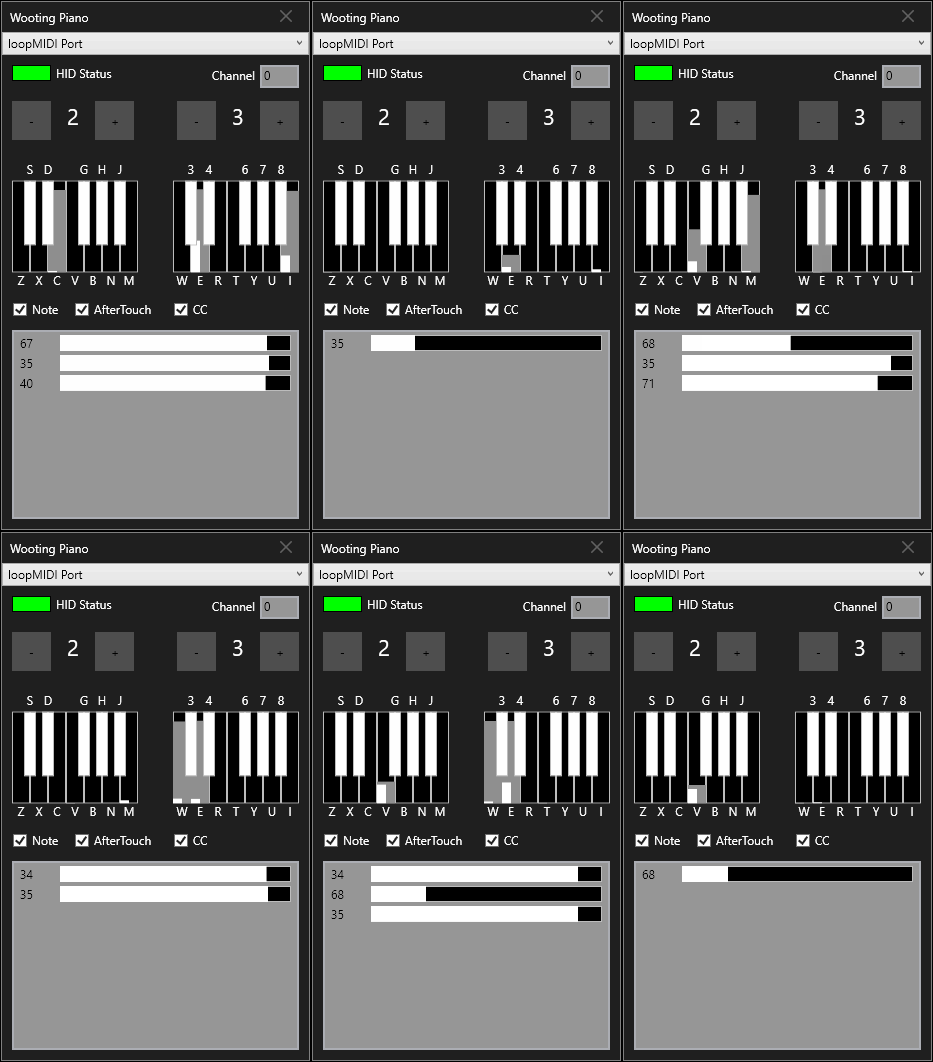
And if you could grab the linear signal by some standard protocol, you could even achieve aftertouch. PC keyboard with custom layout, velocity and aftertouch would be crazy…
While those options for a special hardware would probably make no sense to develope, the magnetic switch hardware is already widely available and used for gaming.
No need to develope a velocity sensitive keyboard with double switches or pressure sensitivity - the one thing you would need to make it work is just access to the linear signal that the keyboard is already capable of producing.
Magnetic keyboards do this:
and you can already get them with 68 of those keys in good quality starting at around 40$
… direct access to this linear signal however, might only be possible with some expensive keyboards (some can send it out as joystick data - don’t know if they can do it for all keys and how that would work, though) - some can also send 2 messages depending on how far a key is pressed, which should work for velocity sensitivity with a special mapping on those keyboards.
But… they usually all run on an open source protocol called QMK/VIA - if it could be accessed over that, that might be a universal solution for magnetic keyboards.
This looks interesting, but I’m a bit worried as it looks like I’m opening a can of worms with this. I have almost no knowledge about gaming keyboard and their differences.
I just took a look at QMK/VIA and it seems to be much about LED control, displays and key-mappings, but I don’t see anything in it for analog response of keys, like these hall-effect sensors provide. I am missing something?
It seems this project is more related to analog keyboards, and it is just handling USB HID devices, which I am already familiar with.
Do you know if the keyboard (or its firmware) you linked on Amazon is providing sensor information? I’m willing to order one, because I’m honestly curious about it, just to play around with it and to test if I can get it working…
I was hoping that maybe the sensor signal can be accessed over that standard protocol, since the driver software of those keyboards runs on that standard protocol without a driver (and often in the browser), and you can see the sensor information in the editors - those editors only show you one sensor at a time though.
My keyboard can be edited both with a standalone and with a browser editor (Browser version of the editor needs Chrome, though, which I want to avoid installing), and you can set the actuation point for each key individually if you like, and it shows you an animation like the GIF I linked for each key (one at a time).
So the question is how does the editor get that information, and could it receive all sensor information at the same time or at least fast enough to make it usable - but I conclude from this that it should be possible to get at least one key at a time over some standard protocol without a custom driver.
A possible workaround might be if it was possible to set 2 actuation points with different commands over that protocol, so you could then just measure the time difference between those two commands - no aftertouch, though
But maybe for that you need a keyboard that provides that option in the first place, which would be much more expensive. With such a keyboard you wouldn’t need the protocol at all though and could just have a custom preset for the keyboard and listen to the commands you set - I don’t know if there are even enough, though… or if there’s an option for additional key commands, like SYSEX messages for MIDI or something like that…
Unfortunately there is no standard protocol for reporting analog data - at least I could not find anything on it. Some manufacturers seem to emulate a GamePad as secondary device and use the axis for providing the analog data, others do their own thing (sending custom HID reports). I spent some time learning about these things since your post, but this topic seems to be very niche, at least when it comes to working which analog data - not much technical protocol information can be found.
I will definitively order a keyboard for testing, just need to decide which one.
I can recommend the one I got for build quality and the high refresh rate on a low budget. But if you got money to burn and want the most high-end keyboard anyway, maybe you can find one that has options for 2 actuation points and joystick output - those are more likely around 200$, though.
Yes, some manufacturers call it this way, if the keyboard sends actual analog data.
Then your keyboard seems not to send any analog data - at least by default, maybe there is some setting for it. Please take it with a grain of salt, because I’m a bit speculating.
Yes - by default it’s just a regular keyboard. I don’t think any keyboard would send out analog data by default, but they can all show it in their editors somehow.
Reading the keyboard HID specification, and having done a QMK thing before, the USB keyboard HID doesn’t support any kind of analog. Other HID profiles have to be used. I think QMK can bind to a limited subset of the USB MIDI specification, but last I looked it didn’t do velocity or after touch.
I’d prefer some alternating on key press CV go up or go down per key, to maybe some modifiers for speed or precision.
So apart from the mystery how the editors get that analog data, those keyboards providing it seem to need to use joystick protocols - Which could be the solution IF they can send out enough at the same time. Don’t think it would be worth it to just have a couple of velocity sensitive keys…
I guess some keyboards have a special mode for the web driver, which enables analog data for a single key to allow showing it in the editor. At least this is what I’m reading:
Keydous (Firmware can provide analogue reports but they unfortunately only say how far the most recent key is being pressed — not even which key that is.)
That GIF looks very promising - Do you need to set up the keys as joysticks in the editor for this or do you just need a keyboard that is compatible with Wooting Analog SDK to read raw analog data?
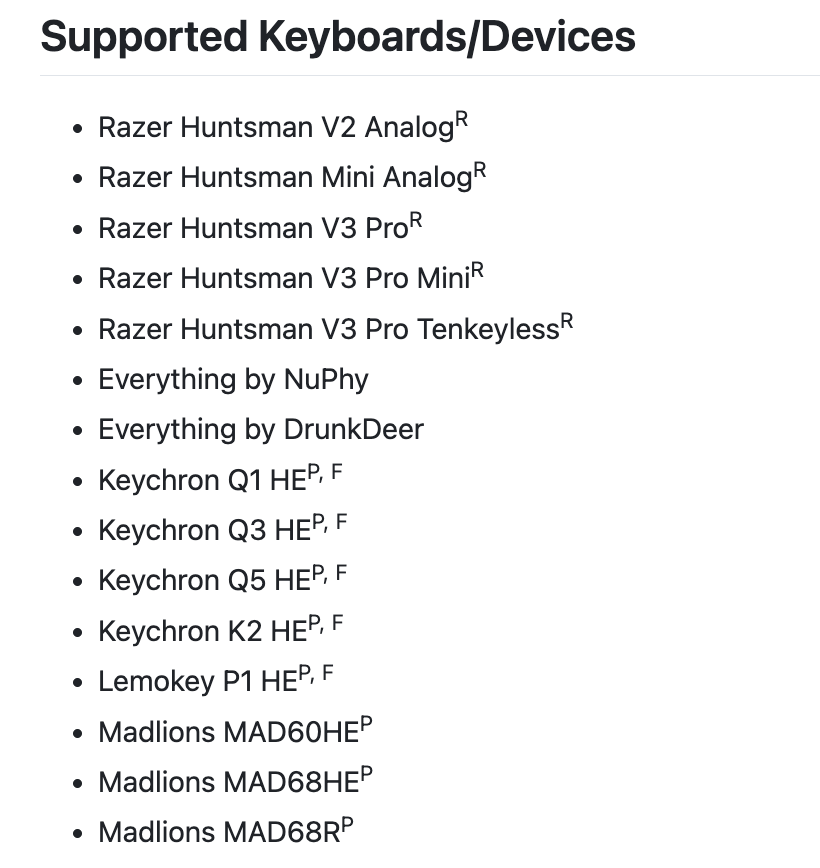
Can’t say, but the link I provided before (AnalogSense/universal-analog-plugin) is a plugin for the “Wooting SDK” to support other manufacturer. I believe you just need a supported keyboard from the list above to get it working.