How to "link" knobs?

I’m trying to “link” some knobs together, so when linked, the linked knobs will take the value of the one they are linked to. In this particular module I have an A-, B-, C- and D-Section, and when linked I want to set the value of the B-, C- and D-knobs to the value of the A-knobs. The following piece of code is executed every 256th cycle:

if (params[LINK_SCALE_PARAM].getValue() > 0.5f) {
    float scale = params[A_SCALE_PARAM].getValue();
    float scaleTrim = params[A_SCALE_TRIM_PARAM].getValue();
    for (int i = 0; i < 3; i++) {
        params[B_SCALE_PARAM + i].setValue(scale);
        params[B_SCALE_TRIM_PARAM + i].setValue(scaleTrim);
    }
}

When I enable Link-mode (latched button), all C-D knobs switch to the value of the A-knobs (as they should). However I can still in the GUI rotate (e.g.) the D-scale knob. I had expected that as soon as I release the mouse, the D-scale knob would snap back to the value of the A-scale knob. If I instead rotate the C-scale knob with the mouse, then the D-scale snaps to the value of the A-scale, but now C-scale is out of sync?

If I rotate the A-knob or disable/enable link, all C- and D-knobs snap back to the A-knobs values. All of the knobs are the default RoundSmallBlackKnob and with regard to the scale-knobs defined with a -1 to +1 range.

In a different module I have a RoundSmallBlackKnob for dialing in channel-count (fixed values from 1 to 16). In this module I have a button to toggle between automatic/manual channel count. In manual mode the user can freely choose count, and in auto-mode the knob will automatic snap to the channel-count of the detected input signal. Like the previous code, this is executed every 256th cycle:

bool useAutoCount = params[AUTO_CHANNEL_COUNT_PARAM].getValue() > 0.5f;
inChannels = haveInput 
    ? inputs[POLY_INPUT].getChannels() 
    : 1;
if (useAutoCount) {
    outChannels = inChannels;
    params[MAN_CHANNEL_COUNT_PARAM].setValue((int)outChannels);
}
else {
    outChannels = (int)params[MAN_CHANNEL_COUNT_PARAM].getValue();
}

In this module the knob behaves exactly as I expect. When you tries to rotate the knob while in auto-mode it will snap-back to the actual channel count. The only difference I can see from the previous module and this module is that the first module lets the user pick an arbitrary value between -1 and +1, where is the 2nd module is fixed at 16 values (1-16).
I don’t know what I’m talking about here, but the first thing I would investigate is whether it’s just a drawing problem (the internal -1…1 value is snapped correctly, but the dial doesn’t update to show it), or if it’s happening both on the DSP and UI side.

1 Like

Instead of accessing the param directly, try going through the paramQuantity.

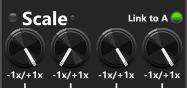
Thanks @pachde I’ll look into this suggestion, @andreya.ek.frisk I tried as you suggested and this is really wierd. I inserted 10V into both the A- and B-inputs. I then linked all scale buttons (at 1x) and turned the B-scale knob down to 0x.

ScaleKnobs

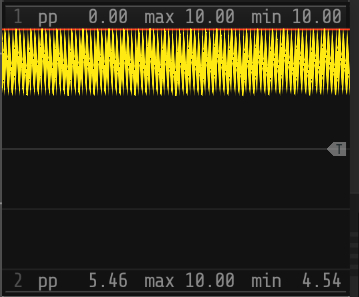
I then fed both the A- and B-output into the same scope module. The A-output stays fixed at 10V (as expected) since I feed in 10V and scale by 1X. However the B-output the output is continious changing (reported by Scope as a signal from 4.54V top 10V (PP 5.46)

My guess is that the scale reduces the the position of the B-knob, and then every 256 cycle the code tryes to set to the B-scale to the level of the A-knob

One of the simplest things to do is to simply ignore the knob’s values when linked. If this were a physical module, it’s unlikely to have motorized knobs that track the master knob. I understand the desire to have the linked nature visible, in which case a physical module could have red leds on the knobs that light up when linked to show that they’d be nonfunctional.

You can “disable” knobs by putting a screening OpaqueWidget over the knob (I have a plugin that does this), and you could also simply hide them.

1 Like

Just an observation more. Leaving the knobs where they were and the disable the Link, the code otherwise running every 256th cycle is no longer running and while the B-knob was set to 0x, the output stops chaning (as it did before between 4.54 and 10) and instead becomes a fixed output at 0V (10*0)

I agree Paul, in the hardware world I am sure this is how it would work, as you say most modules/synth don’t use motorized knobs/faders (too expensive). I just guess to most users the position of the knobs, and their tool tip showing their value would be easier “to read” than knowing to ignore what they see and focus on the A-knob. But perhaps “hiding the knobs” is a better solution.

@pachde I took your advice and use only the values of the A knobs when linked. I am still a bit undecided about what to do with the GUI, either leave the knobs as they are, or try placing an OpaqueWidget on top of them. At least now, by using the values of the A knobs when linked, but at least it will not generate the strange output I saw yesterday.

scaleKnob[0] = params[A_SCALE_PARAM].getValue();
scaleTrim[0] = params[A_SCALE_TRIM_PARAM].getValue();
if (params[LINK_SCALE_PARAM].getValue() > 0.5f) {
    for (int i = 1; i < 4; i++) {
        scaleKnob[i] = scaleKnob[0];
        scaleTrim[i] = scaleTrim[0];
        params[A_SCALE_PARAM + i].setValue(scaleKnob[0]);
        params[A_SCALE_TRIM_PARAM + i].setValue(scaleTrim[0]);
    }
} else {
    for (int i = 1; i < 4; i++) {
        scaleKnob[i] = params[A_SCALE_PARAM + i].getValue();
        scaleTrim[i] = params[A_SCALE_TRIM_PARAM + i].getValue();
    }
}

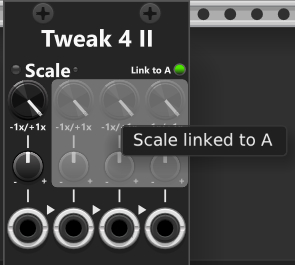
@pachde I ended up taking your other advice also putting an OpaqueWidget ontop of the controls that are disabled while linked to the A-section. It both indicate they can’t be used (the user cannot interact with the knobs) and I’ve added an (optonal) tool-tip that is displayed (for those interested the source for this struct is at the bottom).

In the module using this new widget I simply add the widget after the knobs (to have it on top)

 InfNoiseDisableOverlay* linkScaleOverlay = nullptr;
.,,
linkScaleOverlay = createInfNoiseOverlay(27.244f, 44.374f, 76.405f, 60.553f, "Scale linked to A");
addChild(linkScaleOverlay);

The in the step method need to set the overlay “active” as needed:

void step() override {
	ModuleWidget::step();

	if (!module)
		return;

	auto* m = static_cast<Tweak4IIModule*>(module);
	linkScaleOverlay->setActive(m->linkScaleToA);
	linkOffsetOverlay->setActive(m->linkOffsetToA);
}

And here is the full source for the overlay widget:

struct InfNoiseDisableOverlay : rack::widget::OpaqueWidget {
private:
    bool active = false;
    std::string hint;
    NVGcolor color;
    rack::ui::Tooltip* tooltip = nullptr;

public:
    InfNoiseDisableOverlay(float left, float top, float width, float height,
        const std::string& hintText = "", NVGcolor c = nvgRGBA(160, 160, 160, 160))
    {
        box.pos = Vec(left, top);
        box.size = Vec(width, height);
        hint = hintText;
        color = c;
    }

    ~InfNoiseDisableOverlay() override {
        destroyTooltip();
    }

    InfNoiseDisableOverlay& setActive(bool value) {
        if (active == value)
            return *this;

        active = value;
        if (!active) 
            destroyTooltip();

        return *this;
    }

    InfNoiseDisableOverlay& setHint(const std::string& hintText) {
        hint = hintText;
        if (tooltip)
            tooltip->text = hint;

        return *this;
    }

    InfNoiseDisableOverlay& setColor(NVGcolor c) {
        color = c;
        return *this;
    }

    void draw(const DrawArgs& args) override {
        if (!active)
            return;

        nvgBeginPath(args.vg);
        nvgRoundedRect(args.vg, 0.f, 0.f, box.size.x, box.size.y, 3.f);
        nvgFillColor(args.vg, color);
        nvgFill(args.vg);
    }

    void createTooltip() {
        if (tooltip || hint.empty())
            return;

        tooltip = new rack::ui::Tooltip;
        tooltip->text = hint;
        APP->scene->addChild(tooltip);
    }

    void destroyTooltip() {
        if (!tooltip)
            return;

        if (tooltip->parent)
            tooltip->parent->removeChild(tooltip);
        delete tooltip;
        tooltip = nullptr;
    }

    void step() override {
        OpaqueWidget::step();
    
        if (tooltip) {
            tooltip->box.pos = APP->scene->rack->getMousePos().plus(math::Vec(15.f, 15.f));
            tooltip->text = hint;
        }
    }

    void onEnter(const EnterEvent& e) override {
        OpaqueWidget::onEnter(e);

        if (active && !hint.empty())
            createTooltip();
    }

    void onLeave(const LeaveEvent& e) override {
        OpaqueWidget::onLeave(e);
        destroyTooltip();
    }

    void onButton(const ButtonEvent& e) override {
        if (active)
            e.consume(this);
        OpaqueWidget::onButton(e);
    }

    void onDragStart(const DragStartEvent& e) override {
        if (active)
            e.consume(this);
        OpaqueWidget::onDragStart(e);
    }

    void onDragMove(const DragMoveEvent& e) override {
        if (active)
            e.consume(this);
        OpaqueWidget::onDragMove(e);
    }

    void onDragEnd(const DragEndEvent& e) override {
        if (active)
            e.consume(this);
        OpaqueWidget::onDragEnd(e);
    }
};

template<typename T = InfNoiseDisableOverlay>
T* createInfNoiseOverlay(float left, float top, float width, float height,
    const std::string& hint = "", NVGcolor c = nvgRGBA(160, 160, 160, 160))
{
    return new T(left, top, width, height, hint, c);
}

I’m glad my suggestions are working for you!. For the screening widget, you might try a transparent black instead of white (dimming what’s underneath), and/or screen only the knob. This is less intrusive.

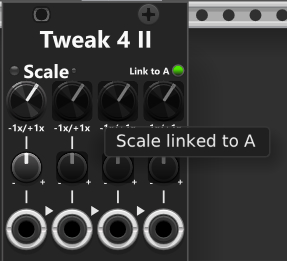
Here each knob is individually “masked” in stead of a larger area

I might have overengineered the implementation. I no longer specify the location and size of the overlays manually. Instead, they are obtained from the IDs, and multiple IDs can be added to a group. That way, simply calling setActive() on a group will show or hide all overlays that belong to that group.

InfNoiseDisableOverlayManager& overlayManager = getDisableOverlayManager();
linkScaleOverlayGroup = overlayManager.addGroup("Scale linked to A");
linkScaleOverlayGroup->addTargets(InfNoiseOverlayTargetType::param, {
	Tweak4IIModule::B_SCALE_PARAM,
	Tweak4IIModule::C_SCALE_PARAM,
	Tweak4IIModule::D_SCALE_PARAM
});
linkScaleOverlayGroup->addTargets(InfNoiseOverlayTargetType::param, {
	Tweak4IIModule::B_SCALE_TRIM_PARAM,
	Tweak4IIModule::C_SCALE_TRIM_PARAM,
	Tweak4IIModule::D_SCALE_TRIM_PARAM
});

linkOffsetOverlayGroup = overlayManager.addGroup("Offset linked to A");
linkOffsetOverlayGroup->addTargets(InfNoiseOverlayTargetType::param, {
	Tweak4IIModule::B_OFFSET_PARAM,
	Tweak4IIModule::C_OFFSET_PARAM,
	Tweak4IIModule::D_OFFSET_PARAM
});
linkOffsetOverlayGroup->addTargets(InfNoiseOverlayTargetType::param, {
	Tweak4IIModule::B_OFFSET_TRIM_PARAM,
	Tweak4IIModule::C_OFFSET_TRIM_PARAM,
	Tweak4IIModule::D_OFFSET_TRIM_PARAM
});