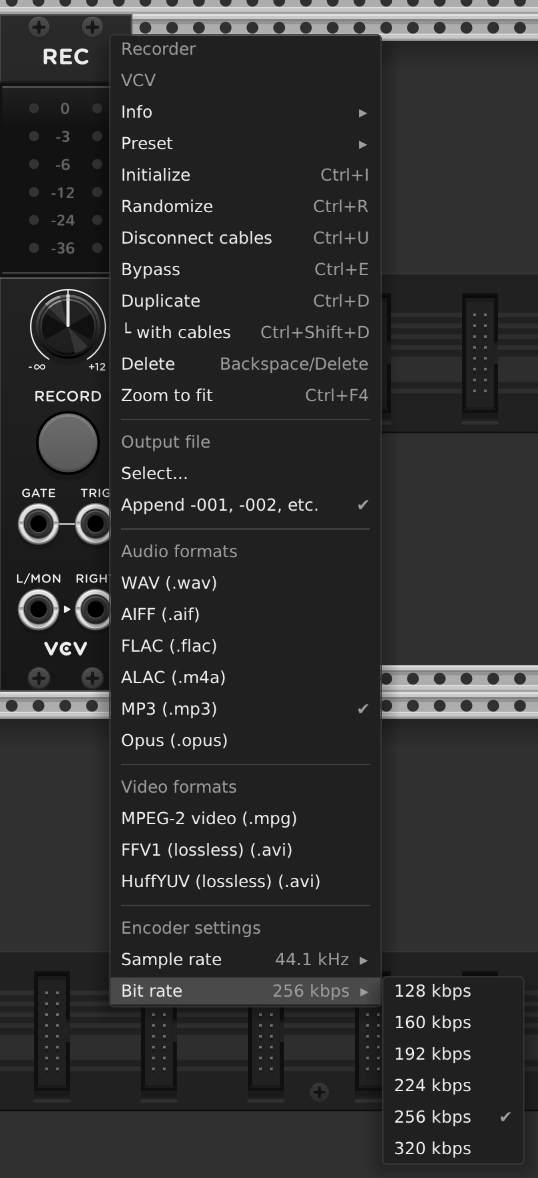
I’d like to record, export, sample and output at 24/48k.. But i cant find where to change the bit rate. I’ve set the sample frequency to 48k in the Engine menu… And in the output module but neither have options for bit rate.. oh and also the samplers, no options there either.
Does any body know where i can find the bit rate setting ?
It’s a simple mathematical equation: sample rate * bit size of float. Rack doesn’t emit compressed streams where the notion of bitrate comes from. Anything for streaming output would be downstream from Rack e.g. in OBS, or on your streaming hardware box.
i thought it might be set in the drivers.. And yea !! i just checked the vcv recorder as well, thanks Yeager Peter Vos.
And thanks stoermelder Ben, for pointing that out, i mean more quantization values/bits, more dynamic range bits…. I cant, at this moment, remember the difference between Depth & Rate, Please remind me if you have the time .
It’s the endless debates: can you actually hear a difference at X versus Y? Sample size (how many bits), vs float/vs integer vs sample rate. In the end you tweak settings until it sounds good for the storage size/transmission speed that gates your scenario.
Digital recordings usually are tagged with 2 numbers to express the general quality of an audio file, bit depth and bit rate. For instance 24/48 expresses a 24 bit depth (length of the bit word) recorded 48 thousand times per second. That is the output , even if the specific sampling method may be 1 bit oversampled, like most audio cards support now.
Bit depth is the resolution of each audio sample (which are 48000 per second at 48kHz). Bit rate is something complete different and talks (usually) how much data is transferred per second. This depends heavily on the used (audio) codec and is usually not constant.
Rack runs always on float, which is 32bit wide, but floating point. This is not really comparable to 24bit/48kHz, which refers to integer. You can read about it on Wikipedia, but 32bit float is the fixed resolution of Rack.
Thanks Ben, i did use the term rate instead of depth.. all i needed to do is record and export at 24 bit and the vcv recorder has those settings. I thought it might be in the engine menu for some reason !
But good to know that vcv is 32 bit float, gives us all options.
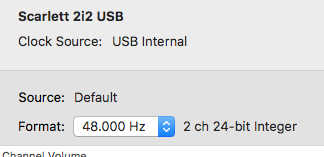
So, everything that Ben has said above. To add - the component that ultimately is responsible for converting the digital signals to analog, which is the only thing we can hear, is the DAC chip in the audio interface. The DAC can be fed digital signals at different sample rates, per its capabilities, and normally we use 44.1 or 48Khz. It usually has a fixed bit-depth in its hardware, usually 16-bit or 24-bit (integer) although on some interfaces different combinations of sample rate and bit-depth can be selected.
In the Rack audio module we select the sample rate to drive the audio interface at (e.g. 48Khz), and the audio module will now (as I understand it) resample the 32-bit float samples, which Rack operates at internally, to the fixed (e.g. 24-bit integer) bit-depth that the audio interface operates at. This is why you can’t choose the bit-depth in the audio module, because it’s fixed in the audio interface and can’t be changed.
However, if a different bit-depth can be selected for the audio interface, it’s done in the audio settings of your operating system, and then that target bit-depth is what the audio module will resample to, as I understand it. So I guess theoretically choosing a bit-depth could be an option in the Rack audio module, but perhaps the underlying rt-audio library doesn’t support that, or some other reason or decision is at play.
Here’s a screenshot from my audio interface settings in my Mac:
Many thanks for that Lars.. Im totally in the box, no interface. I simply needed to record or fix the 32float to 24 bit (depth not transfer rate) and the VCV recorder has it. Problem solved.