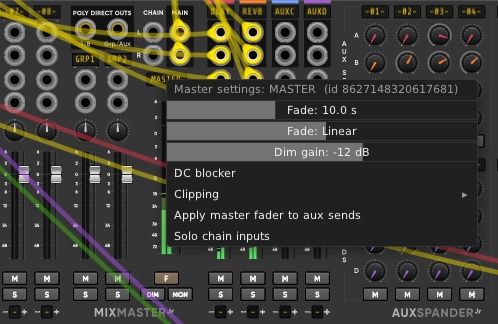
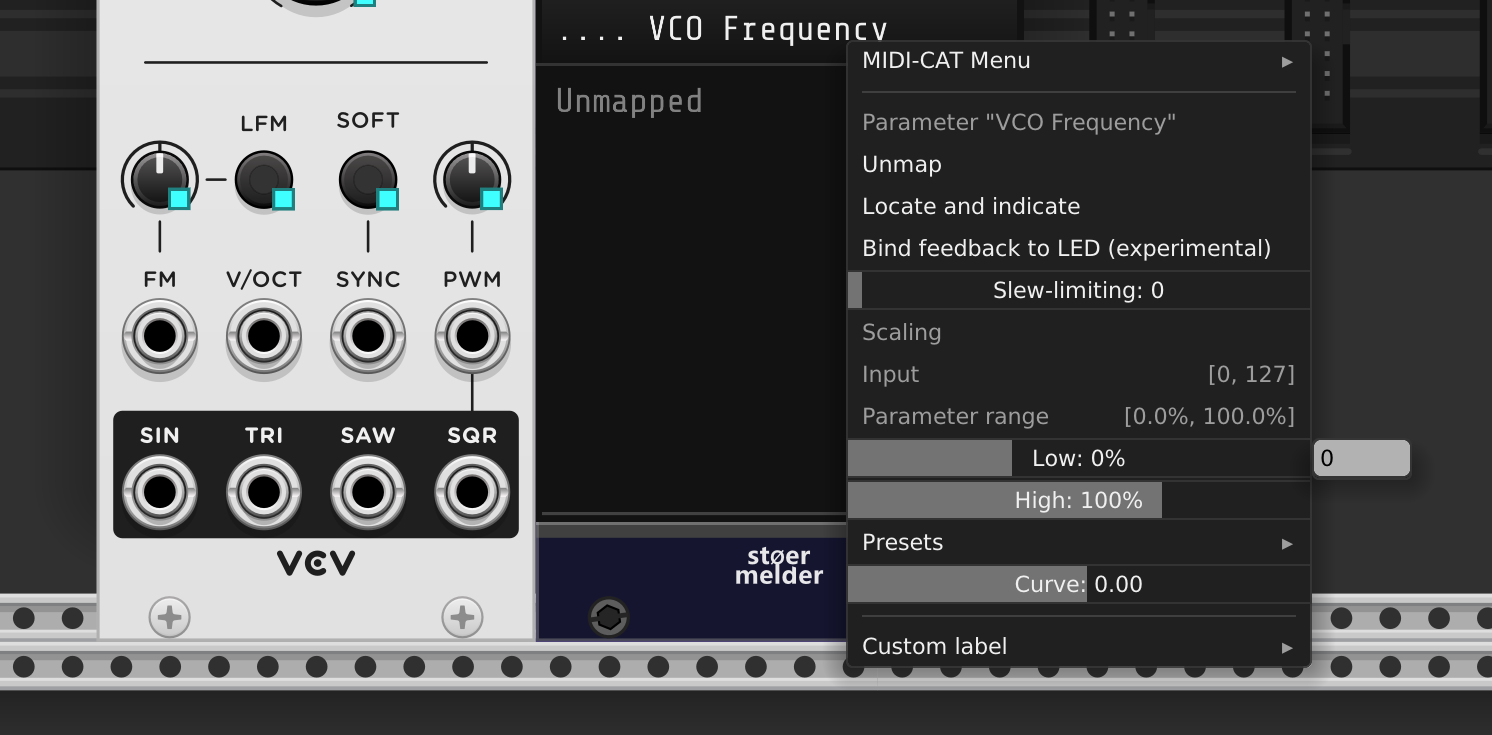
For many parameters, you can right-click on a knob and quickly enter a number with the computer keyboard. Wouldn’t it be nice to be able to also do that for sliders in the context menu? I suppose this would be a feature for VCV Rack rather than individual modules.
I’ve touched on this before in the Purfenator thread, and also could, for example, make good use of it in MindMeld’s MixMaster.
Is that something that makes sense, what do you think?
Oh yes! I love sliders when I don’t need precision, but I hate them when I do! I never use sliders in Venom menus for this very reason. I use text entry instead.
But now that you posted this thread, I have an idea. Instead of placing the slider directly in the menu, make it a submenu that has a read only title, followed by a slider, followed by a text entry. The text entry and slider could both be pointing to the same variable. I think that might work with the existing menu constructs!
For the Dim gain in the picture shown above by Alphagem-O, the decibel value is actually rounded to an integer internally (and displayed as such), so that we know we can reproduce an exact setting every time. The slider was perhaps not the best choice for Dim in hindsight, since the user can get the impression that the setting is more continuous than it really is, but once we know that it’s more the displayed value that counts, as opposed to the exact pixel position of the slider, then it works well enough I guess.
Interesting idea Dave, for those cases where the slider is fine-grained but a precise and easily reproducible value is sometimes also wanted, then it would make total sense.
After a little poking around in the classes, I think if you use an SvgSlider derivative backed by a param, you’ll get the right click menu, but you’ll need to derive and add a button handler to prevent the parent menu from being closed.
Thank you for the clarification! I actually don’t use Dim all too often. On the other hand, it would be great to enter numbers e.g. for the Fade (seconds) parameter.
Within MindMeld, I think this is most needed for PatchMaster Map Ranges. I use PatchMaster a lot, and frequently wish I could easily specify a precise range min and/or max that isn’t found in any of the presets.
I suppose Andrew might be able to modify the existing API menu slider to support a keyin.
But I was proposing something that might work with existing API menu constructs and minimal added code. I haven’t tried it yet. This would have to be done for each plugin (or perhaps each module within a plugin)
But what happens if there is not room to the right for the input field? I assume it will be pushed left and overlap/interfere with the slider. The slider will probably still work as long as the input field is narrower than the slider, but it will not look good.
Yes, it will overlap as it follows the default display logic for submenus in Rack. It is not ideal, but at the time I implemented it, I expected some option for text input will be added to the default slider widget eventually. Well.
With a little bit of effort it should be possible to put both the slider control and a text input in one menu item next to or below each other. Not sure though if this would be a good user interface option.