looks useable to me, i know how to use Purfenators menus already , so an extra level to get to an option is totally fine
1 Like
your menus are fine with me… its not like i constantly play with the options… i usually set it and forget it
1 Like
With so many options, it begs for some factory presets, but alas there don’t seem to be any.
Good point, I’ll happily add some factory presets, lets have a community section  I’ll start a thread for it…
I’ll have a think about the menus, it does bother me sometimes.
Possibly I could do something like have 4 small icons (Module, Colour, Image, Skiff) that have their own context menus separate from the main context menu
maybe you can just add a little button that activates a little flyout expander with buttons for the different menues, just an idea …
A flyout that is done by resizing the panel (to the right) is tricky because it moves adjacent modules when you force resize. This is annoying (fixed in CHEM in a PR post first submission). You have to implement saving the positions of the modules on the right and move them back when you close the flyout.
I’ve attempted modal dialogs but haven’t succeeded yet. Chem::Preset fakes it because the popup is within the bounds of the module.
 of some features I’ve been fiddling with
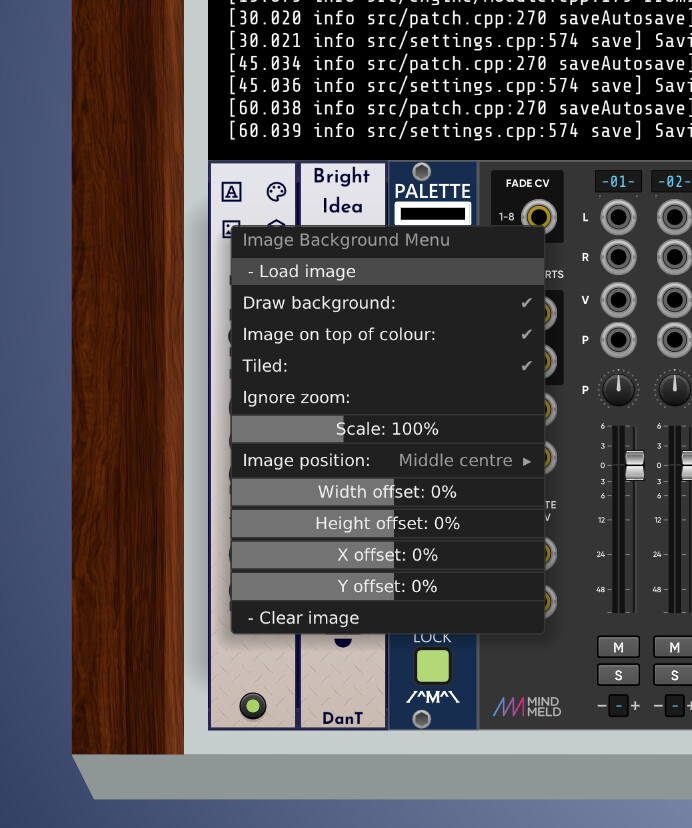
DanTModules v2.5.2
- Chromakey
- Text is now scrollable when larger than the panel
- Text can be loaded from a file dialog
- Autoscroll - with
speedanddelayparameters - Watch file - automatically reload the text when the file changes
- Tail mode - only load the last
nlines of a file, wherenis the amount that fit vertically in the panel (no scrolling required assuming the panel is wide enough) - Presets - view
log.txtand autosavepatch.jsondirectly in Rack
- Purfenator
- Image tokenisation, enables sharing of presets without the need to edit filepaths
- Presets - you can still submit your own presets for inclusion in the next version
- Skiff cheeks - add some style to your skiff with fancy wooden cheeks (or load a custom image of your own)
- Menu buttons -
Show Icon Menuswill display four buttons on the top of the panel to easily access the customisation menus (you can still get to them via the context menu too)
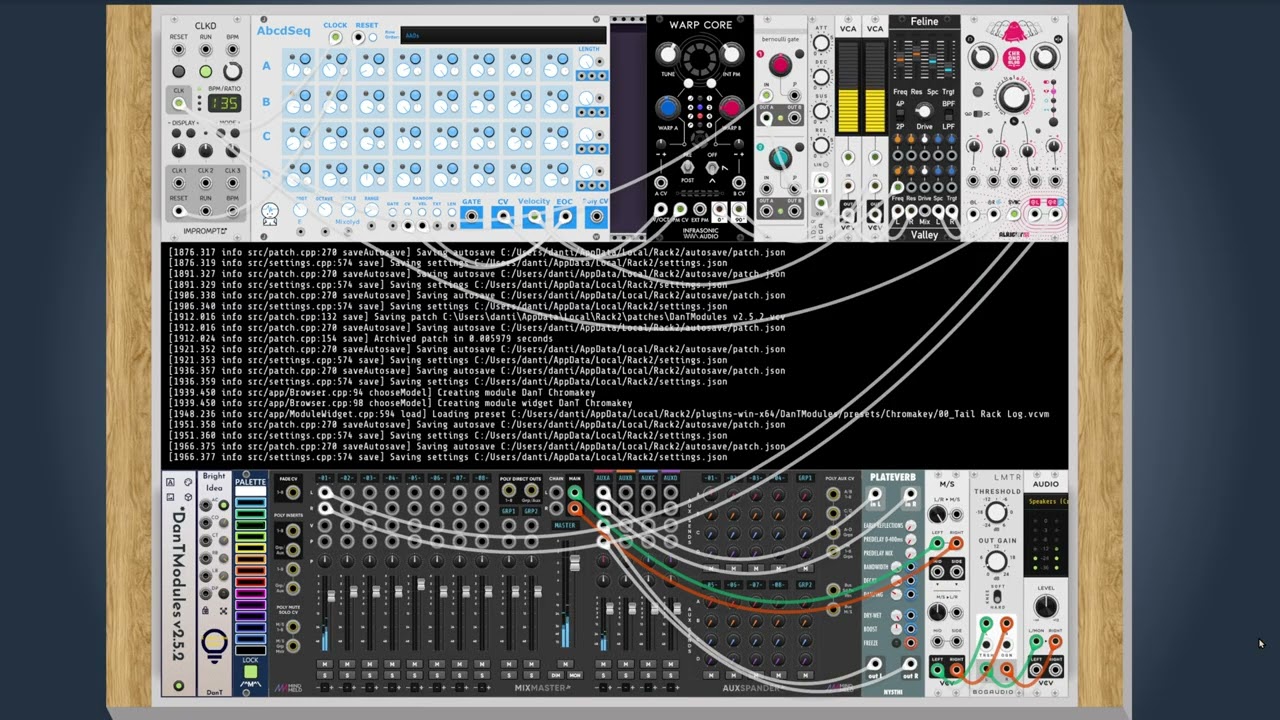
…will add some screenshots and videos shortly
edit: documentation updates are on my todo list
4 Likes
Some great new features! I love the menu icons - it is amazing how much it improves the workflow.
The box gradient radius and range should probably be non-zero by default. At first I thought the box gradient was broken.
2 Likes
I’ll look into it, thanks for letting me know.
8 Likes
Sneak peek 
7 Likes
DanTModules v2.5.3
- General
- Updated to Rack SDK
v2.6.6 - This is now the minimum required version due to the changes in BrightIdea
- Updated to Rack SDK
- BrightIdea
- Added inputs & knobs to control
spotlightBrightness&spotlightRadius
- Added inputs & knobs to control
- Chromakey
- New Text Overlay menu options:
- Generate a patchlist, all the modules currently in the patch
- Save the current text content to a file
- New Text Overlay menu options:
- Purfenator
- New Preset added
- Corrected cheek image rendering
- Added option to mirror the right cheek
- New cheek images available
- That’s No Moon
- Time-Travel context menu options enabled
Sorry, updated docs are still on my TODO list
4 Likes
I noticed one tiny thing: In the Purfenator expander you can set the gradient radius center x and y position (second input jack, poly channel 13+14), but it seems that negative cv values are not accepted. In the example below, channel 13 gets 3 Volt, channel 14 gets -2 Volt. The x is moved 30% from the center as expected, but y stays at 0%. Without cv input you can move the sliders manually in negative direction. But it doesn’t seem to be possible with cv.
I haven’t installed Rack 2.6.6 yet, so I’m not using your current module version. If it’s already fixed in your latest version, just forget what I was writing… 
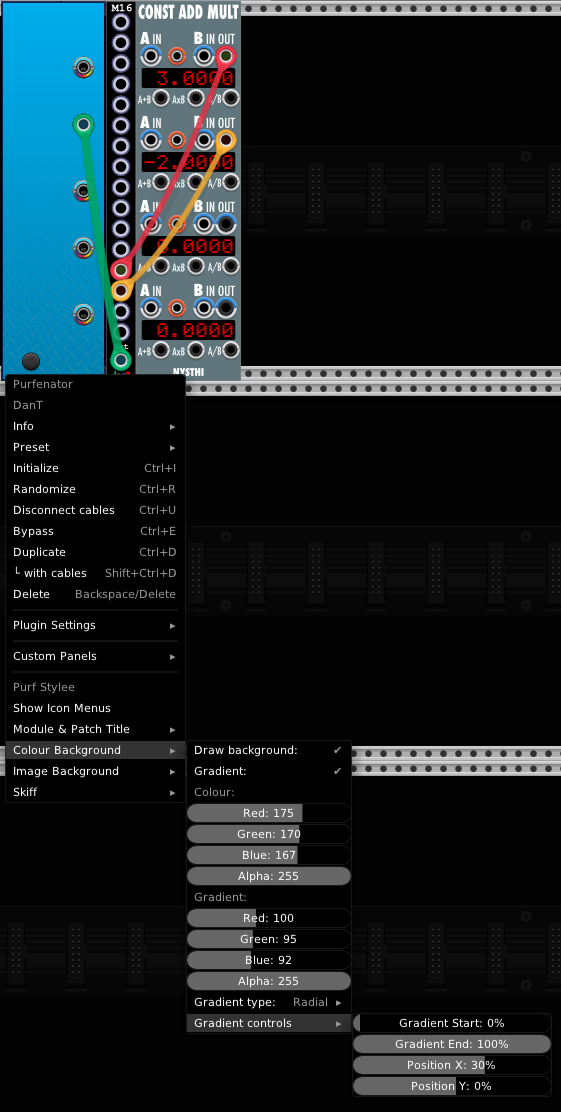
Ah yes, sorry you are correct, the CV input for those params does not respond to negative CV, that’s a bug.
It’s on my TODO list to fix for the next release.
Thanks for the report.
2 Likes
Thank you in advance for the fix!
Been using Nonaquant today. Ran into a small bug when saving and reloading a preset (.vcvm): Upon loading, none of the keys light up, i.e. preset does not show and quantizer does not function. The preset only shows up after clicking on one of the keys in the matrix (which happens to turn on this key, C0 in the pic).
Nonaquant 2.5.3, VCV Rack 2.6.6, WIN10
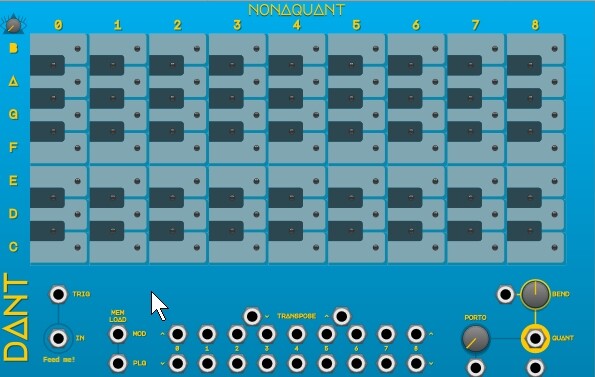
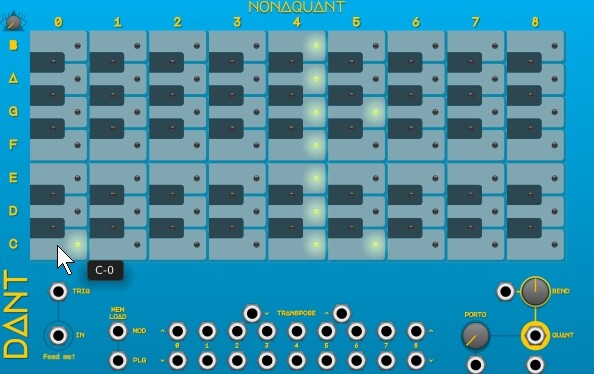
Thanks for the bug report, I’ll put it on my TODO list for the next version
1 Like
DanTModules v2.6.0
- Bug Fixes
- Seizure Trigger - Correct CV inputs for gradient params
- Nonaquant - Refresh key state on preset load
- New Module
- Pitchness - standalone thread
- 16 channel fixed note voltage output
- Loads of presets
- Name label
- Polyphonic output with CV control + individual channels
- Global and Polyphonic transposition
- Pitchness - standalone thread
4 Likes
DanTModules v2.7.1
Kapow
- Drag and drop support for audio sample files and
.kapowdata analysis files - New auto reset features
- Streamlined analysis with no delay and autoclose overlay
- Memory banks to recall different kapow files and param settings
- Option to embed kapow files in patch
Kapow manual thread now updated
9 Likes