I’m trying to use the audio output from the PanCake plugin as a CV signal so that I can create synced envelopes like ShapeMaster Pro. The only issue I’ve noticed is that the output is kind of smoothed. For example if I have a perfect triangle shape in PanCake the result is not a triangle. Does anyone have any tricks to work around that?
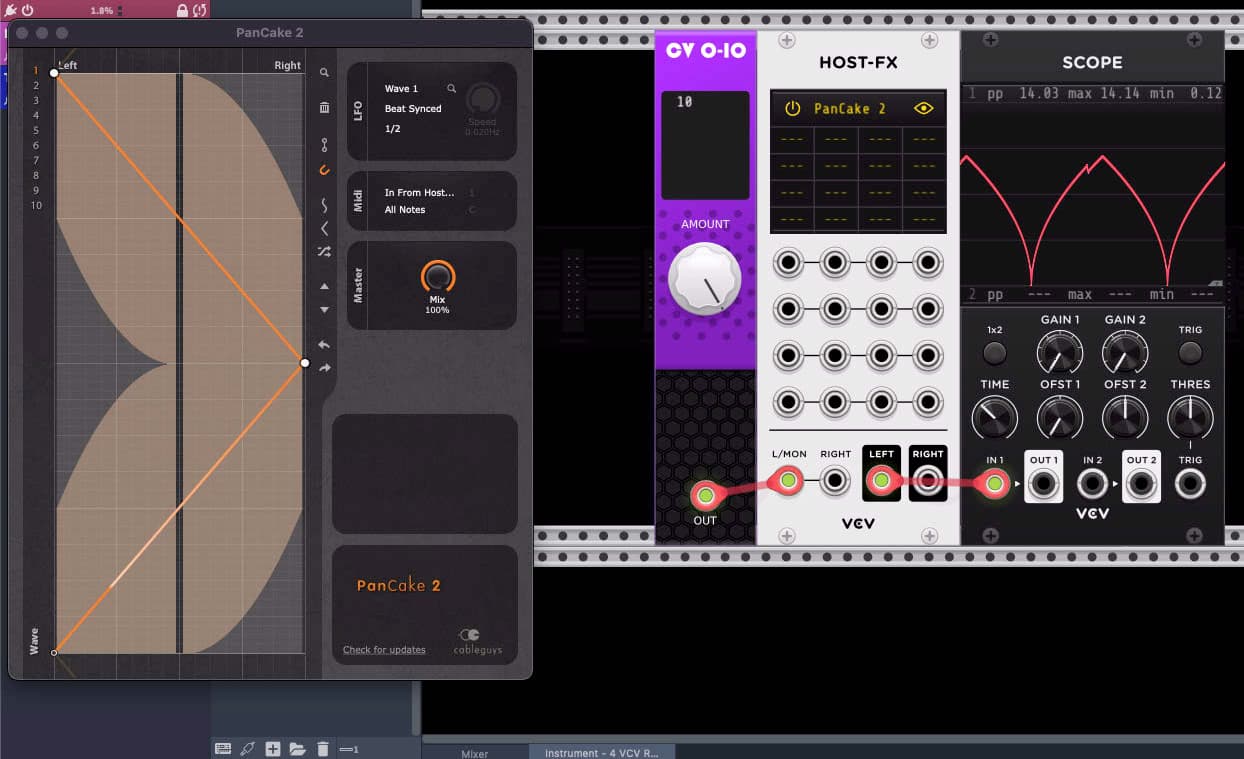
How do you know the output of PanCake is a perfect triangle? My guess it is not.
I tried passing a triangle wave LFO through a Reverb running in Host FX. I set the Reverb plugin Dry/Wet mix to fully dry. My original LFO signal passed through without any distortion or smoothing. Host-FX is not doing any special audio processing that modifies LFO rate CV.
So I suspect in your case the scope is showing the true PanCake output and this is not a Host-FX or VCV issue.
If you are asking how to get PanCake to produce a perfect triangle - I haven’t a clue. Perhaps there is someone in this community that has some experience with that plugin. But this doesn’t seem like the best place to get PanCake support.
So even without having used that plugin I’m sure Dave is right. You’re feeding a 10v DC to left side of a plugin that runs a linear back-and-forth pan automation, and expecting the left output level to show a linear level increase-decrease. That expectation is mistaken!
Long story short, if you linearly decrease left and increase right, the center position will be much quieter than full. In order to have equal total volume* across the pan throw, you need a non-linear response by which both sides are more than halfway up when the pan is centered. You are simply observing that PanCake is doing this correctly. 
*Equal volume everywhere is usually the goal, though not the only way to do things. There are other “pan laws” which make either the center or the L/R positions a little louder or quieter. But the difference is usually +/- 3 or rarely 6 dB at the edge or center. A linear level would give you a much more extreme difference than that.
1 Like
To answer your question more directly. I’m not sure exactly what you mean by synced envelopes. Synced to what? There are almost certainly multiple ways to achieve what you want. Which may or may not involve remapping the PanCake output to be linear (which should be possible but maybe not the best way).
If you share some more context about what you wanna achieve we may be able to help.
Synced to clock. I found STFU by Zeek which can output proper CV. https://zeeks.app/
Right!
The MIDI input module in the fundamental set can outputs a MIDI clock signal which you can use for this. I personally do prefer phasors for syncing to timeline. That is rising 0-10v signals like you were going for here. The way to set that up differs between DAWs in Reaper I bring in a module like for example that CV 0-10 one, and set up parameter automation to turn that knob up in a temposynced ramping pattern. STFU could definitely work as well! Though you may get a block of latency so if you notice timing issues that may be why. It might also work perfectly though. Good luck!
hello,
i am interested how this is done in reaper.
could you please explain how to do this?
sorry i am a newbie.  i found a jsfx module with this name, but don’t know where and how to install it.
i am on linux ubuntu studio.
i found a jsfx module with this name, but don’t know where and how to install it.
i am on linux ubuntu studio.
Bring in a module like that 0-10v one. Move the dial a bit with your mouse. In the top right, find the param menu, it should show “last touched param, 567345” or something like that. Select “Parameter Modulation/MIDI link”. Select a rising sawtooth wave, turn on tempo sync. Set the rate to one bar.
If you did it right, that thing now outputs a temposynced phasor which is always in sync with the DAW timeline. Great to use with the HetrickCV phasor modules for example.
If you want you can set up more than one at different speeds, say one for beat, one for bar, and one for 8 or 16 bars. For the latter, you may need to type in the speed of the modulation (these reaper typeins can go higher than the slider does).
thank you, but my problem is a bit before using it
where (in which directory) do i have to put the jsfx files?
and which one is the right one?
Errr, sorry what jsfx? You don’t need any of those for this trick.
Here’s what I do:
I’m using Bogaudio Offset here, its offset param creates constant output voltage. Its range is -10v…10v and for this we need 0-10. Hence I’ve set the baseline value halfway up (double click to get it exact) and the range to positive 50%. Set up like this, that offset dial will be turning up from 0 to 10 over and over. You can then use that signal for syncronization. I usually set up a few for beat, bar, 8 bars, etc periods.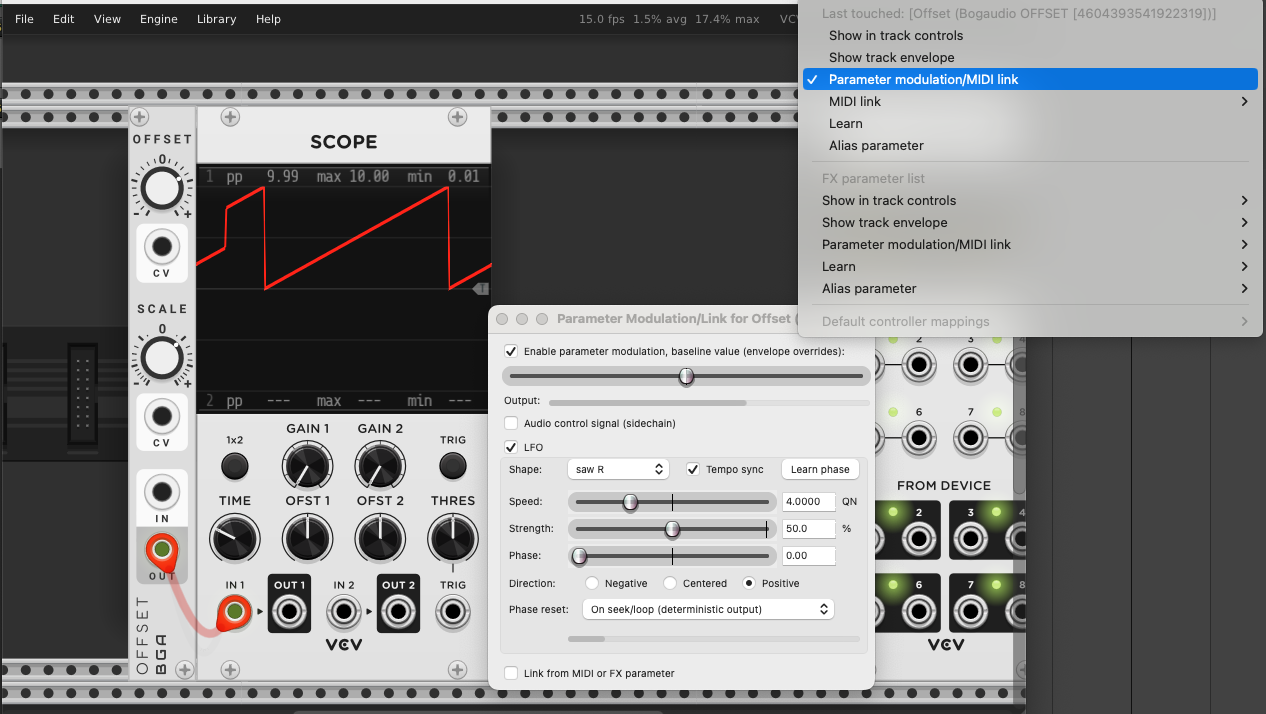
sorry, i misunderstood. i thought that you are talking about reaper and inside there to create a phasor for sync.
for reaper there is a module to do that, as far as i understand. and it is written in jsfx.
i understood that you are talking about reaper, aren’t you?
I am! That screenshot is of reaper. The menu top right with “last touched Bogaudio…” is the parameter menu in Reaper. Press the menu that’s highlighted in the screenshot and it brings up the param modulation window that you see in front there (for said last touched param). Then set it up exactly as shown and the parameter will do the repeatedly rising phasor thing, as you can see on the scope. 
That’s why I was confused by the jsfx comment; you do not need anything extra to do this in Reaper. Just any module that outputs a constant voltage controlled by a knob. Then you can use that reaper parameter modulation on that knob to turn that module into a phasor.