Clarity: a module to enhance Rack UX

Clarity is a module that sets out to make a patch easier to follow and easier to build. I built it for my own use, and I’m making it available in case others find it useful. Getting there meant reaching past its own panel — into how every jack, cable and knob is drawn, and how you connect them.

Here’s a video of it in use — or read on for the details.
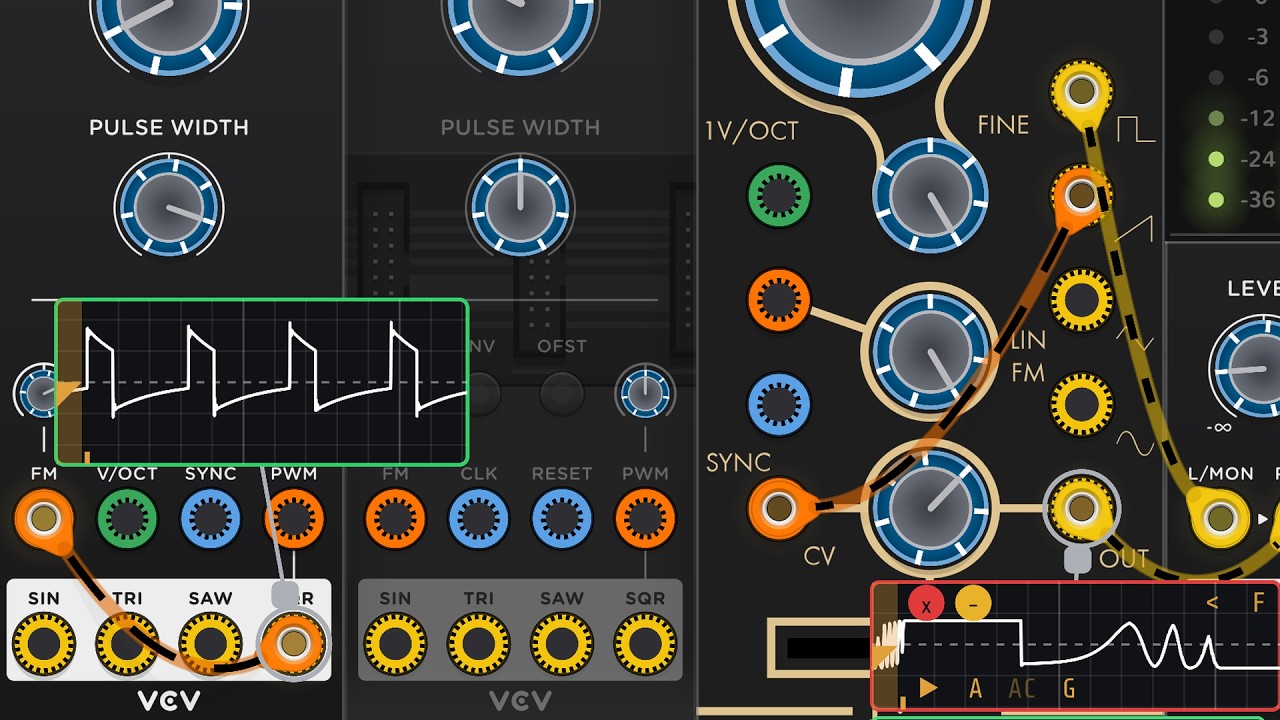
The reason was my eyesight: faceplates are hard for me to read, and cables hard to follow across a patch. Most of it turns out to help anyone, though — whatever a rack doesn’t cost you to read is attention left over for the patch itself.

Two groups will probably get the most from it: anyone whose eyesight is less than perfect, and anyone patching on a trackpad rather than a mouse — click-to-connect and pinch-to-zoom were both written with trackpads in mind.

What it changes about how the rack looks

  • Jacks colour-coded by signal type — yellow audio, orange CV, blue gates and triggers, green pitch — with input and output shown by ring position
  • Cables take the colour of what they feed, so the colour tells you what a cable is being used for
  • Animated dashes along cables show signal direction
  • One consistent knob appearance across every installed plugin

What it changes about how you work

  • Click to connect, instead of dragging
  • Cable trace assist — opacity filtering that fades back everything except the cable you’re following
  • Pinch to zoom on a trackpad
  • Pick up any of the cables on a port, or add another, without a modifier key

Test Gear (previewed from 3:50 in the video) puts measurement and signal generation on the right-click menu of any terminal. Viewers: oscilloscope with 11 seconds of history, spectrum analyser with a waterfall mode, audio monitor. Generators: gate, pulse, clock, DC, LFO, VCO, note, volt-per-octave, noise and attenuverter.

Getting it

Version 2.0.0, with builds for Mac (ARM64 and Intel), Windows and Linux:

Source: GitHub - chrisgr99/DreamerDevelopment · GitHub — GPL-3.0-or-later. Building needs a C++11 compiler and the Rack SDK.

The Library question

It isn’t in the VCV Library, and I’m not sure it can be. Other modules already reach beyond their own panels, but Clarity goes further than most — it changes how the rack is drawn and how you interact with it. I don’t know how that sits with what the Library will accept, and I’d rather find out from people who know than guess at it. If you have a clear view, I’d like to hear it.

Otherwise — this thread is where I’d like bug reports and feedback on both modules. Try it and tell me what breaks.
Impressive work and I like your ideas! Regarding the library: Definately submit it to the library when you feel it has stabilized. We have other crazy modules doing crazy things with Rack so that’s not off limits.

A request: Some of us have taken to using color coded cables for different signal types, using the various color-key modules that exist in Rack. It would be great if the cable and port colors could be configurable in the module, thanks.

Very nice.

Only been exploring for a couple of minutes, upon using widgets the mouse pointer hasn’t reverted to normal (linux):

Also Test Gear uses 10% CPU!

Loaded it into one of my patches, and it set all my cables to yellow. Is this expected behavior? Win11 setup, all updates applied.

Looks interesting… However I’m not sure if color cables can be customized. In fact I’m using Omri Cohen convention since long time:

  • Yellow mainly for V/Oct, also for “BPM CV”.
  • Blue for gates and triggers.
  • Green for modulations.
  • Red for audio (and other purposes).

Not yet tested, though, I am deeply immersed in DeXtral & DeXtral Kompakt modules development…

There are some really good ideas here, I would use the module from the library simply for the feature to hide other cables so that I can see where one specific cable is patched to.

In fact, IMO a lot of these UI enhancements should be Rack feature requests.

Really impressive work! My favorite feature is the Clarity “Draw pointer (for screen recording)” option.

I have some Clarity bugs and feature requests for you. I haven’t spent much time with the Test Gear.

Bugs

  • Cable trace does not work if the cable trace handle overlaps a port
  • Cable trace handle is not appearing on some cables. Problem seems to be correlated with certain modules. Venom AD/ASR consistently has problems
  • You are not honoring the hidden state of widgets when drawing your consistent knobs and color coded jacks. Take a look at Venom Envelope Factory for example.

Awkward “Draw pointer” behavior that is close to being a bug

  • Right click (windows) on parameter widget shows your parameter value graphic, which competes with native VCV popup menu. I think your parameter display should not appear in this case.
  • Clicking on parameter widget activates the mouse movement trace, which requires an extra mouse click away from the parameter to disable. I don’t think mouse movement trace should appear when clicking on parameter widget.

Feature requests

  • Be consistent with terminology between Clarity and Test Gear. Clarity uses “Jack”, Test Gear uses “Terminal”. I prefer “Jack”. I feel that “Port” is another option - that is the term I prefer. But “Jack” is good.
  • You only have two Clarity context menu options. Why not make them all parameters on the faceplate?
  • I think the mouse movement trace should be its own option, and not bundled with the draw pointer option.
  • Perhaps allow user to override port (jack) category
  • Perhaps allow users to define their own color and port categorization schemes via a json file.

VCV Rack consistently uses the term “Port”, as in input and output ports, so I would suggest to use that.

Thanks, all — that was a lot of useful detail. 2.0.2 is pushed and built for Mac, Windows and Linux, on the releases page at GitHub - chrisgr99/DreamerDevelopment · GitHub.

Colours. @Ohmer was right, and the honest explanation is that I had forgotten there was a convention :sweat_smile:. I came back to Rack after two or three years away and picked colours that made sense to me. Clarity’s default now follows the official scheme: red audio, blue gates, yellow V/Oct, green modulation. The old set is still there under Colour scheme, and every colour can be changed.

@technochitlin — recolouring your cables on load was wrong. It is off by default now, it remembers the colour every cable had and puts them back, and there is a menu item to do that at any time. Sorry about that.

@DaveVenom’s JSON idea is in. Name rules and per-port overrides live beside the colours in the settings file, and there is a Signal family entry on every port’s right-click menu. An override is stored against the model rather than the patch, so a port corrected once is correct everywhere.

Terminology. Port throughout, as Rack itself uses it — labels, menus, both manuals. Thanks @LarsBjerregaard and @DaveVenom for settling it.

@DaveVenom’s bugs. All fixed but the last one.

  • Trace refused when the handle overlapped a port. A port’s box is bigger than the jack drawn in it, so a handle over the corner of a neighbour’s box did nothing. The nearer of the two wins now.
  • Handle missing on some cables. The hit area was a small circle inside something much larger, and on long cables the handle was drawn in the wrong place as well. Both fixed. If AD/ASR still misbehaves, I would be glad of the patch.
  • Hidden widget state. I was asking the widget rather than its ancestors.
  • Value readout over the native menu. Suppressed for the right button and while any menu is open.
  • Movement trace stuck after clicking a knob. Rack locks the cursor during a knob drag and dispatches no button events while it is locked, so I never saw the release. Read from the window each frame now.
  • Movement trace split out from Draw pointer. Its own switch.
  • Menu options onto the faceplate. Did you mean Draw pointer and Show hints again? I put Draw pointer there for recording my own demo videos, but if you think it is useful to others I will add it to the panel.

@contemporaryinsanity. The cursor is fixed, and the cause was general rather than Linux: a leave event never arrives if the widget under the pointer is deleted or hidden, so nothing depends on one now. The 10% I cannot reproduce — an analyser measures at about 0.05% of a core here, 32 signal taps at 1.5%, and Clarity has no process() at all. What did you have attached, and was that Rack’s meter or the system’s?

@dan.tilley. Agreed that several of these belong in Rack rather than in a plugin. Meanwhile a plugin is where I can put them. The cable hiding is part of the trace: click the handle on a cable end and every other cable goes away until you click a panel.

The Library. @LarsBjerregaard, thank you — I will submit, once I have heard back on 2.0.2.

Wow - it is really rounding into shape!

The link points to the main page where the 2.0.1 release is listed. I had to go to the Actions tab to get the 2.0.2 version, and that is the zip file, not the full release. It is weird. The Action details show it as the 2.0.2 version release as being successful, but I can’t find it.

Yes, and YES! I have dabbled in tutorial videos, and I wished for this exact functionality. I am sure I am not the only one that would like this. It could be good for performance live broadcasts as well.

Cool. I looked for the entries, but failed to find them. Then again, I am operating on only a couple hours sleep, so maybe that is on me.

I like it!

I have a couple more observations:

  • I wonder if the cable trace should be automatically turned off on the first normal (left on Windows) mouse click after it is activated. I don’t see any advantage to having to hunt for the cable handle to turn it off.
  • When scrolling with the mouse wheel the Clarity parameter window is popping up as parameters pass under the cursor. That should not happen.

That was fast- thanks! 2.02 not in the repository yet though,

Read the first response in my post above yours

I’m not very GitHub-savvy, so I’ll wait until 2.02 pushes through. Except for the colors and knobs it seems pretty much the same as the Biset module.

Huh ? ! ? ! :exploding_head:

I can’t find any feature correlation with any of the Biset modules.

The Biset Blank does some stuff with cables and a scope.

Thanks - I totally forgot about that Biset blank behavior! Still, Biset barely scratches the surface of what Clarity and Test Gear can do.

Sorry, everyone — that one is on me. GitHub Actions reported all four builds as successful, and I took that to mean they were out. They were not: I had not marked the release as published, so it never showed up on the releases page. I am still learning GitHub Actions myself.

There is now a 2.0.3 for all four platforms, properly published this time:

@DaveVenom — this is almost certainly why you could not find the JSON settings entries or the Signal family menu item. You were looking at 2.0.1. They should be there in 2.0.3.

@technochitlin — no GitHub knowledge needed this time. The four files are on that page; take the one for your platform.

Thanks both for chasing it down rather than giving up on it.

Test Gear still uses ~10% CPU when doing nothing on linux here.

No, I managed to install 2.0.2 and find the Signal family menu item. But I never saw the DreamerDevelopment folder with the colours.json file. I found it now with 2.0.3.

I have no idea how to format the “rules” entry.

It would be nice if the default rules were entered into the colours.json file. Then it would be sort of self documenting. You could have a context menu option to restore default rules.

@DaveVenom — no, my earlier example did not include them, and you are right that it should. The built-in rules are now written into the file, so it describes exactly what decides a port’s family rather than hiding it in the code.

This is the file as created on first run, generated by running the same jansson call rather than typed out:

{
  "audio": "#c91847",
  "cv": "#0c8e15",
  "trigger": "#0986ad",
  "pitch": "#c9b70e",
  "mpx": "#ff3cc8",
  "rules": [
    { "match": "MPX",   "family": "mpx" },
    { "match": "V/OCT", "family": "pitch" },
    { "match": "PITCH", "family": "pitch" },
    { "match": "NOTE",  "family": "pitch" },
    { "match": "GATE",  "family": "trigger" },
    { "match": "TRIG",  "family": "trigger" },
    { "match": "CLOCK", "family": "trigger" },
    { "match": "CLK",   "family": "trigger" },
    { "match": "RESET", "family": "trigger" },
    { "match": "SYNC",  "family": "trigger" },
    { "match": "CV",    "family": "cv" },
    { "match": "MOD",   "family": "cv" },
    { "match": "FM",    "family": "cv" }
  ],
  "ports": {}
}

I have folded each rule onto one line for reading; the plugin writes each field on its own line, which is the same JSON.

Four things worth knowing.

Order matters and is preserved. First match wins, which is why MPX is first — an MPX port is called something like “MPX note in”, and the pitch rule would otherwise claim it on the word NOTE.

A port matching nothing is audio. That is the only rule not in the list, because it is not a match, it is what is left.

Matching is a plain substring, without regard to case, anywhere in the port’s name as the module reports it.

An empty rules list means the built-in ones, not “no rules”. A file written by an earlier build has "rules": [], and reading that as “everything is audio” would have recoloured every rack that already had one.

The ports block is what the Signal family entry on a port’s own right-click menu writes. It is keyed by plugin, model, direction and port number — "Venom/AD_ASR/out/3": "cv" — and it beats every rule, since it names one exact port.

On restoring the defaults — I went a bit wider than a single restore option. You can now keep several JSON files, each with its own set of rules, and choose between them by name from the module’s context menu. There is also a colour picker, so you can save a named set of colours, and those appear in the same menu alongside the rule sets.

One caveat: these changes are in the GitHub repository, not in the downloadable builds yet. They will be in the next release.