yeah, i figured that would end up being confusing. i’ve never gotten the hang of versioning, to be entirely honest.
i basically just considered the ‘54’ to kind of be like ‘5.4’, just without the dot. and i picked this up pretty early on i think. i don’t know why i did it, or where i got the idea, but that’s the way i went with it so i just stuck with it.
uhhh, damn i didn’t consider that could happen. i’m actually surprised it was allowed through in that case. i suppose i’ll have to bring it up with them in the plugin’s issue on github.
sorry everyone! i’ll try and get it figured out as soon as i can.
oh and of course thank you very much for bringing it to my attention. i almost certainly wouldn’t have noticed this myself since i pretty much only use a dev build of Rack these days, without even logging into the library.
so i’ve ‘updated’ the plugin again, this time to v2.5.60. it’s currently waiting in the library queue because there was apparently also a separate issue with the most recent library update crashing on some windows installations. they are apparently working on that now.
Andrew also mentioned to me that their build process shouldn’t have allowed my lower-versioned update to even get through in the first place, so he’s gone ahead and fixed that issue on their end as well, which is nice to know.
anyway, whenever they get around to solving the other issue they’re working on, hopefully v2.5.60 should go through soon enough.
FYI: i was recently alerted by VCV support via a github issue that my polyplay module was causing a crash for a user. extra context suggested it was due to having a wav file loaded in the module, exiting VCV Rack, moving/deleting the wav file, and relaunching the patch. the module would cause an immediate crash when it couldn’t find the file.
the issue has been fixed and an update is currently awaiting approval in the library. so just in case anyone has or will experience that particular issue, a fix is on the way.
coincidentally, while fixing that issue i also happened to discover and fix a separate issue with polyplay related to sample rate conversion not being done correctly. that’s also been fixed in the next library update.
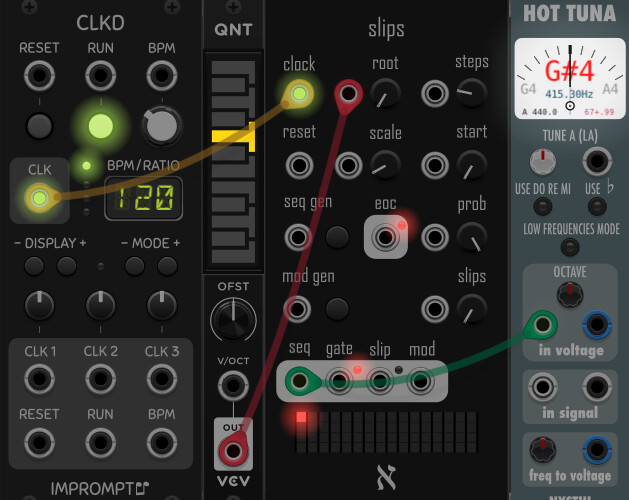
@alefnull : If I check “root input v/oct” in the context menu of Slips and feed a note to the root cv input, sometimes I get unexpected note sequence outputs. For example, if I choose a G as root input and set the scale knob to “major” I get notes that do not belong to the g major scale:
Other incorrect notes of the sequence are A#, C#, D#, F (=E#) which, together with the G#, look like a F# major scale.
Similar if I choose an E and Major scale: The result contains E-flat, B-flat, and A-flat which would be an E-flat major scale (again a semitone down). Same with D-flat (results in C major scale), B-flat (results in A major scale).
However, other root inputs appear to create the correct scales, like C, D, F, …
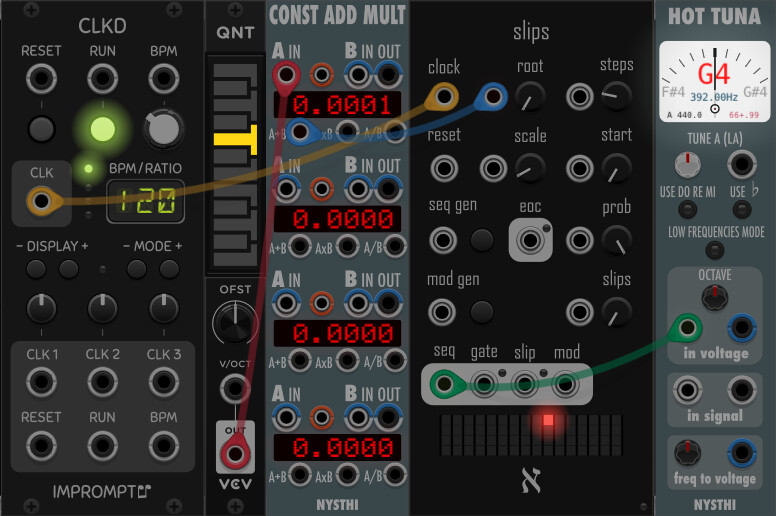
If I add a tiny voltage, like 0.0001, to the root input, it seems to fix the problem for all inputs and I always get correct scale notes:
@alefnull : I have another one: I get sometimes voltages from the slips sequence that are outside of the configured range. For example, if I just add a Slips module to a patch with all default settings (including slips range from -1 to 1) and turn the slips probability to 100 %, some voltage values are greater than 1 and some are less than -1:
regarding the incorrect notes, i have to admit, i feared this would happen at some point, that someone would discover there was in fact something wrong with my quantization. the issue here is that i’m very much a tech guy more than a music guy, so the truth is i know very little about music theory, and which notes belong to which scales, so i tried my best to cobble together a working internal quantizer, but i had a feeling all along that i’d got it wrong and i just wouldn’t be able to realize it.
i appreciate knowing for sure now, although i’m unsure how best to tackle the problem considering my lack of musical knowledge. but i’ll certainly try to look into it and figure out where i went wrong.
as for the other issue about getting values outside of the desired range - you’re right, and that shouldn’t be happening. i’ll also take a look there to see what’s gone wrong.
thanks again for the heads up.
EDIT: after a super quick, cursory glance, i can’t for the life of me figure out how it could possibly be outputting values outside of the desired range. all voltage outputs on the module are mapped using @Patheros’s cvRange.hpp library, and i’ve never noticed any issues with it before. and i just tried creating a new patch matching yours, with everything left default, and i never got a value outside of the default +/-1. so i’m also not sure what’s going on there. i’ll keep digging when i get more time.
EDIT #2: actually, i think i might have an idea of how the module is outputting values outside the selected range. if i’m right i’m not sure yet how best to fix it, but as i said before i’ll dig into it when i can.
so i had a little more time just now to glance over things and have a think, and it occurred to me that this second ‘issue’ of getting values outside the sequence range is actually semi-intended - because what’s happening is it’s taking the actual sequence value, between -1 and +1, as well as the ‘slip’ value for that step, which is also between -1 and +1, and adding those two values together (clamped between +/-10).
so when the sequence value and the slip value add up to something outside either of their ranges, that’s what you’ll get as an output.
it may not be entirely intuitive, but it is actually the original design working as intended. i think i simply missed the part of your original post mentioning turning the slip probability to 100%. that’s when i remembered the module is just adding the slip value to the sequence value, so of course you’ll sometimes get values outside the sequence value range.
i’ll continue trying to figure out the incorrect notes/scales with root input v/oct turned on, but i think the second ‘issue’ is actually ok as it is.
Ah, I understand, somehow I had the suspicion that sequence and slips sequence range are added.
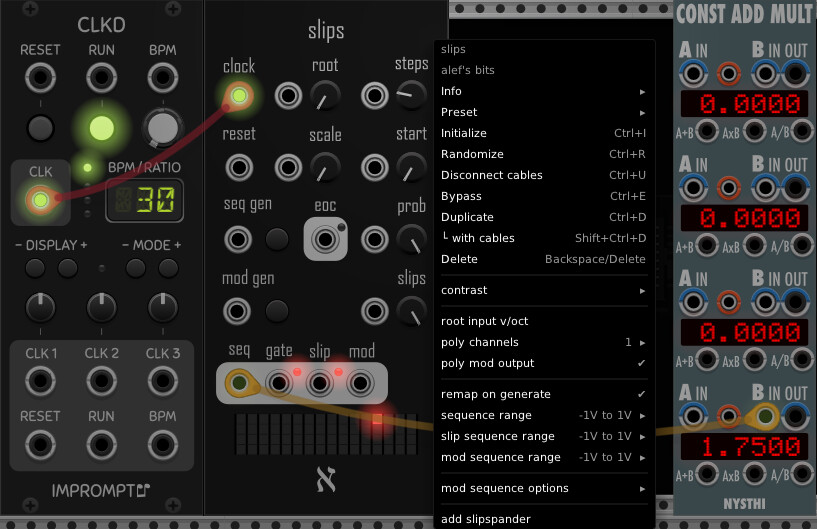
I noticed the issue (or unexpected behaviour) when I was setting sequence range to (-1, 1), but slips sequence range to (1, 2), with the idea that the pitch of all slip notes should stick out a bit with a higher note. I still got slip notes between 0 and 1 which is clear now after your explanation.
Is there any setting to make sure that the slip notes are indeed only in the (1, 2) interval. I was trying (2, 1) (with the idea that -1+2=1 and 1+1=2 to get my indended range, but the module appears to sort the custom interval limits ascending, so I’m back at (1, 2) again for the slips range).
Just to avoid a misunderstanding: the quantization of the sequence values to a scale appears correct to me in all cases.
What seems to be - sometimes - wrong is determining the correct scale root note from the root input voltage: In my example above, the input voltage of the note G4 is 0.58333333333… And it seems that Slips is detecting this value as an F#4 (so one semitone down) instead of G4. Therefore, the quantizer assumes an F# major scale. F#4 in voltage in exactly 0.5 V. Could it be that you round down the root input voltage to the next note which might lead to a rounding error for input values like G4 with a long tail of decimal digits? Like I said, if you add 0.0001 to G4, so that the voltage is 0.583433333333…, the input is correctly interpreted as G4 and not F#4 anymore.
It would always be correct if you search for the nearest note, no matter if its voltage is lower of higher than the voltage input.
Possibly, an easy fix (but I guess it’s a bit rude from a coding viewpoint) is that you always add 0.0001 volt to the root input voltage?
this points me in a pretty clear direction of where to look and what needs to be fixed, in terms of the root note v/oct conversion. i haven’t been able to really sit down and work on it today, but this helps.
and as for the “unexpected behavior” with the sequence/slip ranges - i’m not entirely sure i’m following exactly what you’re trying to do, sorry. if your sequence range is (-1, +1) and slips range is (+1,+2), you will get notes between (0,+3). what is it exactly you’re trying to get? do you want the slip values themselves to always be between (+1,+2)? if so, just set the slip range to that and it should work. if it’s something else, i think i need more specifics.
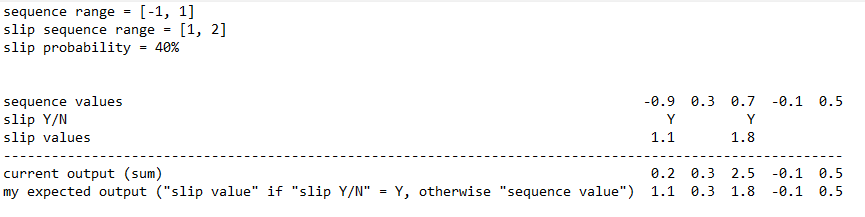
Basically, I want to have the output in a separate range (1, 2) if a slip occurs than a normal non-slip output (-1, 1). I don’t know how I could achieve that with the current logic to sum the values for the final output.
I guess, you cannot change the current logic as others might expect it to work like it is now. Probably the only option would be a context menu item (like “sum sequence and slip value”) which is checked by default to have the current behaviour, but could be disabled to get “my expected output”.
But then, you already explained how it works exactly, and I was just misunderstanding the current logic. I can deal with that, no need to make a change just for me.
ok, so you essentially were hoping to replace the sequence value with the slip value for that step?
if that’s what you’re going for, i didn’t consider that, and it’s actually an interesting alternative. so if i can, i’ll consider adding it as a context menu toggle.
I think, replacing would be the more general option. Currently, in the example above the output could be in the range [0, 3] if a slip occurs. But with the replacing logic, you could achieve the same by just setting the slips sequence range to [0, 3].
In any case, thank you for your time to discuss and consider this option!
hey, so i just pushed a change to my plugin’s github repo, attempting to solve the root input v/oct issue.
you’re right, in that i was using floor() instead of round() to get the root note from the v/oct value. i made the change, and as far as i can tell it worked (basically i generated a sequence and sent a G into the root input, set the scale to Major, toggled on “v/oct” mode for it, and used HotTuna to check the output notes against the G Major scale, and all notes seemed right to me.
but again, i don’t know nearly enough about this stuff. so i’m hoping you might be able/willing to try out the “nightly” build of the plugin and see if the change gives you the expected results. if you can’t, i may need to try and find someone who knows enough to try it out for me at some point.
if you are able, here’s the link to the current nightly build - let me know if you manage to give it a try and how it goes:
Not to be a know it all, but the scale theory isn’t too hard. Maybe using a little modulo can help.
Think of the chromatic scale , C to the next highest C, as the series 0-11, when you reach 12 or higher just subtract the 12. With this concept you need C major to equal the series, (0,2,4,5,7,9,11,0,etc) to get other major scales just rotate the pattern. Skip, skip, step, skip, skip, skip, step- repeat.
i guess i could be more clear. i can at least grasp the math behind the conversion, but knowing what notes are in what scales and such is what i mean when i say i don’t know enough about this stuff. i’ve learned at least a bit by creating the quantizer i use in slips, but not nearly enough to feel confident in my fix.