Tuesday February 24th, 01:10AM (GMT+1/France time):
Not a spectacular update (no sound at the moment, a bit delayed by some days), but a long stuff about a feature requested by community member:

It may be useful on certain platforms (such laptops) who are using a “limited” screen resolution - less than 1080p, when the user can’t see the DX7 LCD display (eg while editing synth parameters, all of them on display)…
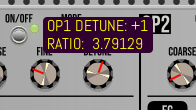
When the mouse cursor is hovering COARSE, FINE or DETUNE potentiometer (top of any OPerator section), also the effective ratio (or fixed frequency) is displayed as a second tooltip line, exactly like this (1080p / zoom @ 100%):
Any control having its state LED or dedicated mini-display (like OP ON/OFF switch, OP MODE, OP L. CURVE, OP R. CURVE, LFO KEY SYNC, OSC KEY SYNC, and LFO WAVEFORM) doesn’t have tooltip.
Custom tooltips concern potentiometers only, from OP1 section to rightmost part of the module. Input and output jacks are using default VCV Rack tooltips (can’t be disabled).
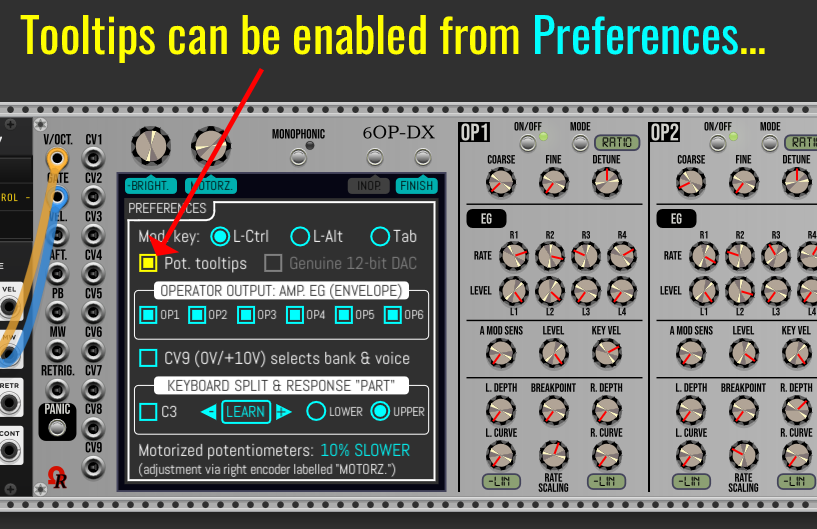
May be enabled from Preferences screen (by default - or after a module reset, potentiometers tooltips are disabled).
Other stuff/fixes:
- Some global settings no more return to factory defaults on module reset (Ctrl+I / Command+I, or Initialize command from contextual menu): concern LCD/OLED emulation (from contextual menu), and these Preferences : Mod. key (future shortcut key for modulations), Pot. tooltips, Genuine 12-bit DAC emulation (not available at the moment, so this setting says grayed) and the operator output behaviors.
- The module is ready for polyphony (input and output jacks, SIMD operations for poly voltages).
- FIXED broken SysEx import (due to change type of variables! reverted back, fixed/OK).
 (please always see lastest post in this topic, below, for package download links - Thanks!)