Venom Release Announcements: version 2.15.0 now in the library

I checked the self oscillation output frequencies, and I am finding the tracking to be better than what you report by an order of magnitude. The error reported by the Nysthi Hot Tuna varies a bit by VCV sample rate, as well as by frequency. But at 48 kHz going from C4 to c8 I find that setting the attenuator to 99.96% gives a “perfect” result.

More importantly, I checked the self oscillation output against the Venom VCO Unit sine as well as the VCV VCO sine, and all were in perfect agreement with each other. So I am wondering if we are running up against the limits of floating point math and sample rate.

So I will not make any tuning adjustments to the filter.

Not criticizing. Just noticing. It can follow V/Oct, that’s the main takeaway. So tuning differences would not occur due to using different sample rates, because I was also running 48 kHz.

But, I did not use a tuner to check, because a tuner might have difficulty tuning to resonant (but still narrow band) noise. I just checked by ear (and minimizing the detuning beating) against two sine and V/Oct sources. In this case using two instances of Bogaudio REFTONE which let you easily set/select notes and octaves, and conveniently outputs both a V/Oct and a Sine. So, could just be my aging and failing auditory perception against the accuracy of a tuner. Definitely don’t fix what ain’t broken.

Whoops, shame on me. I did not read any of the documentation before fiddling knobs.

Finally, on using the Multimode Filter(s) as resonator(s).

Feeding it variations of (low pass) filtered noise yields great varieties of distortion behaviour in sweet spots. E.g using Squinky Labs Colors.

Again, another great module. Thanks for your evergrowing contributions to the VCV Rack community.

1 Like

The Benjolin patch is one of the most outstanding patches I’ve ever had the pleasure of using. Thank you so very much for your amazing dedication and hard work.

1 Like

I’ve added the Wet ↔ Dry Morph modes along with some other enhancements to the Multimode Filter. The changes are available in my Dev blog for now.

I have submitted v2.14.2 to the library. I don’t know when the update will appear in the library. In the mean time you can get the binaries below.
EDIT 2025-12-07 - v2.14.2 is now in the library

Version 2.14.2 Changes

Enhancements

  • Multimode Filter
    • Five new Morph modes
      • BP ↔ Notch
      • Dry ↔ Wet LP
      • Dry ↔ Wet HP
      • Dry ↔ Wet BP
      • Dry ↔ Wet Notch
    • New input coupling option button
      • DC (default) - old behavior
      • AC - This can eliminate saturation asymmetry when the input has a DC offset
    • New Gain VCA polarity option button
      • Unipolar (default) - old behavior
      • Bipolar - This can only have an effect with Gain CV
    • Gain range extended to 10
      • CV now scaled at 1 per Volt instead of 0.2 per Volt
      • Effective gain now clamped to 0V - 10V or -10V - 10V, depending on VCA polarity
      • This can be a breaking change for old patches with Gain CV
  • Wincomp
    • Added context menu option to normal B input to the previous sample from the A input so Wincomp can function as a crude slope detector.

Bug Fix

  • Multimode Filter Notch output was sometimes inverted

Read the updated documentation and/or checkout my dev blog starting here for more info.

11 Likes

The filter is great! Made a nice ping patch with it the other day. Appreciate the super steep slopes too, those are kinda rare in VCV and can sound great sometimes.

2 Likes

Version v2.14.3 | v2.14.4 v2.14.5 has been submitted to the library with a fix for a long standing bug in Linear Beats as per issue 33, reported right in the middle of the last release to the library.

In addition there is a fix for XM-OP sometimes crashing on patch load if quantize is disabled as per issue 34. Thanks to discord user phantombeta for localizing the bug, making it quick and easy for me to fix it.

Multimode Filter enhancement

The Spread Direction now has a new Right Absolute option that causes the Cutoff knob and CV to only apply to the left channel, and the Spread becomes the right cutoff.

v2.14.5 Binaries

If you want the fix and/or enhancement before it hits the library, you can get it below.

1 Like

Another bug (this time for XM-OP) was reported while waiting for 2.14.4 to hit the library (see previous post). So the version was bumped to 2.14.5, and the library submission was updated.

Versions 2.14.3 and 2.14.4 will never make it to the library - they are superseded by 2.14.5.

EDIT 2025-12-27 - 2.14.5 now in the library

7 Likes

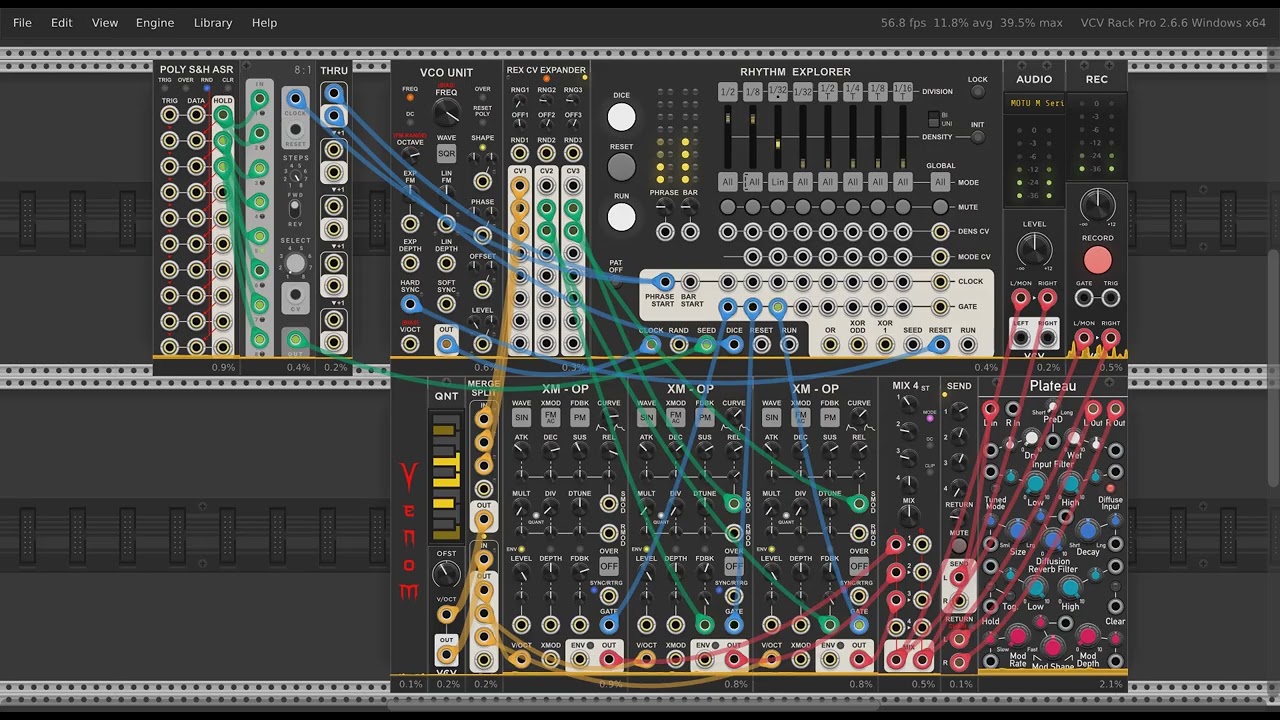
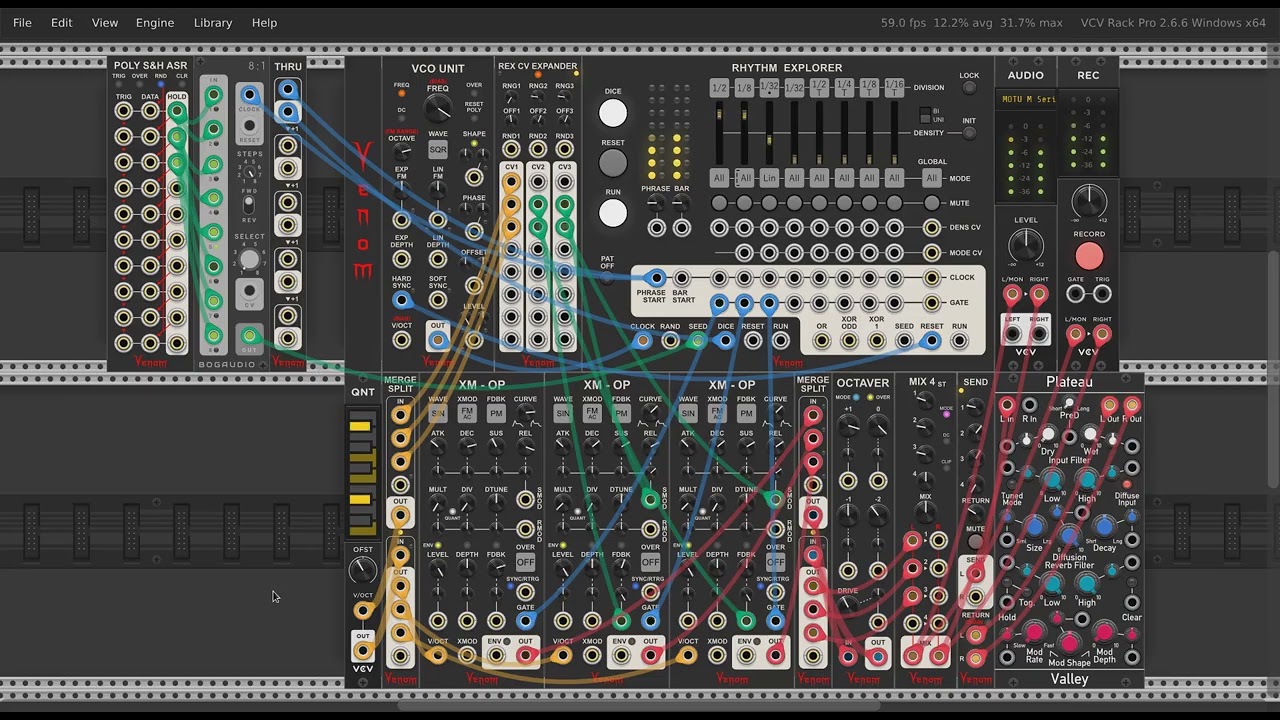
I have submitted Venom v2.15.0 to the library with 8 new modules, enhancements to XM-OP and others, and some bug fixes. You can get the binaries now in the link below, or you can wait for the version to hit the library.

The changes for XM-OP may appear subtle, but they are very significant. It has new context menu options to make the Level VCA respond exponentially to the envelope, and/or to use the Level attenuated signal for feedback. When both are enabled it becomes possible to easily dial in sine phase modulation timbres that come very close to matching the beautiful output of the Bogaudio FM-OP. But of course they can also be applied to other waveforms and modulation types, which FM-OP cannot do.

Here are the new modules:

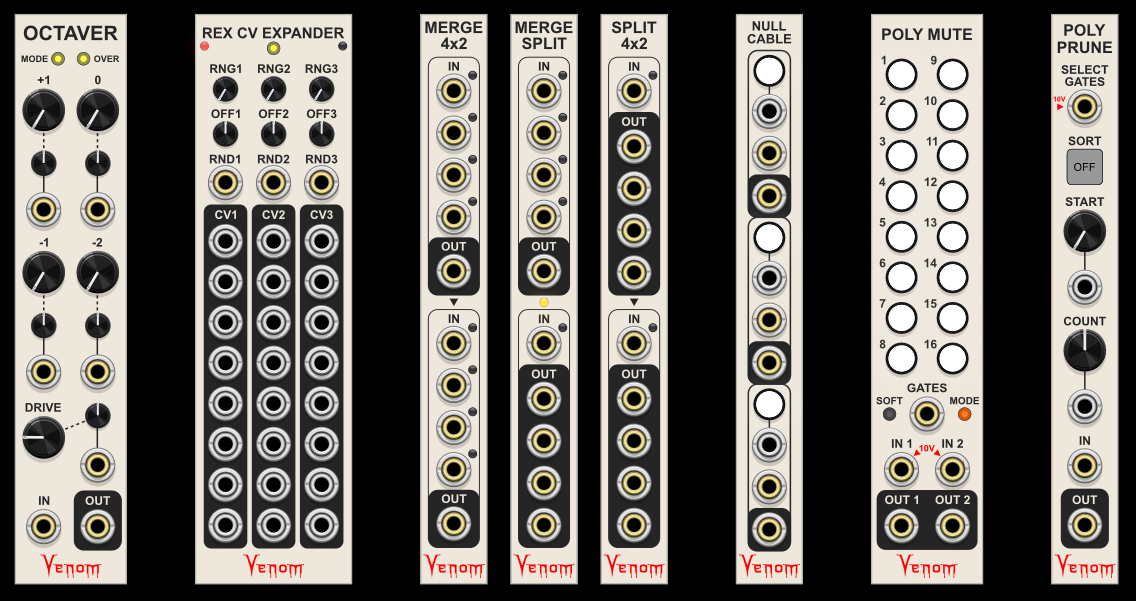
Rhythm Explorer CV Expander (documentation) adds three channels of repeating CV patterns to each of the divisions within the Rhythm Explorer. Two expanders may be used, for a total of six channels of CV per division. The expander makes Rhythm Explorer a very capable auto-generative sequencer.

Octaver (documentation) is a fun effects module that emulates two analog octave effect pedals from the 1980s, the Pearl OC-7 and the Boss OC-2. Unlike the hardware, this module is polyphonic. It tracks well as long as each poly channel is restricted to a single clean pitch. Like the hardware, mixed pitches will cause harsh inharmonic output that is normally not wanted.

This video uses the patch above pitched up one octave, and then adds the Octaver to show the full sound that can be achieved.

Merge 4x2 (documentation) gives you two sections, each of which can merge up to four mono or poly inputs into one polyphonic output. Or leave the top output unpatched and merge up to eight inputs into one output.

Split 4x2 (documentation) performs the reverse, splitting two polyphonic inputs into sets of four mono or poly outputs each, or a single poly input into as many as 8 outputs. By default each output is monophonic. But each output has a context menu to set the number of polyphonic channels, so complex split operations can be performed.

Merge Split (documentation) has an upper section to merge up to four mono or poly inputs into a single polyphonic output. The bottom section splits one polyphonic input into up to four mono or poly outputs. Port context menu options let you choose how many channels to assign to the split outputs. But if the sum of input poly channel counts in the merge matches the input channel count of the split, then Merge Split can automatically assign split channel counts to match the merge inputs.

Null Cable (documentation) gives you manual or CV control to set the output poly channel count to 0, making it seem as if any patched cable(s) is not there. It is basically the same as the Sapphire Moots, but in a much more compact form factor.

Poly Mute (documentation) lets you mute individual channels of a polyphonic input via manual or CV control. It has two input output pairs, so it works well with stereo polyphonic inputs. Inputs are normalled to 10V, so it can also be used to generate polyphonic gates under manual control.

Poly Prune (documentation) gives you two methods to remove channels from a polyphonic input. You can use polyphonic gate inputs to select which channels to preserve - Venom Poly Mute and Venom WinComp work great for this. And/or you can specify a start channel and a count (forward or backward) to select which channels to preserve. Various sort options let you sort before or after selection.

Here is the complete change log.

2.15.0 (2026-04-18)

New Modules

  • Merge 4x2
  • Merge Split
  • Null Cable
  • Octaver
  • Poly Mute
  • Poly Prune
  • Rhythm Explorer CV Expander
  • Split 4x2

Enhancements

  • XM-OP
    • Add context menu options for exponential level response and post level feedback so as to better replicate Bogaudio FM-OP sound
  • Rhythm Explorer
    • External seed of 10 V forces use of internal random seed
  • Entire plugin
    • Give consistent appearance to all LED lights
    • Improve rendering of square switches

Bug Fixes

  • The Trig button on the Poly Sample & Hold Analog Shift Register was not working unless the top trigger input was patched
  • Fixed Poly Offset custom min/max restoration on patch load
  • Restore bypassed module parameter locks and custom defaults on load
  • Linear Beats Add left expander option sometimes misplaced the expander
  • Rhythm Explorer bar count now properly defaults to fixed 1/4 divisions with option for old behavior when 48 PPQN used 1/8 and 96 PPQN used 1/16. Old patches default to old behavior.
23 Likes

Already using splits and merges and null in patches for the convenient size and good layout of each. Null especially is useful with Vlippoo, lift or insert cv is nice.

2 Likes

Great new modules Dave, thanks! Loved the Octaver demo, will be sure to check that one out. Does it keep aliasing in check?

1 Like

Yes, the default x2 oversampling handles most situations, but there are higher oversampling options available when working with high frequencies. Everything is in the documentation.

1 Like

Version 2.15.0 now in the library.

14 Likes

Really enjoying the Venjolin so far, have you ever considered a rungler module like the Rung Division?

1 Like

Thanks.

I have the Venom Benjolin Oscillator that has the oscillators and Rungler of a Benjolin, but is missing the resonant filter.

The Fancyyyyy Rung Divisions looks interesting, but I think I will give this domain a rest, at least as far as development goes.

1 Like

Really like the new plugin, the null is super useful to add and drop cables from a busy patch in real time.

I want to request a feature I would dig, could it have an exclusive mode, that is so that only one could be active at a time and selecting a new pass would null the other two. Thanks for the super fun synths.

Interesting idea, but an exclusive selection between 3 choices seems limiting. I don’t want to get into an expander mechanism that can perform exclusive switching across multiple modules.

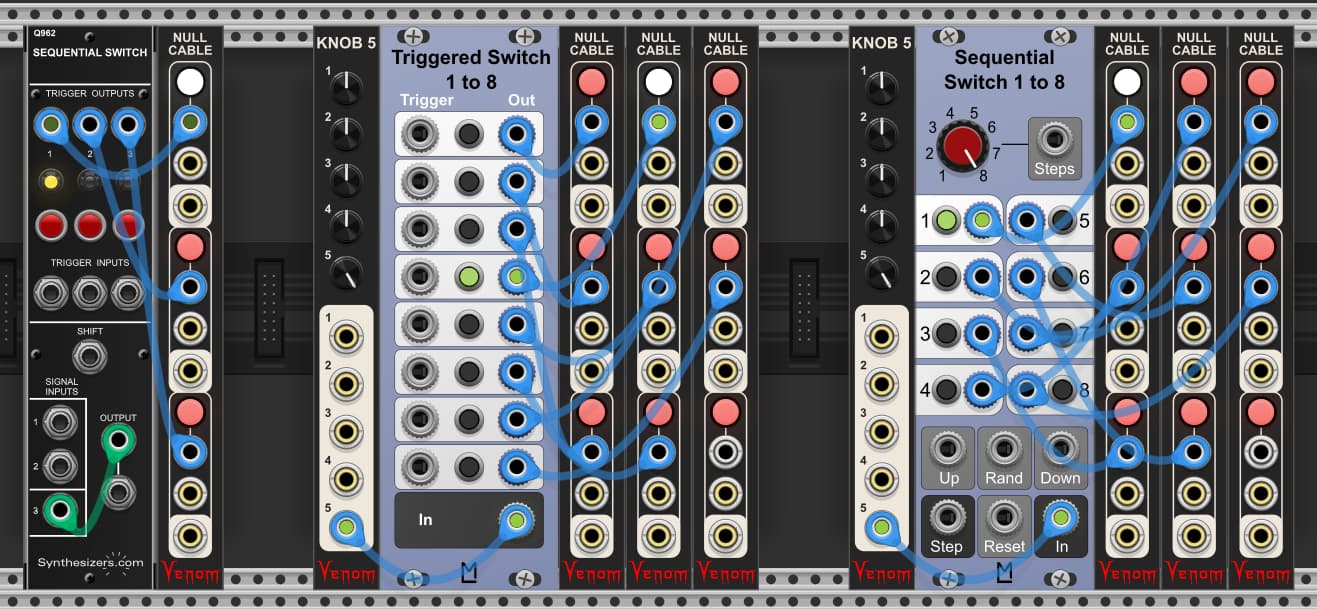
I think I would like to keep the exclusive switching separate from the cable nulling functionality. There are lots of existing exclusive switching options that can drive the functionality your are looking for. Here are a few:

In all of the examples I configure the Null Cable gate modes to Pass. All of these examples provide multiple ways to select one option.

Synthesizers.com Sequential Switch

  • Manually select option via button
  • Leading edge of trigger at Trigger input selects option. Tie goes to the higher numbered option.
  • Leading edge of trigger at Shift input sequentially sequences from 1 to 2 to 3, then back to 1, etc. The green cable from Output to 3 input is needed to get a sequence length of 3.

ML Triggered Switch 1 to 8

  • Manually select option via button
  • Leading edge of trigger at Trigger input selects option. Tie goes to the higher numbered option.

ML Sequential Switch 1 to 8

  • Manually select option via button
  • Sequentially sequence ascending (with wrap) via Up trigger input
  • Sequentially sequence descending (with wrap) via Down trigger input
  • Randomly select option via Rand trigger input
  • Reset to 1st option via Reset trigger input
  • Use CV to select option via Step unipolar input

The beauty of this arrangement is you don’t have to have a 1 to 1 relationship between an exclusive switch option and a Null Cable channel. A single switch option can enable multiple Null Cable channels. And a Null Cable channel can be enabled by multiple exclusive switch options. Each exclusive switch option “remembers” which Null Cable channels to enable based on the cabling.

To avoid a potentially tangled mess of controlling cables, you could opt to use Stoermelder 8 Face Mk 2 or Transit to control the state of any number of Null Cable channels.

1 Like

Very Nice, I like the ML Sequential, that allows cv to select as well. And fair enough, it doesn’t have to be imbedded in null, it is just the most handy little tool as it is, so I will be happy with that. Thanks for the amazing synths, and I’m enjoying your experiments with the Blasser designs.

And just checking to see if this is correct behavior. When I sample poly with Poly S&H ASR and then subsequently disconnect the poly input source, then I get mono output from all the storage bins.

So in short I need a Poly input to get Poly output, is that right?

Yes. Like most Venom modules, the output polyphony count is the maximum channel count found across all inputs. But the Poly S&H ASR is special in that the channel count is computed for each row independently, so each row can have a different poly count. Also, remember that an input poly count may be a normalled value from the row above. Be sure to read the documentaion for details on normalled values and polyphony.