It builds on lin-arm64 too 
ModScript lua doesn’t understand bitwise operators “>>” and “&”
or am I missing something ?
function scale_and_convert(f)
  -- Scales the float to 0..100.
  scaled = f * 100

  -- Converts the scaled float to two 7-bit numbers.
  upper = scaled >> 3
  lower = scaled & 0b111

  return upper, lower
end
I have changed to this, that seems to work so far (not tested with the korg minilogue XD yet)
config.frameDivider = 16
config.bufferSize = 32

done = false
buttonTrig = SchmittTrigger.new()

lastvalue_knob1 = 0
lastvalue_knob2 = 0

function process(block)

	value =  block.knobs[1]

        if (value ~= lastvalue_knob1) then
		lastvalue_knob1 = value
        	scaled = value * 100
  		upper = math.floor(scaled / 8)
  		lower = scaled % 8

                sendMidiMessage(CC, 98, 72) 	--NRPN 48h is User Param 1
        	sendMidiMessage(CC, 6, upper)   --Upper 5 bits of 8 bit value to CC#6
        	sendMidiMessage(CC, 63, lower)  --Lower 3 bits of 8 bit value to CC#63
        end

	value =  block.knobs[2]

        if (value ~= lastvalue_knob2) then
		lastvalue_knob2 = value
        	scaled = value * 100
  		upper = math.floor(scaled / 8)
  		lower = scaled % 8

                sendMidiMessage(CC, 98, 73) 	--NRPN 49h is User Param 2
        	sendMidiMessage(CC, 6, upper)   --Upper 5 bits of 8 bit value to CC#6
        	sendMidiMessage(CC, 63, lower)  --Lower 3 bits of 8 bit value to CC#63
        end
end
(it’s work in progress)
EDIT add: found in the ModScript makefile: luajit := dep/lib/libluajit-5.1.a
I guess lua 5.3 is needed to have included bitwise operators.
Edit2: add2 https://luajit.org/extensions.html I see now, i could have tried “bit.rshift” and “bit.band”
Something isn’t working right for me. I’ve tried to make the simplest possible script to debug, but I’m getting nothing:
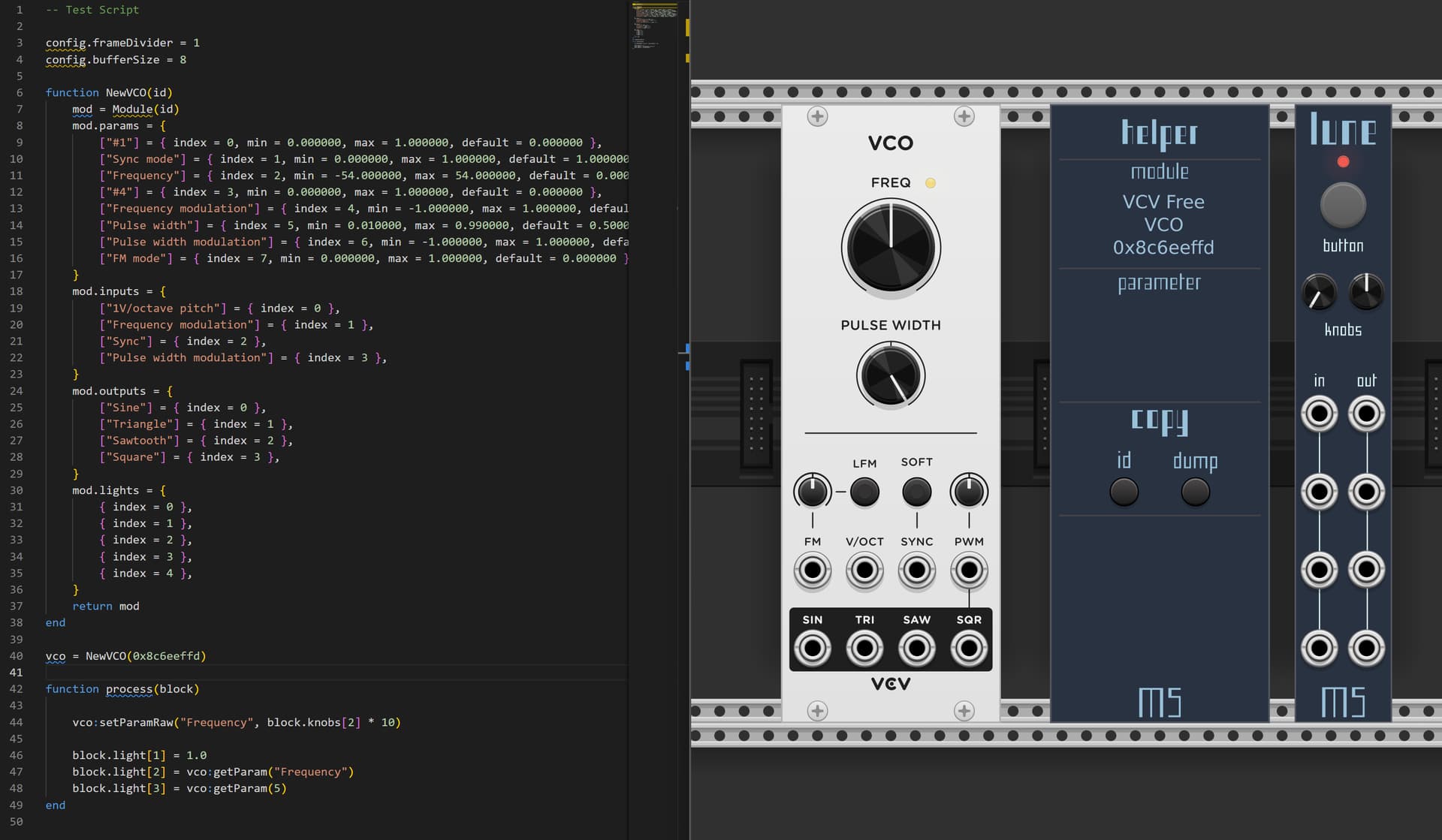
I can turn the red LED on/off by changing the value at Line 46, but I can’t get any module to respond to a parameter change or reading a parameter on Lune or Pleine Lune. I’m running the Nightly build from GitHub, but didn’t recompile myself in Rack 2.4.1 on Windows. For good measure I tested the version you linked back in September, but still no dice.
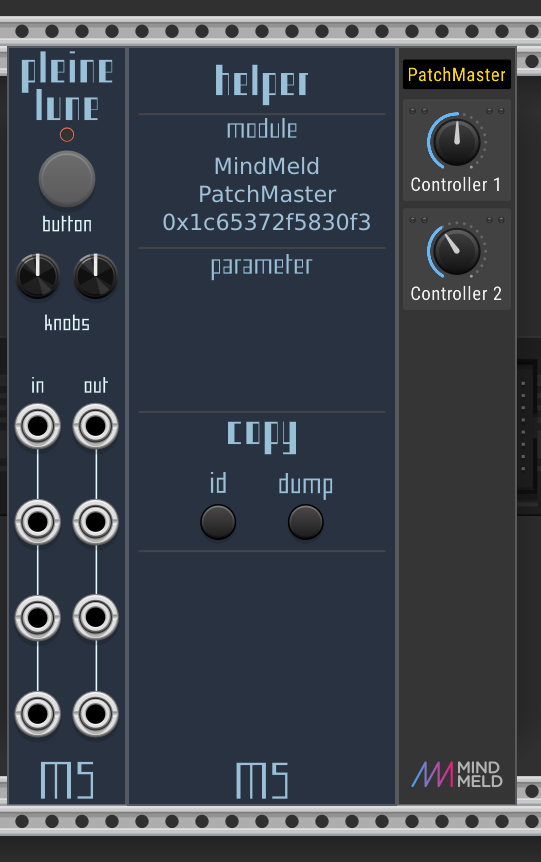
“MS helper” does not display the correct module instance ID (this must have changed in Rack). edit: see below for a fix.
Use the ID reported by the target module right-click-menu
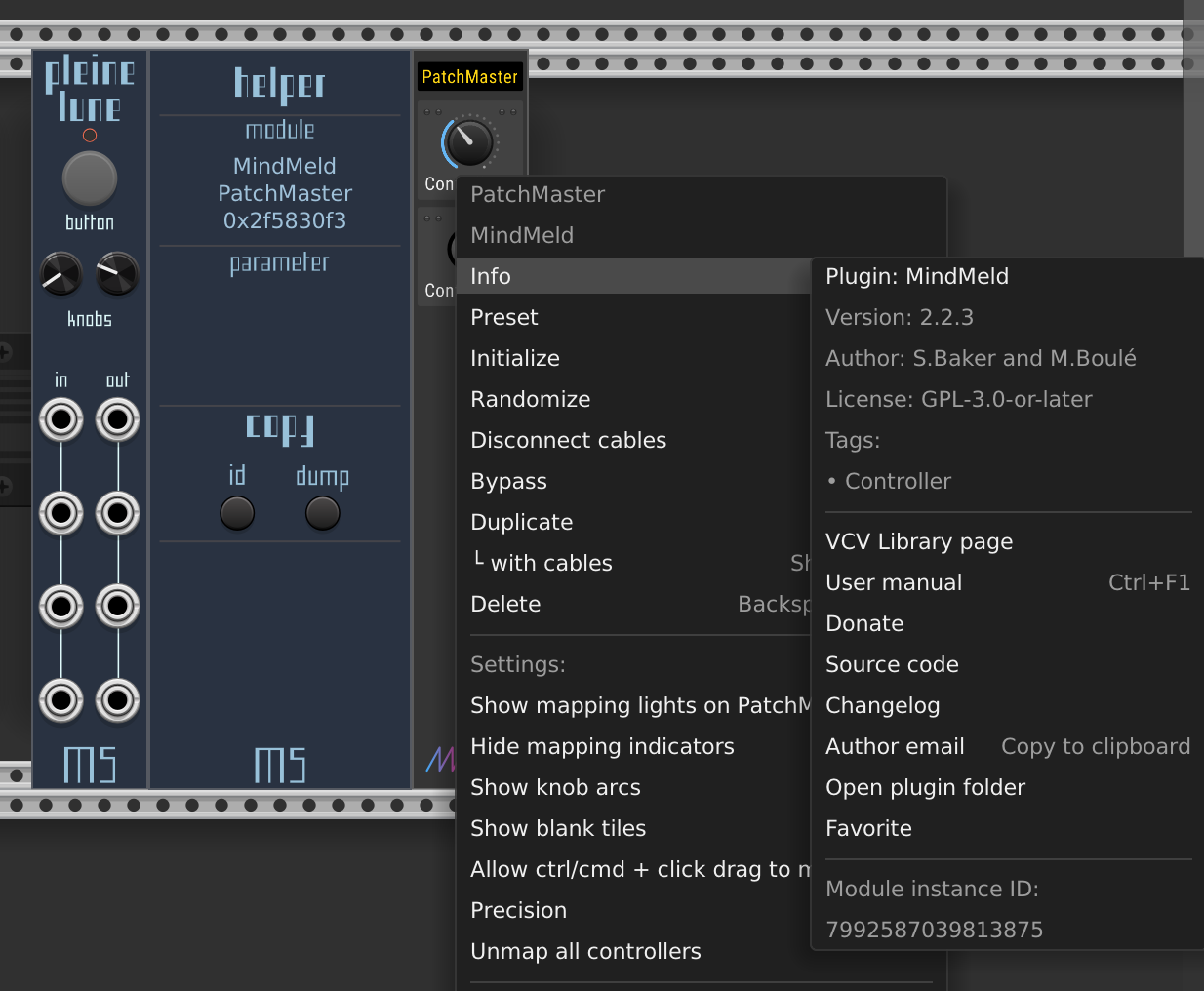
here, the module ID is “7992587039813875”
Simple example ModScript
config.frameDivider = 16
config.bufferSize = 1

function NewPatchMaster(id)
	mod = Module(id)
	mod.params = {
		["Controller 1"] = {index = 0, min = 0.000000, max = 1.000000, default = 0.000000},
		["Controller 2"] = {index = 1, min = 0.000000, max = 1.000000, default = 0.000000},
		["No name"] = {index = 2, min = 0.000000, max = 1.000000, default = 0.000000},
		["No name"] = {index = 3, min = 0.000000, max = 1.000000, default = 0.000000},
		["No name"] = {index = 4, min = 0.000000, max = 1.000000, default = 0.000000},
		["No name"] = {index = 5, min = 0.000000, max = 1.000000, default = 0.000000},
		["No name"] = {index = 6, min = 0.000000, max = 1.000000, default = 0.000000},
		["No name"] = {index = 7, min = 0.000000, max = 1.000000, default = 0.000000},
	}
	mod.inputs = {
	}
	mod.outputs = {
	}
	mod.lights = {
		{index = 0},
		{index = 1},
		{index = 2},
		{index = 3},
		{index = 4},
		{index = 5},
		{index = 6},
		{index = 7},
		{index = 8},
		{index = 9},
		{index = 10},
		{index = 11},
		{index = 12},
		{index = 13},
		{index = 14},
		{index = 15},
		{index = 16},
		{index = 17},
		{index = 18},
		{index = 19},
		{index = 20},
		{index = 21},
		{index = 22},
		{index = 23},
		{index = 24},
		{index = 25},
		{index = 26},
		{index = 27},
		{index = 28},
		{index = 29},
		{index = 30},
		{index = 31},
		{index = 32},
		{index = 33},
		{index = 34},
		{index = 35},
		{index = 36},
		{index = 37},
		{index = 38},
		{index = 39},
		{index = 40},
		{index = 41},
		{index = 42},
		{index = 43},
		{index = 44},
		{index = 45},
		{index = 46},
		{index = 47},
		{index = 48},
		{index = 49},
		{index = 50},
		{index = 51},
		{index = 52},
		{index = 53},
		{index = 54},
		{index = 55},
		{index = 56},
		{index = 57},
		{index = 58},
		{index = 59},
		{index = 60},
		{index = 61},
		{index = 62},
		{index = 63},
		{index = 64},
		{index = 65},
		{index = 66},
		{index = 67},
		{index = 68},
		{index = 69},
		{index = 70},
		{index = 71},
	}
	return mod
end

myPM = NewPatchMaster(7992587039813875)

function process(block)

	value = myPM:getParam("Controller 1")
	display('Controller 1: ' .. value)

	value = myPM:getParam("Controller 2")
	display('Controller 2: ' .. value)

end
Result is live values scrolling, if Rack was started in a shell.
[2508.086 debug src/LuaJITEngineAPI.cpp:6 display] Controller 1: 0.5
[2508.086 debug src/LuaJITEngineAPI.cpp:6 display] Controller 2: 0
1 Like
Looks like it’s showing a left-truncated version of the hex value, so the eight rightmost digits. The full hex is 0x1C65372F5830F3
1 Like
Around here, I think:
way over my C++ skills to fix it.
It’s been too long since I did any C++ for me to suggest the fix, other than bumping up the size of hexID.
Thanks for the tip.
changed two occurences of %lx to %llx in LuneHelper.cpp - and the “long long” hex shows.
$ diff LuneHelper.cpp LuneHelper.cpp.new
89c89
<                       sprintf(hexID, "0x%lx", hoveredModule);
---
>                       sprintf(hexID, "0x%llx", hoveredModule);
147c147
<                               moduleIdLabel->text = string::f("0x%lx", (int64_t)hoveredModule);
---
>                               moduleIdLabel->text = string::f("0x%llx", (int64_t)hoveredModule);
224c224
4 Likes
Thanks for the contributions and fixes provided. I have just pushed a fix for this and tried to credit both correctly. The new nightly should be up now!
At this point I am willing to grant commit access to the repo if anyone wants to contribute. I feel honored that people are actually using ModScript and even take on the task of fixing my own blunders, hehe. More generally don’t hesitate to ping me on Discord in the # development channel if I’m not active here. Thanks!
@Vega Did you get ModScript to work the way you needed it? And hello by the way! 
3 Likes
Hi, Welcome back
Hello  Yep, got it working. Really digging ModScript!
1 Like
I’ve been using ModScript/Lune off and on for minor things after I managed to build it from source. Thanks @FergusL for this great module!
But I discovered that it does not seem to have access to the full Lua standard library. For example, I tried to use the io library to open a file in my code and got the error attempt to index global 'io' (a nil value).
Is there a way I can have access to io and other standard library modules? Hopefully without tweaking the ModScript source?
I am also going to need some precise way of sleeping for (possibly) a very small amount of time, which might require the os module, unless you recommend a better way. Maybe I need to bite the bullet and learn C++, or else use python over OSC…
Also, where can I find the development discord mentioned earlier?
Thanks!
• Discord | # development | VCV
Invite: VCV
hiiii im wondering if someone can help me understand .. i see this is able to map relative knobs. the knob on my controller is a 360 encoder but still sends position-based midicc values (0-127). would i have to modify the controller itself to send relative values, or is it possible to interpret the knob using modscript to send relative values to a module parameter??
Where the MIDI standard mentions relative, it only says so in relation to cc 71-74, where the suggestion comes from a couple of industry groups (MMA and JMSC), and allows for wide interpretation. Normally, a relative interpretation is that 64 (0x40) is zero, and lesser values are negative.
In MIDI, there are just values 0 - 127. Anything else is agreement between a sender and receiver on what to send and how to interpret it, which means configuration of either sender, receiver, or both to agree on the interpretation of a given cc.
So, in your case, the controller has endless encoders, but it doesn’t send relative cc (but perhaps there’s a way to configure it to send relative cc). assuming your controller can’t be configured to do that, to interpret a given cc in the range 0-127 as relative and generate CV, one would subtract 64 from the MIDI CC value, then scale it to -5v..5v (per Rack voltage standard).
(Note: intentionally not mentioning “high resolution” 14-bit, but there the principle is the same.)
thanks for the in depth answer, but perhaps i should rephrase my quesiton. the manual includes a script example for interpreting midi, thats described as:
-- relative mode to increment or decrement parameter from its current value - useful for relative knobs!
mymodule:setParamRelative("cutoff", 0.05)
im wondering how this behavior could be implemented. im not sure how i would build a sript for this, or what parameters/midi messages it would expect from the controller. rn my controller sends a normal 0-127 cc value. i could configure it to send positive/negative change values instead. i can also adjust the cc range to anything, tho in a perfect world id keep the full resolution of the 0-127 range, and rely on attenuation downstream in the cv.
(would 14-bit midi give me even more resolution?? thats perhaps a rabbit hole too many for this current project .. but ive been tempted to look into it.)
ive been experimenting with stoermelder’s midi-step, which interprets positive/negative change from an incoming cc value into triggers, and stack, which translates triggers into set voltage increments. which would work just fine for my use case, but so far it doesnt seem to interpret the cc correctly. ive reached out to the developer for guidance & troubleshooting, and in the mean time was contemplating alternatives.
idk much abt scripting at all, but have learned some lua from working in touchosc, so thought i could maybe scratch something together but low key dont know where to start  is it even possible to use this module to achieve a similar behavior to midi-step?? using a script, could i interpret an incoming cc value as positive/negative change, rather than the actual value its sending?? if so, how would the 0/127 crossover be handled? if not, is there another way i could script something to interpret an incoming cc into relative values rather than a set range, or is that a change id have to make on the controller side??
The implementation of the setParamRelative is likely just adding the passed value to the current value of the param (and perhaps clamping the result to the parameter’s declared range). As simple as that.
No idea what controller you’re talking about, so hard to say.
For 0-127 crossover on this continuous controller, you’d need to track which direction the values are coming from. If the values are rising when you hit zero, then you’re still going positive. If the values are dropping when you hit zero, then you’re going negative. So, you’d need to track the delta between successive values. Using just the last value and current could be enough, but probably susceptible to errors, and probably better to look at a longer trend.
14 bits are more resolution than 7 bit, so if you want that and you can manage to get all the moving parts to agree to send and receive it, then it can work. This tends to work best between devices from the same manufacturer because they’ve decided on one way to do things.
Most controllers don’t support 14-bit resolution, and not many receivers either. The MIDI spec is kinda broken for MPE / high res because it doesn’t guarantee the order of MSB/LSB messages, and encourages an order that’s harder to implement. That’s why Haken Audio created “MPE+” for its devices, which specifies something more exact (and uses less addressable surface area in the range of possible CCs), at the cost of most controllers stuck with 7 bit when talking to these devices.
MIDI CC values are never negative. They are the low 7 bits of an octet – there’s no place for the sign bit. They are only 0-127. It’s all a matter of interpretation. Setting something to relative just means it subtracts 64 from the cc value before adding it to the current value of a parameter.
This will all get more fun when we start seeing the MIDI 2.0 spec implemented. We get 32 bits! No more 7 bits with a poorly specified hacky higher resolution!
maybe i should mention im doing the midi completely from scratch, so have quite a bit of freedom in its configuraiton.
thats exactly the behaviors i was hoping for, so yay im glad this seems feasable .. tho i suppose what i mean by implementation is, how i put together the script to accomplish this?? maybe im missing a tutorial on writing scripts somewhere?? is there a demo script i can poke around in & learn from?? the tutorial videos on the github seem to be defunct
edit: actually, i think i misunderstood .. this isnt actually the behavior im seeking. im looking for more of an increment approach. i think maybe this isnt the tool for me after all, hopefully i can get the midi-step working as it does this increment/decrement method im trying to accomplish in script.
my concern is more going from 0-127. bc this could be interpreted as an increase in value, even if the next interval is decreasing from 127-126. would i have to compensate in the script to account for this specific step from 0-127, or it will be considered a decrement by default?
how?? is this something inherent to lua?? should i find a lua 101 tutorial, am i asking redundant questions??
hmm thats really interesting! when i worked with encoders before (not using midi) they were always programmed to track the delta .. positive or negative change, and by what amount. which then affected a value from its default position or whatever its last active position is. i knew there was no standard for this within midi itself .. like u said midi is just data. its how its interpreted. so my assumption that the common implementation of relative values on like novation gear etc were the same a what i just described: tracking the delta & direction.
ideally id like to ignore the actual cc value all together, and ONLY track the delta+direciton. midi aside, my knob has a resolution of 128 (which corresponds to a cc range of 0-127) so id like to work within a ±0v-10v range of 128 increments (±.078125v per increment). that way the knob position, or the absolute value of the cc, does not matter. only the delta.
maybe this would be simpler to accomplish using osc rather than midi  idk why circuits make sense to me but coding doesnt
actually speaking of tracking delta, i can do that! i can send a cc value of “1” for every increment in value, or “0” for every decrement. maybe instead of script, i should midi-cat those values to triggers, and patch those triggers directly into stoermelder pile … hmmmm .. edit: actually this wont work bc none of the midi mapping modules seem to recognize duplicate messages …. vcv is quite limiting when it comes to midi! which ig is why i was hoping i could script something up to fill in the gaps
but also thats what i was asking originally .. is it possilbe to write a script for this module that could interpret only the delta+direction of a cc w range 0-127, independant of its absolute value, or would i have to configure that in the controller itself?
ah, so it sounds like you’re making your own controller. Since you can configure it to send +/- change values (which in MIDI are offsets from 64), just do that. Any MIDI module in Rack that accepts “relative” midi should then work.
VCV plugins have direct access to the MIDI stream, so they really aren’t constrained by VCV at all (other than missing good support for device removal/addition), so you’re talking about working with available modules.
teehee yes im working in touchosc to build a custom midi controller! sorry, probably should have started with that.
my original assumption was that a module like midi-step would interpret value changes across the entire cc range into increment/decrement values .. meaning a ± change from any value would register as an increment/decrement. but now im realizing the more common implementation is to treat 64 as a neutral point, then 63/65 as increment/decrement messages.
ive gotten midi-step to work according to this logic! now im having an issue with rates of change .. but im in an email thread w benjamin of stoermelder discussing it rn so imma work that one out there, as to not push this thread off-topic.
still tho id be interested to script my own midi implementations using something like modscript. if i am indeed talking about limitations based on availibility of midi modules, it would be nice to fill some of those gaps myself without having to learn to develop an entire module for vcv, or bug developers of existing modules for weird/unconventional implementations. even if this current conundrum can be addressed by existing modules.
im def not a developer (mad respect for them tho) but have reached a point in my practice where to accomplish my musical goals, i need to build my own tools & interfaces. and have been frustrated that there arent simpler options for small script based tasks in vcv. which is why i thought modscript might be perfect! im still eager to understand how to get started with this module, as im struggling to find any tutorials or guides that havent gone defunct.