With the latest VCV upgrade from a few hours ago, I noticed a mouse issue: when clicking on a parameter, it often jumps forward on its own. I don’t understand why, as this didn’t happen before. Could it be a version issue? Or is it my operating system?
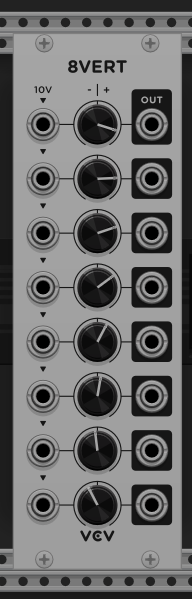
I’m on Linux. When I double-click a parameter to “zero” it (such as setting an 8VERT knob back to zero or a VCO frequency back to C4), it goes to some other value, which seems to depend on the parameter’s index within the module (or something like that).
The snapshot below shows an 8VERT where I had double-clicked each knob.
Anyone know if this is the same thing, or should I submit another report?
It’s probably the same issue. When you double click to reset a parameter, if you hold the second click, it’ll both reset and start dragging the knob. I noticed this behaviour a little while ago, because sometimes I’d notice some knobs I had reset would be just a tiny bit off from 0.