Hi Karl - thanks very much, especially for your very kind offer.
It’s great you were able to get it working (especially on Linux + Android which I hadn’t been able to test).
The idea is that you can create your own additional module mappings to add to your own copy of the factory mapping library (which is stored in the your VCVRack installation’s presets/RSBATechModules/Pylades folder by default). You can do that manually for hand-crafted mappings (see the Youtube video I created - https://youtu.be/Kb1bYARAQpY ) or try the automapping feature.
You could even just automap all modules in a VCVRack patch (that are / are not already in your mapping library) by selecting one of the Pylades context menu “Automap this rack and save” options. But the automapping is dumb - it just assigns each module parameter in the order that is reported by the module, which may not always be in the order the controls appear on the module UI!) to the 6 x 36 grid of controls starting from control #1.
Instead of a donation (thankyou so much for the offer!), if you do create some nice new module mappings, it would be great if you could export them (Manage library mappings → (plugin name) → Export all… ) and post the json file to me … I could then add it to the factory mapping library (with acknowledgement of course).
ok, then i will do an export from my patch that i play with, if all is ready and works.
btw: if i want to create a rack-level mapping of all my patchmaster elements in one go. how do i do this?
is it sufficent enough to map the patchmaster elenents only?
With Rack-level mapping, you hand-map individual parameters on any modules in your patch file (including Patchmasters) , then you need to do this:
Click the context menu’s Save rack-level mapping menu option. This stores the mapping into the current internal state of the Pylades module as a special “rack” mapping.
Save your VCVRack patch (the .vcv file). This saves the Pylades modules preset state into the .vcv file.
Then you can restore the rack mapping at any time you have that .vcv patch open by pressing the “Rack” button on the TouchOSC panel. You can then add add / remove further parameter mappings and go through steps 1 & 2 again to save it. So you don’t need to do the rack mapping all in one edit session, as long as you remember to do steps 1 & 2 to “save” the rack mapping in the VCVRack patch file.
If you start / change a rack mapping but then select a module mapping, the current loaded mapping gets overwritten. If you didnt click the Save rack-level mapping menu option, any changes made will be lost.
I am actually building a Pylades rack mapping right now for the incredible Solar 42 v2.1.vcv patch created by @DaveVenom, in an attempt to avoid a strong GAS urge to buy the real thing.
Cool idea, but I think you may struggle a bit mapping the sequencer select step radio buttons and still maintain the intended functionality. The PatchMaster buttons control the Bogaudio PGMR (and PGMRX) Select buttons. In turn, the step gate outputs are patched to a Stoermelder CV-MAP that controls the PatchMaster select buttons. So the lit PatchMaster button indicates the current playing step, and you can manually jump to any step by pressing one of the PatchMaster Select buttons.
Unfortunately, buttons (any control) can only be controlled by one module, either the CV-MAP, or your Pylades. I think you have two options:
Don’t map Pylades to the sequencer step selection, and rely on the existing PatchMaster UI for manually jumping to a step.
Map the Pylades directly to the PGMR and PGMRX Select buttons, so the PatchMaster buttons serve only as indicator lights. Now you would have to use the Pylades to manually jump to a step.
Hmmh, i 'm struggling with the mapping process.
could you pls describe, how i map a patchmaster module?
if i first click on unmapped inside your module display, it changes to mapping and mouse changes to a cross, but if i click on the patchmaster module, it changes back to unmap. nothing else.
Click on an empty slot in the parameter mapping list on the Pylades module. The row changes to “Mapping…”, and the mouse cursor changes to a cross.
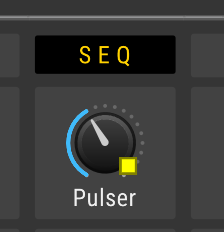
Click on the knob, fader or button you want to map (e.g. on a Patchmaster module). A small yellow flashing square should now appear next to the control.
Now move the TouchOSC control knob you want to map to that VCVRack knob or button. As you move the TouchOSC knob, you should see the control name and values start appearing on the TouchOSC knob display.
A new mapping should be created in the Pylades module, shown with “FDR ”:
If you click something else in VCVRack after step 2, the mapping process quits (which I guess might be what you are encountering?).
This is exactly the same mapping functionality / code as the Stoermelder MIDI-CAT module, so its user manual on parameter mapping might help you too.
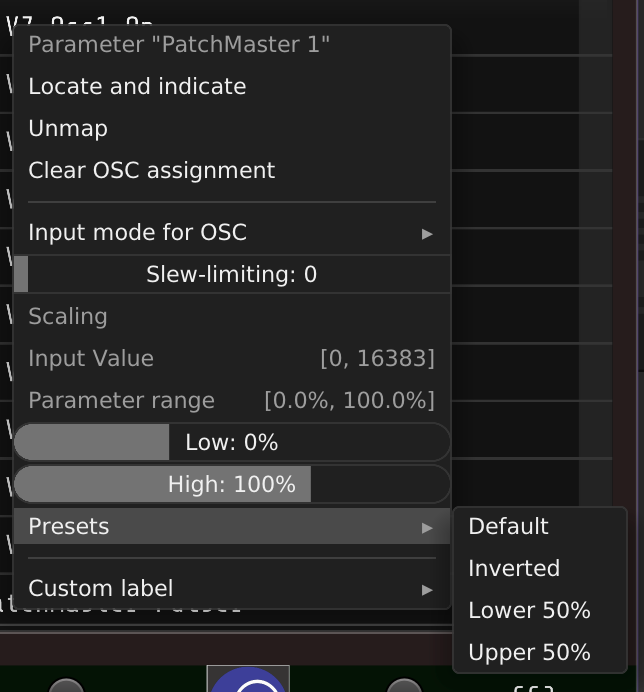
You can also right-click on any parameter mapping shown on Pylades to see more advanced mapping editing functions. For example, if you change your mind which TouchOSC control you want mapped to a VCVRack parameter, select it in the list, right-click, select “Clear OSC assignment”, then you can wiggle another TouchOSC knob to change the mapping.
Thank you for the explanation.
one question to step 4:
does it mean, i have to create a template in TouchOSC first. then map between template and pylades?
The TouchOSC preset gives you 6 pages of 36 knobs to map with. Suggest you press the TouchOSC “Clear” button before you start mapping, which initialises / displays all of the knobs ready to be mapped.
There is no TouchOSC “template” needed - all the mapping information is transmitted from Pylades every time you switch the mapping to a different module or “rack”. All you need to do is figure out how you want to distribute the VCVRack controls across the 6 pages of 6x6 TouchOSC knobs.
Thank you, yesterday i watch the video and now i’m able to map.
BUT i begin to understand that i have to create my own tosc file.
because every mapping goes into a fader or knob.
but i need some buttons.
therefore i have to create some.
is this correct?
if yes how can i replace the fader or knob with a button.
i read that there is more under the hood then i see (script, message and so on).
any info welcome.
here is a screenshot of the patchmaster section of my patch.
i want map all of them.
I think I understand better now, thanks for sharing the info. That’s a big patch!
So, unfortunately, Pylades (& its sister module, Orestes-One) do not directly support changing mapped knobs to other types of controls. Patchmaster buttons can be mapped to TouchOSC knobs, then changed betwen 0 and 1 states at 12 o’clock (I guess you have found that already).
There are some good technical reasons why that is , largely because I haven’t yet found a way to programmatically get TouchOSC to change a control type … as far as I know that is not supported. Even if that was possible in TouchOSC, there is no consistency across VCVRack modules how button controls react to programmatic changes of their underlying between 0 & 1 - toggle vs gate / hold behaviour etc.
But it should be technically possible to create a copy of my “knob grid” .tosc file, in which specific knobs within the 6 x 6 x 6 grids are changed to display buttons instead of fader controls that are tested to work for patchmaster buttons specifically. There is quite a lot of scripting going on under the hood though inside that .tosc script - most of it in the root script.
Maybe I could do an experiment of mapping patchmaster buttons to touchosc buttons and report back ? Then, either I could instruct you on how to do that yourself (if you are fairly familiar with touchosc preset editing?) or I could even create a tosc file for you, if you told me which knobs in the 6x6x6 grids you wanted changed (and for each button, should have momentary or latching behaviour when touched / changed?).
**** Edit** - looking at your screenshot, another problem you are going to have is that it looks like there are more than 216 controls there. If you really want to map ALL of those, then will also need to think about how to achieve that… I could extend the number of pages (but there are reasons I left it 6 at the moment, mostly to do with Electra One limit of max 12 pages - the factory mapping library has to work on both versions). It is possible to have multiple Pylades modules in your patch, each configured with separate OSC ports and their own segregated rack mapping (of up to 6x6x6 controls each) that talk to 2 copies of the tosc file running on your TouchOSC device. Or, even better if you had multiple devices capable of running TouchOSC, so you can use both at the same time.
Oh thank you for your support.
Perhaps you can test first, if it is possible all about.
After that we can write about the future way.
In the meantime i will think about the design of my patch.
if it is ready or if any detail is missing.